Play on PC

다같이 윷놀이
Contains ads


Everyone
info
1M+
Downloads
After continuing, you’ll get an email for Google Play Games on PC

Everyone
Learn more


About this game
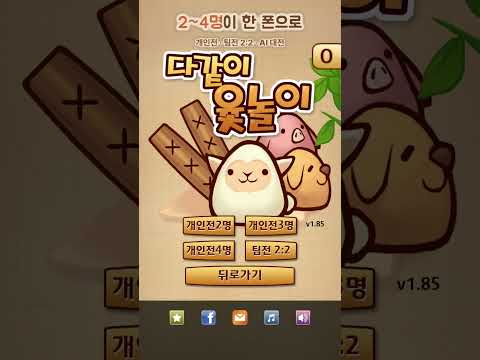
Shake your phone to throw the yut sticks, and choose a piece to take a shortcut! Enjoy authentic Yutnori with just your mobile phone, without a physical board—this is Da-gachi Yutnori.
Play against AI alone, play together on one phone when gathering with friends, or enjoy a game online with a friend far away.
■ How to Play
- Solo: Play a game anytime against AI at 3 difficulty levels: Easy, Normal, and Expert.
- Together: Play 2, 3, or 4-player solo matches and 2v2 team matches all on one phone.
- Online Matches: Real-time matches matched instantly via Quick Start.
- With Friends: Create a room and share the room code to play immediately.
- Rankings: Check your skills with real-time, daily, weekly, monthly, and overall rankings.
■ Just Like Yutnori
- Throw the yut sticks by shaking your phone or touching the screen.
- Not only Do, Gae, Geol, Yut, and Mo, but also Dwitdo and Nak.
- Get a second chance if you get Yut or Mo.
- Get another chance if you capture an opponent's piece—"Gotcha, You Rascal!" - Strategies remain the same, including choosing shortcuts, carrying pieces, and carrying in team matches.
- A fair game where both the user and the AI throw the yut sticks with equal probability.
■ With My House Rules
- Customize your own board by selecting a name, character, and pieces.
- Directly choose whether to allow "falling" (losing) or carrying in team matches.
- Set points awarded for each rank and play multiple consecutive rounds based on accumulated points.
■ Convenience Features
- View History: Review past moves one by one.
- Undo: Watch an ad to revert to 3 turns prior (starting from the 4th turn, 2 times per game).
- Turn background music and sound effects on and off.
- Guest login allows you to start online immediately without signing up; account linking is supported.
■ Rules for Together Yutnori
Rules for Yutnori vary slightly by region. Together Yutnori follows the following rules:
1. If a "Yut" or "Mo" appears, throw again.
2. If you capture an opponent's piece with a "Dwitdo," "Do," "Gae," or "Geol," throw again. You do not need to throw an additional dice when a piece is captured via Yut or Mo.
3. A Back-Do returns the piece to the path it came from. If there are no pieces already on the board, it is treated as a Nak.
4. Even if a Back-Do appears at the last position, the piece returns to the path it came from. However, if a piece that entered via Do uses Back-Do, it moves to the Do position, and the others move out.
5. In Team Battles, you can "carry" or capture pieces from your own team. A carried piece can be moved by all teammates, and if you capture a piece, you throw one more dice.
6. A piece that has already carried a teammate cannot capture your own piece or a teammate's piece; it can only carry them.
※ Data for guest accounts may be lost if you delete the app or change devices. Connecting your account is recommended.
※ An internet connection is required for online battles and rankings.
Inquiries: devsquare.com@gmail.com
----------------------------------------------
This game is a Korean traditional board game "Yutnori". See wikipedia - http://en.wikipedia.org/wiki/Yut
----------------------------------------------
Logic Square - Nonogram
https://play.google.com/store/apps/details?id=com.devsquare.logicsquare
Yut Together
https://play.google.com/store/apps/details?id=com.devsquare.yuttogether
----------------------------------------------
Play against AI alone, play together on one phone when gathering with friends, or enjoy a game online with a friend far away.
■ How to Play
- Solo: Play a game anytime against AI at 3 difficulty levels: Easy, Normal, and Expert.
- Together: Play 2, 3, or 4-player solo matches and 2v2 team matches all on one phone.
- Online Matches: Real-time matches matched instantly via Quick Start.
- With Friends: Create a room and share the room code to play immediately.
- Rankings: Check your skills with real-time, daily, weekly, monthly, and overall rankings.
■ Just Like Yutnori
- Throw the yut sticks by shaking your phone or touching the screen.
- Not only Do, Gae, Geol, Yut, and Mo, but also Dwitdo and Nak.
- Get a second chance if you get Yut or Mo.
- Get another chance if you capture an opponent's piece—"Gotcha, You Rascal!" - Strategies remain the same, including choosing shortcuts, carrying pieces, and carrying in team matches.
- A fair game where both the user and the AI throw the yut sticks with equal probability.
■ With My House Rules
- Customize your own board by selecting a name, character, and pieces.
- Directly choose whether to allow "falling" (losing) or carrying in team matches.
- Set points awarded for each rank and play multiple consecutive rounds based on accumulated points.
■ Convenience Features
- View History: Review past moves one by one.
- Undo: Watch an ad to revert to 3 turns prior (starting from the 4th turn, 2 times per game).
- Turn background music and sound effects on and off.
- Guest login allows you to start online immediately without signing up; account linking is supported.
■ Rules for Together Yutnori
Rules for Yutnori vary slightly by region. Together Yutnori follows the following rules:
1. If a "Yut" or "Mo" appears, throw again.
2. If you capture an opponent's piece with a "Dwitdo," "Do," "Gae," or "Geol," throw again. You do not need to throw an additional dice when a piece is captured via Yut or Mo.
3. A Back-Do returns the piece to the path it came from. If there are no pieces already on the board, it is treated as a Nak.
4. Even if a Back-Do appears at the last position, the piece returns to the path it came from. However, if a piece that entered via Do uses Back-Do, it moves to the Do position, and the others move out.
5. In Team Battles, you can "carry" or capture pieces from your own team. A carried piece can be moved by all teammates, and if you capture a piece, you throw one more dice.
6. A piece that has already carried a teammate cannot capture your own piece or a teammate's piece; it can only carry them.
※ Data for guest accounts may be lost if you delete the app or change devices. Connecting your account is recommended.
※ An internet connection is required for online battles and rankings.
Inquiries: devsquare.com@gmail.com
----------------------------------------------
This game is a Korean traditional board game "Yutnori". See wikipedia - http://en.wikipedia.org/wiki/Yut
----------------------------------------------
Logic Square - Nonogram
https://play.google.com/store/apps/details?id=com.devsquare.logicsquare
Yut Together
https://play.google.com/store/apps/details?id=com.devsquare.yuttogether
----------------------------------------------
Yutnori Together – Enjoy alone, with family and friends, or online!!! Let's start a game.
Updated on
Powered by Intel® technology
Safety starts with understanding how developers collect and share your data. Data privacy and security practices may vary based on your use, region, and age. The developer provided this information and may update it over time.
- No data shared with third partiesLearn more about how developers declare sharing
- No data collectedLearn more about how developers declare collection
- Data is encrypted in transit


Everyone
Learn morePlay on PC
Play this game on your Windows PC with Google Play Games
Learn moreOfficial Google experience
Bigger screen
Level up with improved controls
Seamless sync across devices*
Earn Google Play Points
Minimum requirements
- OS: Windows 10 (v2004)
- Storage: Solid state drive (SSD) with 10 GB of available storage space
- Graphics: IntelⓇ UHD Graphics 630 GPU or comparable
- Processor: 4 CPU physical cores
- Memory: 8 GB of RAM
- Windows admin account
- Hardware virtualization must be turned on
To learn more about these requirements, visit the Help Center
Intel is a registered trademark of Intel Corporation or its subsidiaries. Windows is a trademark of the Microsoft group of companies.
*Might not be available for this game
App support
About the developer
데브스퀘어
devsquare.com@gmail.com
대한민국 서울특별시 마포구
마포구 백범로 13, 307호 (노고산동, 신촌르.메이에르타운II)
04101
+82 10-4553-8648