
Play on PC
Car Bridge 3D: Draw to Save
Contains adsIn-app purchases

Everyone
info
1M+
Downloads
After continuing, you’ll get an email for Google Play Games on PC

Everyone
Learn more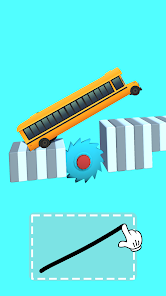
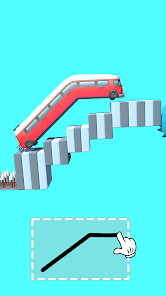
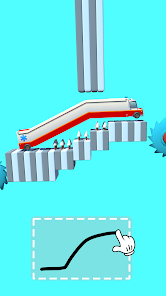
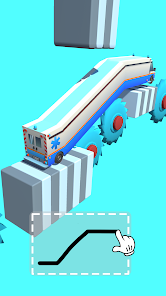
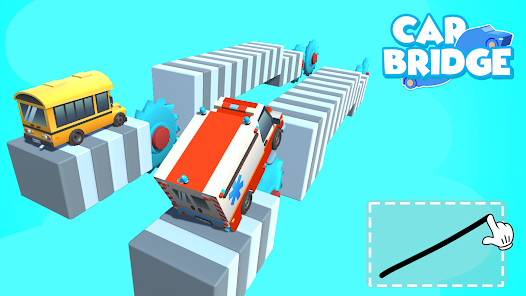
About this game
Do you enjoy a puzzle game that only lets you draw 1 line to solve the challenges? What if instead of drawing a bridge, you MAKE A BRIDGE OUT OF YOUR CAR?
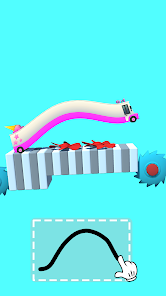
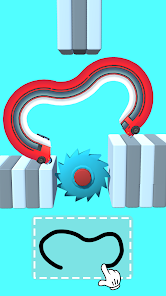
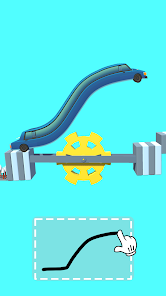
Sounds interesting? If you're bored and tired of playing traditional draw-line games, let's try a whole new concept of draw-to-bridge, where you draw a line to stretch your car and become a bridge. Try our new game: Car Bridge 3D: Draw to Save
Everyone can draw a normal and boring bridge. But do you have what it takes to make your car a bridge and help it reach the other side?
Let your creativity fly and draw a unique & special bridge that no one has done and wow the world with your creativity & madness.
Train your brain through 150+ puzzles and levels that we make for you. Each challenge will force you to use your brain to the fullest, and improve both logical IQ and creativity.
Draw & Build up a famous bridge that you love!
Let's dive into the game and build the craziest bridge ever
HOW DO YOU PLAY?
- Touch the screen to start drawing in the drawing panel.
- Hold and drag across to make the shapes you want.
- Once you finish, release your finger
- The car will stretch and follow the line you drew.
- Wait for the result: if the car reaches the other side, you win the level!
Very simple gameplay yet is very hard to master.
OUR UNIQUE FEATURES
- Don't be afraid to trial and error: you can always redo
- New and improved mechanics.
- Exciting levels.
- Relaxing music.
- No limit on playtime.
Start solving your favorite puzzle and play Car Bridge 3D: Draw to Save now!
Sounds interesting? If you're bored and tired of playing traditional draw-line games, let's try a whole new concept of draw-to-bridge, where you draw a line to stretch your car and become a bridge. Try our new game: Car Bridge 3D: Draw to Save
Everyone can draw a normal and boring bridge. But do you have what it takes to make your car a bridge and help it reach the other side?
Let your creativity fly and draw a unique & special bridge that no one has done and wow the world with your creativity & madness.
Train your brain through 150+ puzzles and levels that we make for you. Each challenge will force you to use your brain to the fullest, and improve both logical IQ and creativity.
Draw & Build up a famous bridge that you love!
Let's dive into the game and build the craziest bridge ever
HOW DO YOU PLAY?
- Touch the screen to start drawing in the drawing panel.
- Hold and drag across to make the shapes you want.
- Once you finish, release your finger
- The car will stretch and follow the line you drew.
- Wait for the result: if the car reaches the other side, you win the level!
Very simple gameplay yet is very hard to master.
OUR UNIQUE FEATURES
- Don't be afraid to trial and error: you can always redo
- New and improved mechanics.
- Exciting levels.
- Relaxing music.
- No limit on playtime.
Start solving your favorite puzzle and play Car Bridge 3D: Draw to Save now!
Updated on
Powered by Intel® technology
Safety starts with understanding how developers collect and share your data. Data privacy and security practices may vary based on your use, region, and age. The developer provided this information and may update it over time.

This app may share these data types with third parties
Device or other IDs

No data collected
Learn more about how developers declare collection

Data isn’t encrypted
Data can’t be deleted
Everyone
Learn morePlay on PC
Play this game on your Windows PC with Google Play Games
Learn moreOfficial Google experience
Bigger screen
Level up with improved controls
Seamless sync across devices*
Earn Google Play Points
Minimum requirements
- OS: Windows 10 (v2004)
- Storage: Solid state drive (SSD) with 10 GB of available storage space
- Graphics: IntelⓇ UHD Graphics 630 GPU or comparable
- Processor: 4 CPU physical cores
- Memory: 8 GB of RAM
- Windows admin account
- Hardware virtualization must be turned on
To learn more about these requirements, visit the Help Center
Intel is a registered trademark of Intel Corporation or its subsidiaries. Windows is a trademark of the Microsoft group of companies.
*Might not be available for this game
App support
About the developer
EPIKMOUNT JOINT STOCK COMPANY
am@epikmount.com
58 Lane 279 Doi Can, Ngoc Ha Ward,
Ha Noi
Vietnam
+84 848 763 888