
FolderSync
Contains adsIn-app purchases
4.4star
34.7K reviewsinfo
1M+
Downloads

USK: All ages
info
About this app
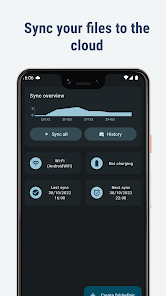
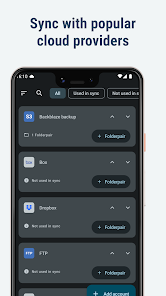
FolderSync enables simple sync to cloud based storage to and from local folders on the device SD cards. It support a wide range of different cloud providers and file protocols, and support for more platforms are added continuously. Root file access supported on rooted devices.
Effortlessly sync your files. Backup your music, pictures and other important files from the phone to your cloud storage or the other way around. It has never been easier. Automation support using Tasker and similar programs enables fine grained control of your syncs.
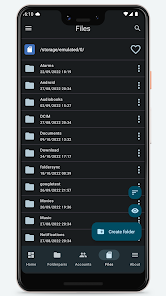
FolderSync contains a full file manager, that enables you to manage your files locally and in the cloud. Copy, move and delete your files in your cloud/remote accounts. Support for creation/deletion of buckets in Amazon S3. Upload and download files from the phone. It's all supported.
Supported cloud providers
- Amazon S3 Simple Storage Service
- Box
- CloudMe
- Dropbox
- Google Cloud Storage
- Google Drive
- HiDrive
- Kolab Now
- Koofr
- Livedrive Premium
- luckycloud
- MEGA
- MinIO
- MyDrive.ch
- NetDocuments
- NextCloud
- OneDrive
- OneDrive for Business
- OwnCloud
- pCloud
- Storegate
- SugarSync
- WEB.DE
- Yandex Disk
Supported protocols
- FTP
- FTPS (SSL/TLS implicit)
- FTPES (SSL/TLS explicit)
- SFTP (SSH File Transfer)
- SMB1/Samba/CIFS/Windows Share
- SMB2
- SMB3
- WebDAV (HTTPS)
Change log
https://foldersync.io/changelog
Support
https://foldersync.io/support
FAQ
https://foldersync.io/docs/faq
Permissions
ACCESS_FINE_LOCATION
Optional permission that can be granted if Foldersync should detect SSID name on Android 9 or newer.
ACCESS_NETWORK_STATE
Needed to determine current network state
ACCESS_WIFI_STATE
Needed to access info about the current WiFi state (SSID etc.)
CHANGE_NETWORK_STATE/CHANGE_WIFI_STATE
These two are needed to be allowed to turn WiFi on and off
CHANGE_WIFI_MULTICAST_STATE
Needed to autodiscover WebDAV, SMB, FTP and SFTP servers using Bonjour/UPNP protocol
INTERNET
Needed to access the internet connection to send and retrieve files
READ_EXTERNAL_STORAGE/WRITE_EXTERNAL_STORAGE
Needed to read and write files from and to SD card
RECEIVE_BOOT_COMPLETED
Needed to automatically start after reboot of device, so scheduled syncs will still run
WAKE_LOCK
Needed to keep the device running during a sync, so it doesn't enter sleep mode
Effortlessly sync your files. Backup your music, pictures and other important files from the phone to your cloud storage or the other way around. It has never been easier. Automation support using Tasker and similar programs enables fine grained control of your syncs.
FolderSync contains a full file manager, that enables you to manage your files locally and in the cloud. Copy, move and delete your files in your cloud/remote accounts. Support for creation/deletion of buckets in Amazon S3. Upload and download files from the phone. It's all supported.
Supported cloud providers
- Amazon S3 Simple Storage Service
- Box
- CloudMe
- Dropbox
- Google Cloud Storage
- Google Drive
- HiDrive
- Kolab Now
- Koofr
- Livedrive Premium
- luckycloud
- MEGA
- MinIO
- MyDrive.ch
- NetDocuments
- NextCloud
- OneDrive
- OneDrive for Business
- OwnCloud
- pCloud
- Storegate
- SugarSync
- WEB.DE
- Yandex Disk
Supported protocols
- FTP
- FTPS (SSL/TLS implicit)
- FTPES (SSL/TLS explicit)
- SFTP (SSH File Transfer)
- SMB1/Samba/CIFS/Windows Share
- SMB2
- SMB3
- WebDAV (HTTPS)
Change log
https://foldersync.io/changelog
Support
https://foldersync.io/support
FAQ
https://foldersync.io/docs/faq
Permissions
ACCESS_FINE_LOCATION
Optional permission that can be granted if Foldersync should detect SSID name on Android 9 or newer.
ACCESS_NETWORK_STATE
Needed to determine current network state
ACCESS_WIFI_STATE
Needed to access info about the current WiFi state (SSID etc.)
CHANGE_NETWORK_STATE/CHANGE_WIFI_STATE
These two are needed to be allowed to turn WiFi on and off
CHANGE_WIFI_MULTICAST_STATE
Needed to autodiscover WebDAV, SMB, FTP and SFTP servers using Bonjour/UPNP protocol
INTERNET
Needed to access the internet connection to send and retrieve files
READ_EXTERNAL_STORAGE/WRITE_EXTERNAL_STORAGE
Needed to read and write files from and to SD card
RECEIVE_BOOT_COMPLETED
Needed to automatically start after reboot of device, so scheduled syncs will still run
WAKE_LOCK
Needed to keep the device running during a sync, so it doesn't enter sleep mode
Updated on
Safety starts with understanding how developers collect and share your data. Data privacy and security practices may vary based on your use, region, and age. The developer provided this information and may update it over time.

No data shared with third parties
Learn more about how developers declare sharing

This app may collect these data types
App activity, App info and performance, and Device or other IDs

Data is encrypted in transit

Data can’t be deleted
Ratings and reviews
4.4
31K reviews

A Google user
- Flag inappropriate
- Show review history
September 17, 2018
This app worked pretty well as long as I used it to upload files to Dropbox. I thought that I could simply switch to Mega. However, this appears to not be the case. I have now tried for several days to sync a folder that contains a few thousand files. Syncing to Mega is unbearably slow which is why I switched to a different app for that folder. I don't know how well it works with any of the other cloud service providers it supports. Even it that part worked well, it'd still not be a 5 stars app. I think there really should be different requirements for automatic syncing than for manual syncing. I only want automatic syncing to start when my phone is charging but when I press the sync button, I want it to work on battery. Same with wifi vs mobile internet connection. Edit: This app works well with Nextcloud. It doesn't have a Nextcloud option but I selected OwnCloud 9 and it works for me.

FaRo (Fabian Röling)
- Flag inappropriate
August 28, 2020
This app is a blessing and a curse: It totally works, yes, but it also checks every single file pair on every single sync. With the 21095 files in my Google Drive, this can take up to 1½ hours and drain a lot of the battery. InSync is a program for desktop computers and is much more lightweight, it detects changes both in the file system and in the cloud and then immediately syncs only that, not needing to check everything all the time. I tried a lot of apps for Google Drive sync and none did this. FolderSync is at least the least bad among these. I've also tried a lot to get InSync running on Android, but even in Termux it doesn't want to work. I'm seriously considering to switch to Ubuntu Touch, mainly because of this (and because many other programs would become compatible).
13 people found this review helpful

Ich Nicht
- Flag inappropriate
- Show review history
November 7, 2023
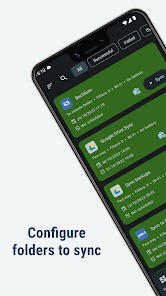
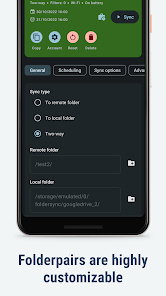
Best sync app for NextCloud, ownCloud etc.: it really downloads the files from the cloud server instead of showing links that don't work offline! And it syncs them to a real directory, not to some app-internal database. After sync you can use any file manager to acess the files on your android device. I use it to keep 4 devices and my NextCloud in sync - great! I love the staged structure: FIRST you add accounts, THEN you add folders to synchronize - with different settings if you want.
3 people found this review helpful
What’s new
Bugfixes for MEGA
App support
About the developer
Tacit Dynamics ApS
support@tacit.dk
Trindsøvej 6, sal 1
8000 Aarhus C
Denmark
+45 93 80 80 74


