
Edit Text Files TXT File Maker
Contains ads
4.4star
5.08K reviewsinfo
100K+
Downloads

PEGI 3
info




About this app
Classic Notepad to save .TXT Files like Computer:
Classic Notepad is a feature rich and Powerful Notepad app that saves .TXT Files in the same way as you used create to in Computers.
We have added all the important features of classic Text Editors in this app to make you feel like you are making TXT Format text file in your Laptop or PC.
Like Classic notepad Editors, you will find Open file and New File options with Save and Save as file choices in the File menu.
There are a number of Toolbar choices including Undo or Redo functions and buttons to Perform Cut Copy Paste operations.
Text Search Function has Find word feature with Find Next option and Go to option.
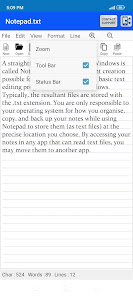
App also has Insert Time and date feature and Sliders options for Zoom in Zoom out.
Editing options include Font Alignment and change text size with slider, Text Shadow feature with Font styles and Strike through options.
You choose to Show or Hide line in the notepad and change to space between horizontal lines of notepad using Line spacing feature
Select text and Word wrapping features to make the text editing easy and simple.
Classic Notepad is a feature rich and Powerful Notepad app that saves .TXT Files in the same way as you used create to in Computers.
We have added all the important features of classic Text Editors in this app to make you feel like you are making TXT Format text file in your Laptop or PC.
Like Classic notepad Editors, you will find Open file and New File options with Save and Save as file choices in the File menu.
There are a number of Toolbar choices including Undo or Redo functions and buttons to Perform Cut Copy Paste operations.
Text Search Function has Find word feature with Find Next option and Go to option.
App also has Insert Time and date feature and Sliders options for Zoom in Zoom out.
Editing options include Font Alignment and change text size with slider, Text Shadow feature with Font styles and Strike through options.
You choose to Show or Hide line in the notepad and change to space between horizontal lines of notepad using Line spacing feature
Select text and Word wrapping features to make the text editing easy and simple.
Updated on
Safety starts with understanding how developers collect and share your data. Data privacy and security practices may vary based on your use, region, and age. The developer provided this information and may update it over time.

This app may share these data types with third parties
Location and Device or other IDs

No data collected
Learn more about how developers declare collection

Data is encrypted in transit

Data can’t be deleted
Ratings and reviews
4.5
4.67K reviews

Stephanie Weigt
- Flag inappropriate
- Show review history
November 26, 2025
Simple. Basic. No ads. Exactly what I was looking for. Two specific annoyances though: 1) I can't change parent folder in which to save (it's possible this is a skill issue, but the solution isn't obvious to me), and 2) it kept bugging me to rate it every few times I saved a file. Very annoying. EDIT: It's now putting a date in my file names. Why? If I wanted that, I'd add it myself. I want it to stop. Or, at least,a toggle-able option. It didn't with my first file name. I do not like this.
1 person found this review helpful

S G “Dr Steve” Mc
- Flag inappropriate
November 30, 2025
Very good overall. Simple, intuitive for most western word processor users I would guess, with most formatting tools you would find in MSWordpad, for example. files easy to find and move within android. acceptable levels of privacy, and no intrusive adverts as yet. recommended.

Zhankef Mirkovsni
- Flag inappropriate
November 23, 2025
Been using over a year with app permissions allowing access to save files. Suddenly, it wants access to access and change without my knowledge of it doing so at any time. It's been a good app, but that's a creepy deal breaker.
What’s new
Thanks for downloading our Free Notepad Files Maker App.
Features:
* Open file and New file
* Save and Save as file .TXT
* Undo and Redo function
* Perform Cut Copy Paste operations
* Find word feature and Go to feature
* Insert Time and date feature
* Zoom in Zoom out
* Font Alignment and style with Fonts family
* Text Shadow and Strike through feature
* Line spacing and Show Hide lines
* Show and hide Toolbar and Status bar
* Change text size
* Select text and Word wrapping features
Features:
* Open file and New file
* Save and Save as file .TXT
* Undo and Redo function
* Perform Cut Copy Paste operations
* Find word feature and Go to feature
* Insert Time and date feature
* Zoom in Zoom out
* Font Alignment and style with Fonts family
* Text Shadow and Strike through feature
* Line spacing and Show Hide lines
* Show and hide Toolbar and Status bar
* Change text size
* Select text and Word wrapping features
App support
About the developer
Kaveri Tyagi
info@drpudomains.com
J-110, Patel Nagar-1, Ghaziabad
Ghaziabad, Uttar Pradesh 201001
India
undefined


