
Calendar Notes
Contains ads
4.1star
2.67K reviewsinfo
1M+
Downloads

PEGI 3
info



About this app
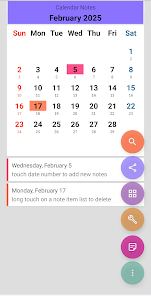
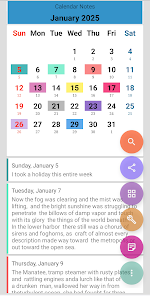
An very easy app to save your idea and your notes in a calendar date form
* beautiful & simple application without any pretension/requirement
* add a note, idea, personal agenda, diary into calendar
* perpetual calendar
* swipe left and right to change month
* in month view, you can change year by swipe left/right as well
* backup your notes manually into email or your online storage ( no need to login , you need do this manually )
* optimized app, use latest android design guide and library
* small size APK
Don't let your idea gone, write it down with this calendar notes app !
---
App icon is modified version from icon designed by
Laura Reen, http://laurareen.com/
Icon license : Attribution 3.0 Unported (CC BY 3.0)
* beautiful & simple application without any pretension/requirement
* add a note, idea, personal agenda, diary into calendar
* perpetual calendar
* swipe left and right to change month
* in month view, you can change year by swipe left/right as well
* backup your notes manually into email or your online storage ( no need to login , you need do this manually )
* optimized app, use latest android design guide and library
* small size APK
Don't let your idea gone, write it down with this calendar notes app !
---
App icon is modified version from icon designed by
Laura Reen, http://laurareen.com/
Icon license : Attribution 3.0 Unported (CC BY 3.0)
Updated on
Safety starts with understanding how developers collect and share your data. Data privacy and security practices may vary based on your use, region, and age. The developer provided this information and may update it over time.


Ratings and reviews
4.1
2.56K reviews

Hazratosman Noori
- Flag inappropriate
July 22, 2025
I’ve been using Calendar Notes for a while and really like it. It’s colorful, simple, and easy to use. The backup via Google account works well, and organizing daily notes is smooth. I suggest adding three key features: (1) auto-saving to prevent accidental data loss. (2) alarm/reminder setup for time-based notes. (3) desktop/PC access without needing Bluestacks. It’s still a great app and highly recommended! thank you, Noori
2 people found this review helpful

Lora E. B. Smith
- Flag inappropriate
October 24, 2025
easy to use, helps me track things for my kids, like dosing schedule if their sick, or behavior patterns, etc.
2 people found this review helpful

Ms Tony Love
- Flag inappropriate
February 6, 2022
I thought it was pretty good, to begin with. It is good for taking notes and keeping them on specific dates. You have to page through it month by month to find old notes, but still good. Last I checked they were still on that phone that I typed them into. Even though it had been dead for a month or two.Until I switched phones, it didn't transfer a single note I had in it. If you can't move the notes to a new phone what good is it. You can't save them, when get a new phone, why take them.
37 people found this review helpful
What’s new
* Bug Fixes
App support
About the developer
Edi Ermawan
AsyncByte@Gmail.com
Dsn Awar Awar Ds Mancon RT 003 RW 003
Kec. Wilangan
Kab. Nganjuk
Jawa Timur 64462
Indonesia
undefined


