
Linksys
4.0star
73.4K reviewsinfo
5M+
Downloads

PEGI 3
info

About this app
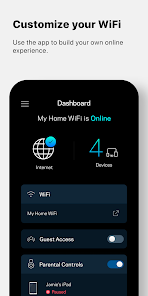
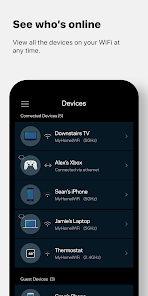
This app is the command center for your Velop system and Linksys Smart WiFi routers. Use the Linksys app anywhere you have an internet connection to check connected devices, set up guest access, or keep your kids off the internet when they should be doing homework.
KEY FEATURES
• Remote Access – All you need is the internet.
• Dashboard – Your WiFi's vital stats on one page.
• Guest Access – Give friends internet access, but keep personal data secure.
• Device Prioritization – Improve streaming and online gaming by giving WiFi priority to favored devices.
• Network Security - Be proactive against network threats and malicious sites with Linksys Shield.
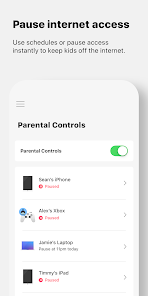
• Parental Controls – Encourage kids' healthy internet behavior by pausing internet access.
Privacy Policy: https://www.linksys.com/embed/lswf/en-us/privacy-policy/
Terms of Use: https://www.linksys.com/embed/lswf/en-us/terms/
SYSTEM REQUIREMENTS*
• Velop systems and Linksys Smart WiFi routers. Full list of supported routers: http://www.LinksysSmartWiFi.com/cloud/ustatic/mobile/supportedRouters.html
• User account (created in the app or at http://www.LinksysSmartWiFi.com) connected to your Linksys product.
• Android 9.0 and greater
Our Velop product line features Bluetooth setup. In Android 6 and higher, apps must request location permissions to use Bluetooth. We don't collect or use any location information in our app.
For additional help, visit our support site at http://support.linksys.com
KEY FEATURES
• Remote Access – All you need is the internet.
• Dashboard – Your WiFi's vital stats on one page.
• Guest Access – Give friends internet access, but keep personal data secure.
• Device Prioritization – Improve streaming and online gaming by giving WiFi priority to favored devices.
• Network Security - Be proactive against network threats and malicious sites with Linksys Shield.
• Parental Controls – Encourage kids' healthy internet behavior by pausing internet access.
Privacy Policy: https://www.linksys.com/embed/lswf/en-us/privacy-policy/
Terms of Use: https://www.linksys.com/embed/lswf/en-us/terms/
SYSTEM REQUIREMENTS*
• Velop systems and Linksys Smart WiFi routers. Full list of supported routers: http://www.LinksysSmartWiFi.com/cloud/ustatic/mobile/supportedRouters.html
• User account (created in the app or at http://www.LinksysSmartWiFi.com) connected to your Linksys product.
• Android 9.0 and greater
Our Velop product line features Bluetooth setup. In Android 6 and higher, apps must request location permissions to use Bluetooth. We don't collect or use any location information in our app.
For additional help, visit our support site at http://support.linksys.com
Updated on
Safety starts with understanding how developers collect and share your data. Data privacy and security practices may vary based on your use, region, and age. The developer provided this information and may update it over time.

No data shared with third parties
Learn more about how developers declare sharing

No data collected
Learn more about how developers declare collection
Ratings and reviews
4.0
70.5K reviews

Gene Kagan
- Flag inappropriate
- Show review history
November 3, 2025
Freezes a lot. To a point where a re-install of the app needs to happen all the time. Parental controls are unusable. (So not sure what additional charges would bring to the table if app is unresponsive). Also, while on a network, it will take a very long time to display devises. And in most cases Shows wrong device names and wrong pictures of them. a lot of times even though I'm connected to wifi it's telling me I'm not. when clearly I'm online. I've been trying to do this for past 2 hrs
46 people found this review helpful

Nick Gill
- Flag inappropriate
December 28, 2022
Very poor app as loads of information is wrong, or unreliable. To name a few: Network admin tells me Velop4 is offline, but device list shows 5 things connected to it with good signals. It's definitely online. My wife's OnePlus 6T is displayed as a Samsung Galaxy! Fing displays it correctly, why can't Linksys. My OnePlus 9Pro shows as connected via WiFi 5G AND via LAN! I name some devices once identified, but later those names disappear. Very poor 😥
2 people found this review helpful

Matt B
- Flag inappropriate
- Show review history
January 2, 2025
The Linksys home mesh WiFi system is fantastic, but unfortunately this app is very flakey and usually won't connect. I'm using a local password only (no cloud account), I can often get the app to connect to my router once, but then I need to force stop and clear all app data for a chance the app will connect to the router again. I can reliably access the web portal directly, but some features are available in the app only.
27 people found this review helpful
What’s new
Support for more Android devices.
App support
About the developer
Jimmy Y Chung
jimmy.chung@linksys.com
3994 Marion Ave
Los Alamitos, CA 90720-2241
United States
undefined


