Remap Device Buttons & Keys
Contains ads
10K+
Downloads

PEGI 3
info
About this app
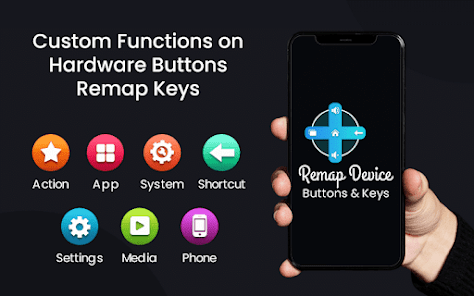
Remap Device Buttons & Keys app helps you to assign custom action on your android phone hardware buttons the way you like. Remap custom actions to device hardware buttons such as back button, home button, headset button, volume button, etc...
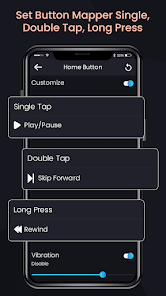
Button Mapper makes it easy to remap new actions for a single click, double click, long press to hardware buttons. You can remap your device keys to launch any app, shortcut, or custom action assigned.
This Remap Device Buttons & Keys app uses Accessibility services. Accessibility is used to detect when the physical or capacitive buttons are pressed on your device. Buttons Remapper doesn't collect or share any personal information with any third party, it is safe and from a privacy perspective.
You can remap all hard buttons like:-
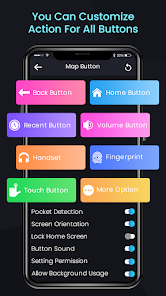
⇾ Map a back button action to a single tap, double tap, and long press.
⇾ Map a home button action to a single tap, double tap, and long press.
⇾ Map a recent button action to a single tap, double tap, and long press.
⇾ Map new actions for a single click, double click, long press to the volume button.
⇾ Remap custom new actions to headset button.
⇾ New action to touch button on single click, double click, long press, swipe up-down, and swipe left-right.
⇾ Remap buttons to screen taps and touch events (even for games!)
Actions added on buttons mapper are:-
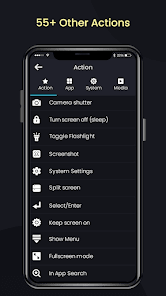
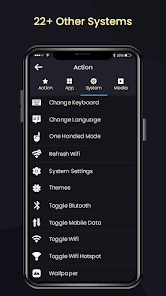
• Default, home, back, headset button, Google Assistant, power dialog, search, toggle flashlight, and turn the screen off.
• Set apps shortcuts on single click, double click, long press to the volume button.
• Key Mapper gives setting options to set on single click, double click, long press to the volume button.
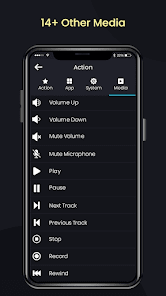
• Map new functions to Buttons like mute-unmute volume, play, pause, stop, next track, previous track, volume up-down, and record.
Salient Features of Buttons Remapper:-
- Simple and easy to use
- Swap volume keys on orientation change
- Remap new functions to hardware Buttons
- Enable pocket detection
- Set screen orientation into auto-rotate mode
- Set lock screen after 1 minute
- On vibration after the action
- Launch any app or shortcut
- No need of internet
- Small size application
Button Mapper makes it easy to remap new actions for a single click, double click, long press to hardware buttons. You can remap your device keys to launch any app, shortcut, or custom action assigned.
This Remap Device Buttons & Keys app uses Accessibility services. Accessibility is used to detect when the physical or capacitive buttons are pressed on your device. Buttons Remapper doesn't collect or share any personal information with any third party, it is safe and from a privacy perspective.
You can remap all hard buttons like:-
⇾ Map a back button action to a single tap, double tap, and long press.
⇾ Map a home button action to a single tap, double tap, and long press.
⇾ Map a recent button action to a single tap, double tap, and long press.
⇾ Map new actions for a single click, double click, long press to the volume button.
⇾ Remap custom new actions to headset button.
⇾ New action to touch button on single click, double click, long press, swipe up-down, and swipe left-right.
⇾ Remap buttons to screen taps and touch events (even for games!)
Actions added on buttons mapper are:-
• Default, home, back, headset button, Google Assistant, power dialog, search, toggle flashlight, and turn the screen off.
• Set apps shortcuts on single click, double click, long press to the volume button.
• Key Mapper gives setting options to set on single click, double click, long press to the volume button.
• Map new functions to Buttons like mute-unmute volume, play, pause, stop, next track, previous track, volume up-down, and record.
Salient Features of Buttons Remapper:-
- Simple and easy to use
- Swap volume keys on orientation change
- Remap new functions to hardware Buttons
- Enable pocket detection
- Set screen orientation into auto-rotate mode
- Set lock screen after 1 minute
- On vibration after the action
- Launch any app or shortcut
- No need of internet
- Small size application
Updated on
Safety starts with understanding how developers collect and share your data. Data privacy and security practices may vary based on your use, region, and age. The developer provided this information and may update it over time.

This app may share these data types with third parties
Device or other IDs

No data collected
Learn more about how developers declare collection

Data is encrypted in transit

Data can’t be deleted
App support
About the developer
NIDHI MANTHAN PATEL
nidhipuj2311@gmail.com
A 2 3 SHANTINI KETAN APPARTMENT IC GANDHI
SCHOOL NIGALIMA NEAR JAINMANDIR VASTADEVDI
Surat, Gujarat 395008
India
undefined


