
SENSEPOINT APP
1.8star
34 reviews
5K+
Downloads

Everyone
info
About this app
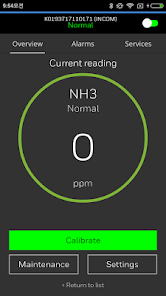
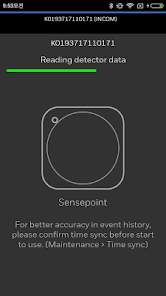
The Honeywell Sensepoint App allows you to use your smart device to configure and maintain the Honeywell Sensepoint XCL and XRL. Using Bluetooth Low Energy (BLE) communication, this app provides an intuitive interface which can be used for a wide variety of commissioning and maintenance tasks without having to physically connect to the gas detector.
Using this Sensepoint App, you can:
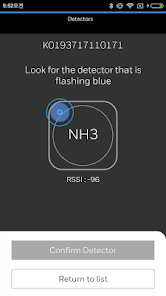
• Pair with the Sensepoint XCL or XRL device using a secure Bluetooth connection
• View live readings from the gas detector
• Check the status of the detector
• Inhibit the output of the Sensepoint XCL or XRL device for maintenance tasks
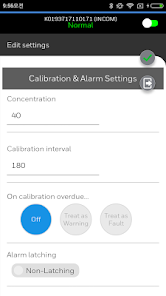
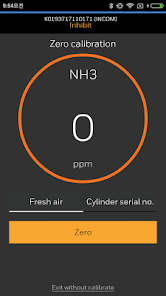
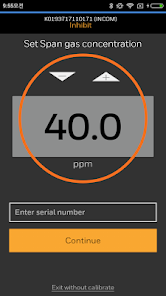
• Perform calibrations on the Sensepoint XCL or XRL device
• Change the alarm threshold for Sensepoint XCL or XRL device
• Change the behavior of the status indicator during normal operation
Supported instruments:
• Sensepoint XCL or XRL device
Compatibility
- Compatible with Android OS 11 or higher
- Bluetooth required
- Wifi or cellular communication required
Note: Support for app versions older than v1.4 has been stopped, users are advised to update this app to the latest version.
Using this Sensepoint App, you can:
• Pair with the Sensepoint XCL or XRL device using a secure Bluetooth connection
• View live readings from the gas detector
• Check the status of the detector
• Inhibit the output of the Sensepoint XCL or XRL device for maintenance tasks
• Perform calibrations on the Sensepoint XCL or XRL device
• Change the alarm threshold for Sensepoint XCL or XRL device
• Change the behavior of the status indicator during normal operation
Supported instruments:
• Sensepoint XCL or XRL device
Compatibility
- Compatible with Android OS 11 or higher
- Bluetooth required
- Wifi or cellular communication required
Note: Support for app versions older than v1.4 has been stopped, users are advised to update this app to the latest version.
Updated on
Safety starts with understanding how developers collect and share your data. Data privacy and security practices may vary based on your use, region, and age. The developer provided this information and may update it over time.

No data shared with third parties
Learn more about how developers declare sharing

This app may collect these data types
Personal info and Messages

Data is encrypted in transit

You can request that data be deleted
Ratings and reviews
1.8
31 reviews

A Google user
- Flag inappropriate
June 25, 2019
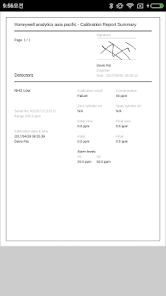
The app works halfway. On my note 8. I can setup sensors, calibrate and create reports. You can not share them as a pdf. On my s7 I can setup sensors and calibrate, but can not create reports or share them. This app needs to be fixed. it would be great if everything worked.
2 people found this review helpful

Wade Riggs
- Flag inappropriate
August 18, 2023
Needs some work. Calibration reports don't show Location Tag of the sensor to make it easier to identify. The cal reports can't be deleted after a job report is created. Doesn't have an option to save the password on the device

Dave Eisele
- Flag inappropriate
- Show review history
April 21, 2025
Won't connect to gas detectors. Frequently crashes. Have to retype the password every time the app crashes. No updates in a year and a half. This app is dumb.
1 person found this review helpful
What’s new
-Enabled communication with BLE 5.0 to support new chipset
-Removed failure message (in English and Korean) when connecting to AD-hoc
-Added setting to enable/disable Stop-bit according to the Parity Bit setting of XCL/XRL.
-Added Logout function
-Added Calibration warm-up cancel function
-Modified exit button if no response during sensor replacement
-Added O2LL GAS ID
-Added recovery routine if user data corruption is found during connection to XCL/XRL
-Added Location Tag to Calibration report
-Removed failure message (in English and Korean) when connecting to AD-hoc
-Added setting to enable/disable Stop-bit according to the Parity Bit setting of XCL/XRL.
-Added Logout function
-Added Calibration warm-up cancel function
-Modified exit button if no response during sensor replacement
-Added O2LL GAS ID
-Added recovery routine if user data corruption is found during connection to XCL/XRL
-Added Location Tag to Calibration report
App support
About the developer
한국하니웰(주)
joonyeon.kim@honeywell.com
대한민국 서울특별시 마포구
마포구 월드컵북로 434 (상암동)
03922
+82 10-9188-9591