Light Manager 2 - LED Settings
Contains adsIn-app purchases

2.7star
2.27K reviews
500K+
Downloads

Everyone
info
About this app
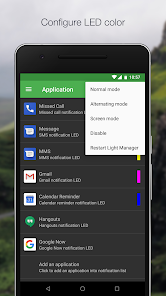
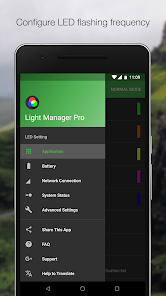
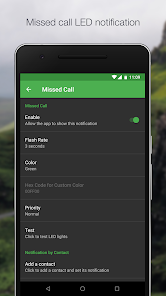
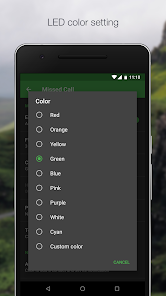
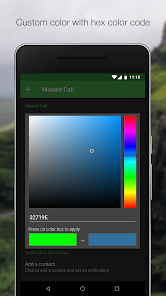
Configure LED color and its flashing frequency for notification as shown below:
- Miss call
- SMS
- MMS
- Gmail
- Calendar reminder
- Hangouts
- Email
- Facebook
- Facebook Messenger
- Twitter
- WhatsApp
- BBM
- LINE
- GO SMS Pro
- Handcent SMS
- chomp SMS
- Textra SMS
- Verizon Messages
- Any 3rd party apps
- Low battery
- Battery charging
- Battery charged
- No signal
- Roaming
- No 3G/4G
- No Wifi
- Airplane Mode On
- Silent Mode On
- Vibration Mode On
- Ringer Mode On
- Mobile Data On
- Wifi On
- Wifi Hotspot On
- GPS On
- Bluetooth On
- NFC On
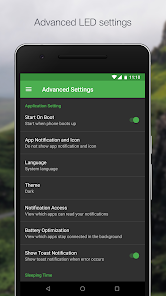
There are three operating modes:
1) Normal Mode - Only LED color for the first notification will be flashing
2) Alternating Mode - A few LED colors will be flashing alternately when multiple notifications are received
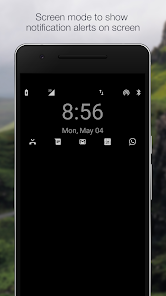
3) Screen Mode - Notifications alert will be shown on screen (For those devices without a physical notification LED, only available for Android 4.3 and above)
You may go to the test section to test whether this app works for your device.
For supported devices list and FAQ, you may go to the link below:
https://docs.google.com/document/d/1t26evGufoC4Fha1Vjyho1cgBKHY6MLJGBPHcsGKZVLc/edit
- Miss call
- SMS
- MMS
- Gmail
- Calendar reminder
- Hangouts
- Facebook Messenger
- BBM
- LINE
- GO SMS Pro
- Handcent SMS
- chomp SMS
- Textra SMS
- Verizon Messages
- Any 3rd party apps
- Low battery
- Battery charging
- Battery charged
- No signal
- Roaming
- No 3G/4G
- No Wifi
- Airplane Mode On
- Silent Mode On
- Vibration Mode On
- Ringer Mode On
- Mobile Data On
- Wifi On
- Wifi Hotspot On
- GPS On
- Bluetooth On
- NFC On
There are three operating modes:
1) Normal Mode - Only LED color for the first notification will be flashing
2) Alternating Mode - A few LED colors will be flashing alternately when multiple notifications are received
3) Screen Mode - Notifications alert will be shown on screen (For those devices without a physical notification LED, only available for Android 4.3 and above)
You may go to the test section to test whether this app works for your device.
For supported devices list and FAQ, you may go to the link below:
https://docs.google.com/document/d/1t26evGufoC4Fha1Vjyho1cgBKHY6MLJGBPHcsGKZVLc/edit
Updated on
Safety starts with understanding how developers collect and share your data. Data privacy and security practices may vary based on your use, region, and age. The developer provided this information and may update it over time.

No data shared with third parties
Learn more about how developers declare sharing

No data collected
Learn more about how developers declare collection

Data is encrypted in transit

Data can’t be deleted
Ratings and reviews
2.7
2.25K reviews

A Google user
- Flag inappropriate
- Show review history
July 3, 2019
I'm curious... I was looking through the list of permissions for this app and the list was so long. some of those seem to go a bit too far considering the purpose of the app. Any reason why they're necessarily? (for example: reading all contact information on the phone, access to wifi connections including wifi name, reading the content in messages, access to call data including the remote number calls are connected to, browsing data, and so much more).
20 people found this review helpful
RagmyAI.com
July 14, 2019
Reading all contact is for generating LED notification by contact. Access to wifi connection is to generate LED when you WiFi is on or off or no WiFi etc.

Jared Drakeford
- Flag inappropriate
July 20, 2020
DO NOT DOWNLOAD PLEASE READ REVIEWS FIRST!!! Can't believe I didn't realize this before having my carrier send me a replacement phone. This app is the worst!!! My Galaxy Note 9 was fine for almost a year with your app until it started to freeze upon charging and constantly reboot until I would take my phone off the charger. This is the only app that would be running before and after reboot, so as soon as I uninstalled, the problem went away. Loved, but now it's a headache. REMOVE!!!!!!!!!!!!!!!
43 people found this review helpful

Michelle De La Guerre
- Flag inappropriate
January 6, 2025
So I always had the normal light manager app, until it stopped working and I couldnt update because it is no longer on google play. Downloaded this one, then it kept going out of app when I start using it. Deleted it and tried several times a few weeks apart, eventually it works again! But!!!! The light colors keep flashing and it says flash settings can not be accessed on this app!!! Why?! I dont like flashing and want to put it off so led just shines whole time. Want it the way it was!!!!
1 person found this review helpful
What’s new
Publish again
App support
About the developer
Koo Ming Chin
koomingchin@gmail.com
Jalan 2/116B
82-03-04 De Tropicana Condo
Kuchai Entrepreneurs Park
58200 Kuala Lumpur
Malaysia
undefined