

Annotium - Photo Annotation
Contains adsIn-app purchases

4.0star
683 reviews
1L+
Downloads

Everyone
info
About this app
Focus on technical fields, helps user can easily take notes/illustrations on photo with high precision, track details and share works, intuitively and productively.
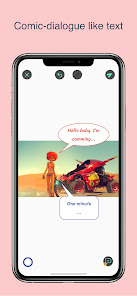
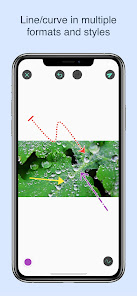
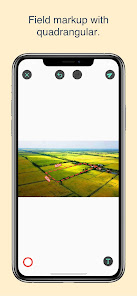
User can draw line/curve with multiple kinds of arrow and format, beside rectangle, ellipse, round rectangle, triangle, quadrangular, polygon, plenty kinds of text like plain text, callout(comic) text box, pointer text, spotlight, magnifier, text highlight, free draw, icons ... User can point and illustrate directly to the attention point, makes work faster and productive.
FEATURES
◆ Numerous built-in tools as line, curve, rectangle, oval, text ...
◆ Fully customize shape with width, size, color, font, dash, arrow...
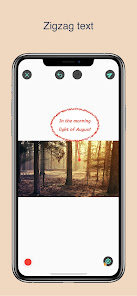
◆ Comic dialog with Callout text, extra text feature like zigzag text
◆ Polygon with unlimited vertices
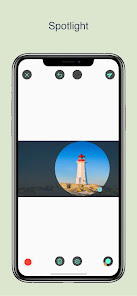
◆ Highlight a part of your photo with Spotlight.
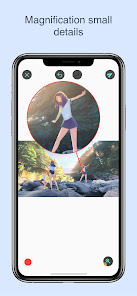
◆ Magnify small details with Loupe.
◆ Hide your sensitive info with Blur.
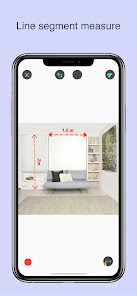
◆ Measuring line segment or angle with Measure tools.
◆ Zoom and pan support while editing.
◆ Auto-rotate support, work in landscape and portrait mode.
◆ Simple and Friendly User Interface.
◆ Hundred of built-in icons
◆ High resolution image.
◆ Numerous free tools to help your daily work easier.
◆ Conveniently share your visualized work with friends, colleagues.
◆ Must-have tool for student, businessman, construction, architecture, maintenance and all technical fields
USE CASES
◆ You are asking maintaining/ repairing something, take a photo of the issue, point arrow to or magnify it and send to the contractor.
◆ You are at the construction site, found problem/something needs to improve, take a photo and annotate it and ask for worker/inspector/engineer to solve problem.
◆ Take map screenshot, freehand draw path and send to friend.
◆ Screenshot a class lesson and highlight note.
User can draw line/curve with multiple kinds of arrow and format, beside rectangle, ellipse, round rectangle, triangle, quadrangular, polygon, plenty kinds of text like plain text, callout(comic) text box, pointer text, spotlight, magnifier, text highlight, free draw, icons ... User can point and illustrate directly to the attention point, makes work faster and productive.
FEATURES
◆ Numerous built-in tools as line, curve, rectangle, oval, text ...
◆ Fully customize shape with width, size, color, font, dash, arrow...
◆ Comic dialog with Callout text, extra text feature like zigzag text
◆ Polygon with unlimited vertices
◆ Highlight a part of your photo with Spotlight.
◆ Magnify small details with Loupe.
◆ Hide your sensitive info with Blur.
◆ Measuring line segment or angle with Measure tools.
◆ Zoom and pan support while editing.
◆ Auto-rotate support, work in landscape and portrait mode.
◆ Simple and Friendly User Interface.
◆ Hundred of built-in icons
◆ High resolution image.
◆ Numerous free tools to help your daily work easier.
◆ Conveniently share your visualized work with friends, colleagues.
◆ Must-have tool for student, businessman, construction, architecture, maintenance and all technical fields
USE CASES
◆ You are asking maintaining/ repairing something, take a photo of the issue, point arrow to or magnify it and send to the contractor.
◆ You are at the construction site, found problem/something needs to improve, take a photo and annotate it and ask for worker/inspector/engineer to solve problem.
◆ Take map screenshot, freehand draw path and send to friend.
◆ Screenshot a class lesson and highlight note.
Updated on
Safety starts with understanding how developers collect and share your data. Data privacy and security practices may vary based on your use, region and age. The developer provided this information and may update it over time.


Ratings and reviews
3.9
647 reviews

Charles
- Flag inappropriate
4 May 2024
Does just what I need for my consulting work. Interface was not as intuitive as I would like but not bad. I was able to figure out out pretty quickly. An ad popped up screaming at me as soon as I saved my first photo, which I hated! But the pro version was only $7 so I got it right away.
4 people found this review helpful

Stuart
- Flag inappropriate
- Show review history
19 August 2023
Thought it would be good for adding measurements to a photo for sizing a job, but you can't zoom into an image enough. Moving an image around is difficult too. Picking up the end point of an existing line or angle is hit and miss and often it just thinks you want to draw a new line which is really annoying. This could be a useful app, the basics are there, but it's implementation is lacking for any detail work, which is odd considering it's supposed to be a 'technical tool kit'.
3 people found this review helpful
Annotium Team
20 August 2023
Hi, thanks for your details feedback. You can zoom then move the image with 2 fingers(or you can use pan tool).
For selecting point, it could be difficult for people with big finger then you can change touch mode in the app settings. If you have any more problems then you can write us at support email annotium@gmail.com

Noah Blair
- Flag inappropriate
5 February 2021
Its 'okay'....very confusing just to change text colours..no explanation as to what each button does and feels very over valued. $9? Lol thats a joke right? You can get PC apps with a lot more features for less. Lower your price and don't give my that craap that you don't need to pay for it. That proves you know its over priced but you make more from ad rev. Fix how there's no text to say what each button does.
4 people found this review helpful
Annotium Team
17 February 2021
Thank you for your feedback. The price goes up because of your country tax. Most of tools in app are free and enough for regular users. Only extended are charged. You can turn them off in settings if you want. We're building documentation to help new users can easily start with the app. Best regards
What's new
Upgrade SDK 35
App support
phone
Phone number
+84814133328
About the developer
Le Quoc Hoang
hoaquo.ios@gmail.com
111B Ly Thanh Tong Tan Thoi Hoa, Tan Phu Dist.
Thành phố Hồ Chí Minh 700000
Vietnam
undefined


