VB Bluetooth Keyboard +
In-app purchases
3.6star
1.29K reviews
5L+
Downloads

Everyone
info

About this app
Virtual Buttons turns your phone into a Bluetooth keyboard, touchpad/mouse, and gamepad, all in one lightweight and customizable app. It connects as a standard Bluetooth HID device, so it works instantly with most computers, phones, tablets, and smart devices.
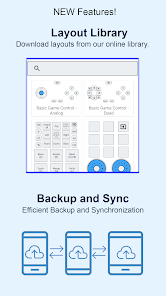
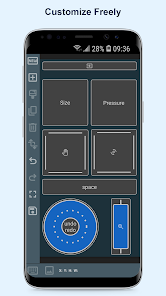
Use built-in layouts or create your own fully personalized control panels.
All-in-One Bluetooth Controller
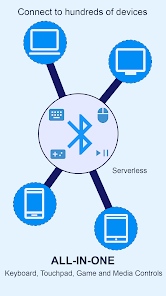
• Keyboard, mouse/touchpad, and gamepad in one app
• Connects as a standard Bluetooth HID device
• No servers, accounts, or extra setup needed
Works on All Major Platforms
• Windows
• macOS
• iPhone/iPad
• Android
• ChromeOS, Linux, TVs, and more
Any device that accepts a Bluetooth keyboard, mouse, or controller is supported.
Fast, Lightweight, and Flexible
• Low latency and smooth performance
• Minimal battery usage
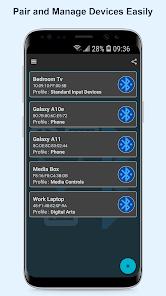
• Manage multiple paired devices easily
Create Custom Layouts
• Add keyboard keys, gamepad buttons, touchpads, scroll zones, and dials
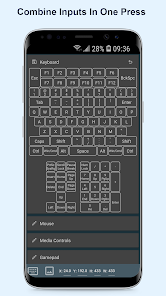
• Combine keyboard, mouse, and gamepad actions in one button
• Add labels or choose from thousands of icons
• Supports portrait and landscape orientations
• Save and switch between multiple configurations
Ready-to-Use Templates
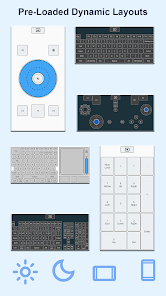
• Pre-loaded standard layouts
• Automatically adjusts based on device orientation
Great For
• Remote controlling PCs
• Mobile and emulator gaming
• Streaming shortcuts and macros
• Accessibility and custom input setups
• Replacing physical keyboards and controllers
Virtual Buttons gives you total flexibility, full customization, and a seamless Bluetooth experience. A portable keyboard, mouse, and gamepad anytime you need it.
Use built-in layouts or create your own fully personalized control panels.
All-in-One Bluetooth Controller
• Keyboard, mouse/touchpad, and gamepad in one app
• Connects as a standard Bluetooth HID device
• No servers, accounts, or extra setup needed
Works on All Major Platforms
• Windows
• macOS
• iPhone/iPad
• Android
• ChromeOS, Linux, TVs, and more
Any device that accepts a Bluetooth keyboard, mouse, or controller is supported.
Fast, Lightweight, and Flexible
• Low latency and smooth performance
• Minimal battery usage
• Manage multiple paired devices easily
Create Custom Layouts
• Add keyboard keys, gamepad buttons, touchpads, scroll zones, and dials
• Combine keyboard, mouse, and gamepad actions in one button
• Add labels or choose from thousands of icons
• Supports portrait and landscape orientations
• Save and switch between multiple configurations
Ready-to-Use Templates
• Pre-loaded standard layouts
• Automatically adjusts based on device orientation
Great For
• Remote controlling PCs
• Mobile and emulator gaming
• Streaming shortcuts and macros
• Accessibility and custom input setups
• Replacing physical keyboards and controllers
Virtual Buttons gives you total flexibility, full customization, and a seamless Bluetooth experience. A portable keyboard, mouse, and gamepad anytime you need it.
Updated on
Safety starts with understanding how developers collect and share your data. Data privacy and security practices may vary based on your use, region and age. The developer provided this information and may update it over time.

No data shared with third parties
Learn more about how developers declare sharing

This app may collect these data types
Personal info and App info and performance

Data is encrypted in transit

You can request that data be deleted
Ratings and reviews
3.6
1.24K reviews

hiaaya alomari
- Flag inappropriate
4 December 2025
Does not work well. The buttons are too small, so sometimes I'm clicking two keys at once. It also lags or does not respond when clicking letters on the keyboard. I do not reccomend.
JB Mobisoft
4 December 2025
Thanks for sharing your experience. Could you tell us if the small buttons were from a layout you downloaded or the default one? You can edit any downloaded layout to resize and space out buttons. For the lag and missed taps, when does it usually happen? Any detail will help us check it further.

Bradley Jones
- Flag inappropriate
22 October 2025
Should be a 5 star review because it was working great with minimal lag up until a few days ago. Now the in app controller is unresponsive or is spotty when recognizing touch. I'm not sure what changed but I'd be willing to pay for it if this gets fixed
5 people found this review helpful
JB Mobisoft
4 December 2025
Thanks for sharing this. We recently released updates that improve Bluetooth responsiveness, so please try the latest version to see if it helps. If the touch issue continues, could you describe when it happens so we can look into it further?

Omar Alzawawy
- Flag inappropriate
10 November 2025
the best app for the Bluetooth keyboard and mouse , but actually i am a code writer and there is some sympols like - _ " i can't write one the screen so if you can add gesture to write it and if you can add arabic and English keyboard to the library.
JB Mobisoft
10 November 2025
Thanks for sharing your suggestions. We’ll remember this and consider it for future updates to improve the typing experience.
What's new
Better and more stable Windows connectivity.
Snap functionality for easier layout customization.
Caps lock sync with the paired device.
Bug fixes.
Snap functionality for easier layout customization.
Caps lock sync with the paired device.
Bug fixes.
App support
About the developer
Jose Benigno Balahadia
cusport.jbmobisoft@gmail.com
8168 136A St #183
Surrey, BC V3W 2Z6
Canada
undefined


