

FP sDraw (Drawing app)

4.2star
5.65K reviews
1M+
Downloads

Everyone
info



About this app
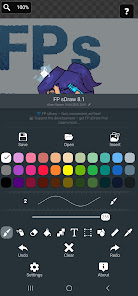
FP sDraw is a simple and lightweight drawing app - no ads, no clutter, just open and draw.
✅ Designed for those who need a simple tool for simple tasks.
Perfect for quick moments when you need to:
🎭 Create a meme or add text to a photo.
🧠 Sketch a diagram, note, or quick idea.
🖼️ Highlight or mark something directly on an image.
🎨 Experiment with different styles - lines, shapes, airbrush, text, and more.
Why FP sDraw is worth having:
📦 Doesn’t take up space or run in the background.
🛑 No ads - nothing distracts you from drawing.
📉 Less than 1 MB - installs in seconds.
⚙️ No setup needed - starts instantly.
📱 Works even on very old phones.
🧩 Flexible UI - even the button shapes can be customized.
✍️ Stylus support: sPen, Active Pen, etc.
💡 Helpful tips appear only when needed.
🛟 Automatic backup keeps your sketches safe.
🔊 Volume buttons can trigger quick actions.
Drawing tools:
🪄 Layers - organize complex sketches.
🖼️ Insert from gallery.
🖍 Brush and eraser.
🌬 Airbrush.
🏺 Fill.
🅰️ Text.
✂️ Selection.
🔳 Shapes.
📏 Ruler.
🎨 Eyedropper.
🧩 Mosaic.
🖱 Precision brush.
The free version is fully functional - no essential features locked.
Pro version adds a few nice extras:
💛 Support the developer.
🖼️ Option to remove “sDraw” label from saved images.
🚫 Removes the message in the main menu.
🙅♂ No more “Buy Pro” reminders when saving.
⚡️ Projects from the free version are fully compatible with Pro.
🍞 Doesn’t eat resources or space - but always ready when needed 😊
✅ Designed for those who need a simple tool for simple tasks.
Perfect for quick moments when you need to:
🎭 Create a meme or add text to a photo.
🧠 Sketch a diagram, note, or quick idea.
🖼️ Highlight or mark something directly on an image.
🎨 Experiment with different styles - lines, shapes, airbrush, text, and more.
Why FP sDraw is worth having:
📦 Doesn’t take up space or run in the background.
🛑 No ads - nothing distracts you from drawing.
📉 Less than 1 MB - installs in seconds.
⚙️ No setup needed - starts instantly.
📱 Works even on very old phones.
🧩 Flexible UI - even the button shapes can be customized.
✍️ Stylus support: sPen, Active Pen, etc.
💡 Helpful tips appear only when needed.
🛟 Automatic backup keeps your sketches safe.
🔊 Volume buttons can trigger quick actions.
Drawing tools:
🪄 Layers - organize complex sketches.
🖼️ Insert from gallery.
🖍 Brush and eraser.
🌬 Airbrush.
🏺 Fill.
🅰️ Text.
✂️ Selection.
🔳 Shapes.
📏 Ruler.
🎨 Eyedropper.
🧩 Mosaic.
🖱 Precision brush.
The free version is fully functional - no essential features locked.
Pro version adds a few nice extras:
💛 Support the developer.
🖼️ Option to remove “sDraw” label from saved images.
🚫 Removes the message in the main menu.
🙅♂ No more “Buy Pro” reminders when saving.
⚡️ Projects from the free version are fully compatible with Pro.
🍞 Doesn’t eat resources or space - but always ready when needed 😊
Updated on
Safety starts with understanding how developers collect and share your data. Data privacy and security practices may vary based on your use, region, and age. The developer provided this information and may update it over time.

No data shared with third parties
Learn more about how developers declare sharing

No data collected
Learn more about how developers declare collection
Ratings and reviews
4.2
4.81K reviews

Oskar Jensen
- Flag inappropriate
October 27, 2025
Lovely app, runs smoothly and loads of customization for such a simple app. I do have one feature request though! I was wondering if it's possible to change the color/shade of the out-of-bounds background, as currently there's no way that I can see to change it from the dark grid. Maybe a light mode for the settings UI too?
3 people found this review helpful
Fsoft Production
October 27, 2025
Thank you for your review ☺️
I'm thinking about doing that, do you have any ideas hot it would be better to implement?

S ?
- Flag inappropriate
September 12, 2025
Nice and simple but, unless I've missed these features, the app needs a few QOL improvements. Setting the canvas size by text input would be good. When inserting an image to work on, it would be nice if the app gave the option to automatically resize the canvas to focus on the image. Really nice to use though. Long overdue for an app like this to exist.
3 people found this review helpful
Fsoft Production
September 12, 2025
Thank you for your review 😊
Some of features you mentioned ia already in my to-do list, some I'll consider adding.
Thank you!

Denis “morushroom” Baranique
- Flag inappropriate
November 3, 2025
Guys you're so goated I love this app very much. Your hard work is rewarded and I will donate to you soon! Also, please, if this aligns with your design philosophy, consider giving one an option to save size presets for brushes and turn off switch to pixel on zoom. It would be pretty cool!
2 people found this review helpful
Fsoft Production
November 3, 2025
Thank you for your review ♥️
You can partially disable pixel mode by changing its threshold to something like 10000% in settings, it will not will bother you
What’s new
Canvas resize window
Rounded rectangle
Save as copy
Fit to screen
Checkerboard brightness slider
Eyedropper delay slider
Export layer to gallery
"Paste from gallery" added to quick access menu
Improved design
Bug fixes
Rounded rectangle
Save as copy
Fit to screen
Checkerboard brightness slider
Eyedropper delay slider
Export layer to gallery
"Paste from gallery" added to quick access menu
Improved design
Bug fixes
App support
About the developer
ROMAN PAPUSHA
drfailov21@gmail.com
вул. Радунська 42/10, кв. 4
Київ
Ukraine
02097
undefined


