
[DISCONTINUED] Widget Drawer
1 Tsg.+
Downloads

Jedes Alter
info

Über diese App
NOTICE: Widget Drawer has been merged into Lockscreen Widgets! Send me an email with your Widget Drawer purchase receipt or from the email you used to purchase Widget Drawer.
https://play.google.com/store/apps/details?id=tk.zwander.lockscreenwidgets
Do you use widgets frequently? Are you maybe tired of having to go to the home screen just to take a quick glance at your inbox? You could just open the widget's app, but then you have to wait for the app to open and load.
Widget Drawer aims to take care of this convenience issue by adding a way for you to access your widgets from nearly any app or screen.
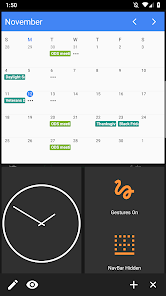
When enabled, Widget Drawer will add a handle to the side of your screen. Simply swipe that handle inward and you will be presented with an area to add widgets. This handle will stay on the screen whether you're on the home screen, browsing the internet, or reading a book.
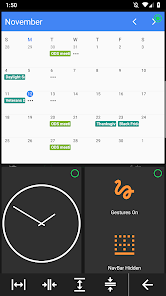
Widget Drawer also provides certain customization options for the drawer itself:
- Change the height of each widget
- Set whether a widget should take up 1 or 2 columns in width
- Reorder widgets
- Choose whether or not widgets should have an opaque background
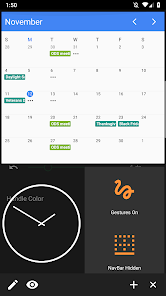
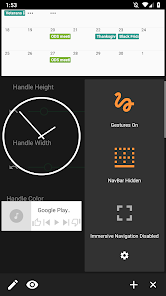
The handle has a few options as well. It can be moved vertically or even to the other side of the screen by long-pressing it and then dragging. The size and color can even be personalized from within the app itself.
Widget Drawer makes use of the following permissions:
- SYSTEM_ALERT_WINDOW
- Used to show the drawer over other apps
- VIBRATE
- Used to provide haptic feedback for certain actions
- FOREGROUND_SERVICE
- Used to start a foreground Service to keep Widget Drawer running
- BIND_APPWIDGET
- Used to host the widgets
- INTERNET
- Used by Firebase to track crashes and gather logs
- Accessibility
- Widget Drawer optionally uses an Accessibility Service to display on top of the lock screen and notification center (called Enhanced View Mode in the app). This feature and permission are completely optional and no data is collected.
This app is open source! https://github.com/zacharee/WidgetDrawer
XDA Labs: https://labs.xda-developers.com/store/app/tk.zwander.widgetdrawer
XDA Thread: https://forum.xda-developers.com/general/paid-software/app-widget-drawer-t3866671
https://play.google.com/store/apps/details?id=tk.zwander.lockscreenwidgets
Do you use widgets frequently? Are you maybe tired of having to go to the home screen just to take a quick glance at your inbox? You could just open the widget's app, but then you have to wait for the app to open and load.
Widget Drawer aims to take care of this convenience issue by adding a way for you to access your widgets from nearly any app or screen.
When enabled, Widget Drawer will add a handle to the side of your screen. Simply swipe that handle inward and you will be presented with an area to add widgets. This handle will stay on the screen whether you're on the home screen, browsing the internet, or reading a book.
Widget Drawer also provides certain customization options for the drawer itself:
- Change the height of each widget
- Set whether a widget should take up 1 or 2 columns in width
- Reorder widgets
- Choose whether or not widgets should have an opaque background
The handle has a few options as well. It can be moved vertically or even to the other side of the screen by long-pressing it and then dragging. The size and color can even be personalized from within the app itself.
Widget Drawer makes use of the following permissions:
- SYSTEM_ALERT_WINDOW
- Used to show the drawer over other apps
- VIBRATE
- Used to provide haptic feedback for certain actions
- FOREGROUND_SERVICE
- Used to start a foreground Service to keep Widget Drawer running
- BIND_APPWIDGET
- Used to host the widgets
- INTERNET
- Used by Firebase to track crashes and gather logs
- Accessibility
- Widget Drawer optionally uses an Accessibility Service to display on top of the lock screen and notification center (called Enhanced View Mode in the app). This feature and permission are completely optional and no data is collected.
This app is open source! https://github.com/zacharee/WidgetDrawer
XDA Labs: https://labs.xda-developers.com/store/app/tk.zwander.widgetdrawer
XDA Thread: https://forum.xda-developers.com/general/paid-software/app-widget-drawer-t3866671
Aktualisiert am
Was die Sicherheit angeht, solltest du als Erstes verstehen, wie Entwickler deine Daten erheben und weitergeben. Die Datenschutz- und Sicherheitspraktiken können je nach deiner Verwendung, deiner Region und deinem Alter variieren. Diese Informationen wurden vom Entwickler zur Verfügung gestellt und können jederzeit von ihm geändert werden.


Neuerungen
- A crash caused by deleting a widget and then selecting another widget before the snackbar timed out is fixed.
- The arrow for controlling the bottom bar in the drawer should have the correct tint now.
- The arrow for controlling the bottom bar in the drawer should have the correct tint now.
Support für diese App
Informationen zum Entwickler
Zachary Wander
zachary@zwander.dev
90 Rock Ridge Rd
Upper Black Eddy, PA 18972-9518
United States
undefined


