
Lekh: whiteboard & diagramming
In-app purchases

star
854 reviews

Everyone
info
100K+
Downloads


About this app
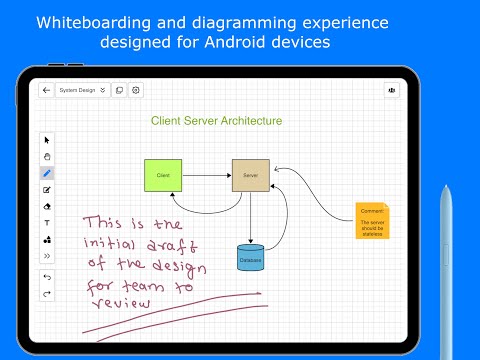
Lekh is a diagram and flowchart maker that understands your sketches. Draw a box, an arrow or a wall by hand and Lekh turns it into a clean shape. Make flowcharts, diagrams, floor plans and layouts, mind maps, UML and network diagrams, mark up photos and take visual notes, on Android, iPhone, iPad, Mac and the web, online or offline.
Infinite canvas:
Lekh whiteboard offers an infinite canvas, giving you the freedom to draw concepts, ideas, or diagrams as if you had limitless and endless paper.
Diagram & flowchart maker:
You can draw flowchart shapes and diagramming shapes such as rectangles, circles, connection lines etc just by sketching. In smart mode, you draw as naturally as on paper, and Lekh automatically transforms your rough sketches into precise shapes and connections. Lekh features best-in-class shape recognition technology.
Photo markup & visual notes:
Import a photo, screenshot or plan and draw on it: circle problems, add arrows, measurements and text. Keep handwritten notes and sketches next to your diagrams on one infinite canvas.
Floor plans, site plans & inspection drawings:
Lekh is perfect for creating roof, window, or house inspection drawings where you need to design layouts and add measurements. With Lekh's smart mode, you can quickly sketch layouts on the screen and easily add text by double-clicking anywhere. It's also great for quickly drawing basic floor plans, house plans, street maps, parking lot layouts, fence layouts, and more. Mark posts and gates on a fence run, write window and door sizes on a photo of each opening, draw gutter and downspout runs on a house photo, and sketch deck, patio and shed site plans. Turn on scaling to draw to scale in inches or cm, write the measurements on, and export a PDF for your customer. Sketch simple wiring and electrical layouts with lines, shapes and labels.
Swimlane diagram & business process mapping:
With Lekh, you can create swimlane diagrams, process flow diagrams, and business process mapping diagrams. The Lekh shape library includes BPMN and Archimate shapes, allowing you to draw any type of business diagram.
Rapid UI Wireframing:
Lekh enables you to create UI wireframes swiftly. The shape library offers customizable wireframe shapes that can be easily configured to achieve your desired results in no time.
More diagram types:
With Lekh, you can create a wide variety of diagrams, including mindmaps, UML, ERD, sequence diagrams, state diagrams, use cases, data flow diagrams (DFD), org charts, and cloud architectures like AWS, GCP, and Azure, among others.
Works with AI:
Connect Lekh to Claude or ChatGPT and ask it to draw or change a diagram on your board. The result is a normal Lekh board you can keep editing by hand.
Online and Offline mode:
Lekh functions in both online and offline modes. In online mode, your drawings and diagrams are stored on the Lekh cloud, allowing you to access them from any device, including through browsers. This mode also enables real-time collaboration, where multiple users can draw on the same canvas simultaneously. In offline mode, all drawings are saved directly to your device, and no internet connection is needed.
Cross platform:
Lekh is a cross-platform app that works on a wide range of devices, including browsers. Visit our homepage to learn more.
Free and Individual plans:
Free: 3 cloud boards and unlimited boards on your device. Individual plan: unlimited cloud boards, sync, real-time collaboration and custom shape libraries.
We appreciate every feedback we receive. Your constant interest and improvement ideas keep the updates coming.
Check out https://lekh.app for more info.
Reach out to us at info@lekhapp.com for any query.
Visit our youtube channel https://www.youtube.com/channel/UCiNazNZGwEkefO_kJXXdX6g for video demos.
Diagram & flowchart maker: sketch layouts & floor plans, mark up photos
Updated on
Safety starts with understanding how developers collect and share your data. Data privacy and security practices may vary based on your use, region, and age. The developer provided this information and may update it over time.
- No data shared with third partiesLearn more about how developers declare sharing
- This app may collect these data typesPersonal info and App activity
- Data is encrypted in transit
- You can request that data be deleted


Ratings and reviews
662 reviews

Taylor Grayson
- Flag inappropriate
December 7, 2025
I love the core functionality of the app; it's very intuitive. The main drawback for using it as a primary note taking app is that using the pen to write text doesn't work well with my active stylus; if I don't move it very slowly, it won't register some strokes. For drawing, there are only two improvements I'd like to see: 1) a way to select shapes and align them and make them the same size. 2) a way to branch connectors.
2 people found this review helpful

niobe trinity
- Flag inappropriate
- Show review history
November 27, 2024
I had a one-off requirement, a diagram I had sketched on an index card a while back. Decided quick look and see what's on the play store. Found Lekh, installed. Had my diagram completed and exported to my phone in 10 minutes. Lekh is very intuitive and recognized shapes, resized instantly. Easy to add text at desired font size etc. I don't have an ongoing need for Lekh cloud. Just want the dev to know this is a cool app.
4 people found this review helpful

Anonymous player
- Flag inappropriate
- Show review history
March 8, 2024
Veryyyy useful, doesn't have watermarks, has lots of features, love it. In the mobile app I didn't know how to insert text in a diagram at first, so had to try a lot of things. Then I found out that you just have to double tap on the diagram. Edit : There are only 4 font Styles available for text, it would be wonderful if there were few more.
10 people found this review helpful
What’s new
We've rebuilt Lekh's drawing engine so your boards look and behave the same on every device. Text now renders identically everywhere, and you get smoother ink, better palm rejection, copy and paste between boards, automatic reconnect after a connection drop, and better export for all languages. Plus many smaller fixes.
Text on existing boards may wrap slightly differently the first time you open them, so it matches every other device.
App support
About the developer
LEKHAPP LLC
info@lekhapp.com
1035 Aster Ave Apt 1170
Sunnyvale, CA 94086
United States
+1 650-383-8224


