
Lekh: whiteboard & diagramming
In-app purchases

star
855 reviews

Everyone
info
100K+
Downloads


About this app
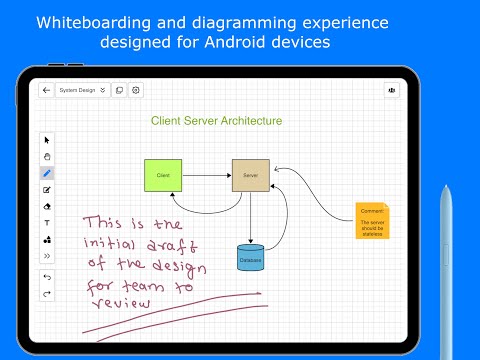
Lekh is a diagram and flowchart maker that understands your sketches. Draw a box, an arrow or a wall by hand and Lekh turns it into a clean shape. Make flowcharts, diagrams, floor plans and layouts, mind maps, UML and network diagrams, mark up photos and take visual notes, on Android, iPhone, iPad, Mac and the web, online or offline.
Infinite canvas:
Lekh whiteboard offers an infinite canvas, giving you the freedom to draw concepts, ideas, or diagrams as if you had limitless and endless paper.
Diagram & flowchart maker:
You can draw flowchart shapes and diagramming shapes such as rectangles, circles, connection lines etc just by sketching. In smart mode, you draw as naturally as on paper, and Lekh automatically transforms your rough sketches into precise shapes and connections. Lekh features best-in-class shape recognition technology.
Photo markup & visual notes:
Import a photo, screenshot or plan and draw on it: circle problems, add arrows, measurements and text. Keep handwritten notes and sketches next to your diagrams on one infinite canvas.
Floor plans, site plans & inspection drawings:
Lekh is perfect for creating roof, window, or house inspection drawings where you need to design layouts and add measurements. With Lekh's smart mode, you can quickly sketch layouts on the screen and easily add text by double-clicking anywhere. It's also great for quickly drawing basic floor plans, house plans, street maps, parking lot layouts, fence layouts, and more. Mark posts and gates on a fence run, write window and door sizes on a photo of each opening, draw gutter and downspout runs on a house photo, and sketch deck, patio and shed site plans. Turn on scaling to draw to scale in inches or cm, write the measurements on, and export a PDF for your customer. Sketch simple wiring and electrical layouts with lines, shapes and labels.
Swimlane diagram & business process mapping:
With Lekh, you can create swimlane diagrams, process flow diagrams, and business process mapping diagrams. The Lekh shape library includes BPMN and Archimate shapes, allowing you to draw any type of business diagram.
Rapid UI Wireframing:
Lekh enables you to create UI wireframes swiftly. The shape library offers customizable wireframe shapes that can be easily configured to achieve your desired results in no time.
More diagram types:
With Lekh, you can create a wide variety of diagrams, including mindmaps, UML, ERD, sequence diagrams, state diagrams, use cases, data flow diagrams (DFD), org charts, and cloud architectures like AWS, GCP, and Azure, among others.
Works with AI:
Connect Lekh to Claude or ChatGPT and ask it to draw or change a diagram on your board. The result is a normal Lekh board you can keep editing by hand.
Online and Offline mode:
Lekh functions in both online and offline modes. In online mode, your drawings and diagrams are stored on the Lekh cloud, allowing you to access them from any device, including through browsers. This mode also enables real-time collaboration, where multiple users can draw on the same canvas simultaneously. In offline mode, all drawings are saved directly to your device, and no internet connection is needed.
Cross platform:
Lekh is a cross-platform app that works on a wide range of devices, including browsers. Visit our homepage to learn more.
Free and Individual plans:
Free: 3 cloud boards and unlimited boards on your device. Individual plan: unlimited cloud boards, sync, real-time collaboration and custom shape libraries.
We appreciate every feedback we receive. Your constant interest and improvement ideas keep the updates coming.
Check out https://lekh.app for more info.
Reach out to us at info@lekhapp.com for any query.
Visit our youtube channel https://www.youtube.com/channel/UCiNazNZGwEkefO_kJXXdX6g for video demos.
Infinite canvas:
Lekh whiteboard offers an infinite canvas, giving you the freedom to draw concepts, ideas, or diagrams as if you had limitless and endless paper.
Diagram & flowchart maker:
You can draw flowchart shapes and diagramming shapes such as rectangles, circles, connection lines etc just by sketching. In smart mode, you draw as naturally as on paper, and Lekh automatically transforms your rough sketches into precise shapes and connections. Lekh features best-in-class shape recognition technology.
Photo markup & visual notes:
Import a photo, screenshot or plan and draw on it: circle problems, add arrows, measurements and text. Keep handwritten notes and sketches next to your diagrams on one infinite canvas.
Floor plans, site plans & inspection drawings:
Lekh is perfect for creating roof, window, or house inspection drawings where you need to design layouts and add measurements. With Lekh's smart mode, you can quickly sketch layouts on the screen and easily add text by double-clicking anywhere. It's also great for quickly drawing basic floor plans, house plans, street maps, parking lot layouts, fence layouts, and more. Mark posts and gates on a fence run, write window and door sizes on a photo of each opening, draw gutter and downspout runs on a house photo, and sketch deck, patio and shed site plans. Turn on scaling to draw to scale in inches or cm, write the measurements on, and export a PDF for your customer. Sketch simple wiring and electrical layouts with lines, shapes and labels.
Swimlane diagram & business process mapping:
With Lekh, you can create swimlane diagrams, process flow diagrams, and business process mapping diagrams. The Lekh shape library includes BPMN and Archimate shapes, allowing you to draw any type of business diagram.
Rapid UI Wireframing:
Lekh enables you to create UI wireframes swiftly. The shape library offers customizable wireframe shapes that can be easily configured to achieve your desired results in no time.
More diagram types:
With Lekh, you can create a wide variety of diagrams, including mindmaps, UML, ERD, sequence diagrams, state diagrams, use cases, data flow diagrams (DFD), org charts, and cloud architectures like AWS, GCP, and Azure, among others.
Works with AI:
Connect Lekh to Claude or ChatGPT and ask it to draw or change a diagram on your board. The result is a normal Lekh board you can keep editing by hand.
Online and Offline mode:
Lekh functions in both online and offline modes. In online mode, your drawings and diagrams are stored on the Lekh cloud, allowing you to access them from any device, including through browsers. This mode also enables real-time collaboration, where multiple users can draw on the same canvas simultaneously. In offline mode, all drawings are saved directly to your device, and no internet connection is needed.
Cross platform:
Lekh is a cross-platform app that works on a wide range of devices, including browsers. Visit our homepage to learn more.
Free and Individual plans:
Free: 3 cloud boards and unlimited boards on your device. Individual plan: unlimited cloud boards, sync, real-time collaboration and custom shape libraries.
We appreciate every feedback we receive. Your constant interest and improvement ideas keep the updates coming.
Check out https://lekh.app for more info.
Reach out to us at info@lekhapp.com for any query.
Visit our youtube channel https://www.youtube.com/channel/UCiNazNZGwEkefO_kJXXdX6g for video demos.
Diagram & flowchart maker: sketch layouts & floor plans, mark up photos
Updated on
Safety starts with understanding how developers collect and share your data. Data privacy and security practices may vary based on your use, region, and age. The developer provided this information and may update it over time.
- No data shared with third partiesLearn more about how developers declare sharing
- This app may collect these data typesPersonal info and App activity
- Data is encrypted in transit
- You can request that data be deleted


Ratings and reviews
663 reviews

AnderWriter
- Flag inappropriate
August 5, 2021
Brilliant! It's much easier, faster, and more fun drawing diagram shapes (and seeing them "magically" turn into precise ones) than having to pick each of them from a list. It couldn't be easier to use, as long as you take a few moments to look through the sample diagram that shows the gestures and features. (I have a feeling some negative reviewers here didn't bother doing that.) Thanks for this swell app! 😀👍
29 people found this review helpful

Nora Ghaoui
- Flag inappropriate
- Show review history
March 23, 2024
Update: I would give this zero stars if I could. I paid for this app and now it refuses to let me export diagrams without a subscription. I am really not impressed with this move. New user interface has ruined it. It used to be quick and intuitive to use. Now it's not.
8 people found this review helpful
LEKHAPP LLC
March 26, 2022
Can you please share more detail on what issues are you facing? Please send us email to info@lekhapp.com We will try fix issues.
Thanks

Anirban Bhowmik
- Flag inappropriate
August 23, 2022
This is a really wonderful app! I just have one little request. It would be nice if I could open the .lekh diagrams (or svg's, if possible) from file manager without importing them. That would make this app much more efficient for working with other apps. Thank you for this app! ❤️
3 people found this review helpful
What’s new
- Connector improvements: now connector end points can be moved from one shape to other and also connector can stay without any connecting shapes
- Bug fixes
- Bug fixes
App support
About the developer
LEKHAPP LLC
info@lekhapp.com
1035 Aster Ave Apt 1170
Sunnyvale, CA 94086
United States
+1 650-383-8224


