
BMO Canada
4.5star
96.9K reviews
1M+
Downloads

Everyone
info

About this app
Important: The BMO Canada app is designed for our Canadian based customers to access Canadian banking services. For US based customers search "BMO Digital Banking" in the App Store.
With the BMO® Mobile Banking app, completing everyday transactions is quick and easy so you can get on with your day, your way. Plus, BMO Mobile Banking is safe and secure, so you can confidently bank on the go.
We work hard to protect your confidential information and privacy. Rest assured that you are protected by our 100% Electronic Banking Guarantee. We will reimburse you 100% for any losses to your personal bank accounts resulting from unauthorized transactions through BMO Mobile Banking. For more information please visit: bmo.com/security
FEATURES:
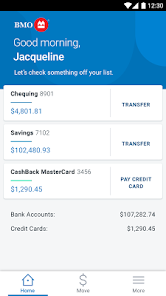
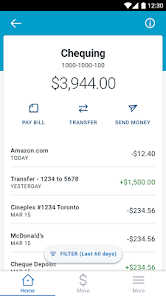
• View your banking, credit card, mortgage, and investment balances directly from your Account Summary. View transaction history on any of your accounts.
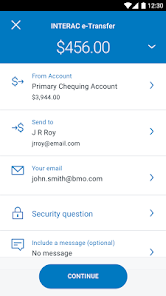
• Transfer funds including cross currency and send Interac e-Transfers. Also, add or edit e-Transfer recipients.
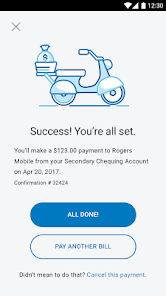
• Pay bills, manage Payees, set up future-dated bill payments and view payment history
• View detailed account info, including credit card balances, due dates, minimum payments, mortgage details and funds on hold for bank accounts.
• Book an appointment
• Travel notifications
• Save your most used BMO Debit Cards or BMO personal credit cards with nicknames to sign in quickly and securely.
• Find BMO branches and ATMs
GET STARTED:
To use BMO Mobile Banking, you must be registered for BMO Online Banking. Simply sign in to BMO Mobile Banking exactly as you would sign in to BMO Online Banking. If you are not registered for BMO Online Banking, visit bmo.com/onlinebanking to register today.
Learn more at:
bmo.com/mobile
BMO Bank of Montreal
bmo.com
PRIVACY DISCLOSURES
You acknowledge and understand that this app incl. updates or upgrades may (i) cause your device to automatically communicate with BMO’s servers to deliver the functionality described above and to record usage metrics, (ii) affect app-related preferences or data stored on your device, and (iii) collect, use and disclose personal information as set out in our BMO Digital privacy policy. You can withdraw your consent at any time by uninstalling the app. For help please contact us at:
BMO Bank of Montreal - Privacy.Matters@bmo.com
®Registered trade-mark of Bank of Montreal
®* INTERAC, the INTERAC logo and INTERAC e-Transfer are registered trade-marks of Interac Inc. Used under license.
With the BMO® Mobile Banking app, completing everyday transactions is quick and easy so you can get on with your day, your way. Plus, BMO Mobile Banking is safe and secure, so you can confidently bank on the go.
We work hard to protect your confidential information and privacy. Rest assured that you are protected by our 100% Electronic Banking Guarantee. We will reimburse you 100% for any losses to your personal bank accounts resulting from unauthorized transactions through BMO Mobile Banking. For more information please visit: bmo.com/security
FEATURES:
• View your banking, credit card, mortgage, and investment balances directly from your Account Summary. View transaction history on any of your accounts.
• Transfer funds including cross currency and send Interac e-Transfers. Also, add or edit e-Transfer recipients.
• Pay bills, manage Payees, set up future-dated bill payments and view payment history
• View detailed account info, including credit card balances, due dates, minimum payments, mortgage details and funds on hold for bank accounts.
• Book an appointment
• Travel notifications
• Save your most used BMO Debit Cards or BMO personal credit cards with nicknames to sign in quickly and securely.
• Find BMO branches and ATMs
GET STARTED:
To use BMO Mobile Banking, you must be registered for BMO Online Banking. Simply sign in to BMO Mobile Banking exactly as you would sign in to BMO Online Banking. If you are not registered for BMO Online Banking, visit bmo.com/onlinebanking to register today.
Learn more at:
bmo.com/mobile
BMO Bank of Montreal
bmo.com
PRIVACY DISCLOSURES
You acknowledge and understand that this app incl. updates or upgrades may (i) cause your device to automatically communicate with BMO’s servers to deliver the functionality described above and to record usage metrics, (ii) affect app-related preferences or data stored on your device, and (iii) collect, use and disclose personal information as set out in our BMO Digital privacy policy. You can withdraw your consent at any time by uninstalling the app. For help please contact us at:
BMO Bank of Montreal - Privacy.Matters@bmo.com
®Registered trade-mark of Bank of Montreal
®* INTERAC, the INTERAC logo and INTERAC e-Transfer are registered trade-marks of Interac Inc. Used under license.
Updated on
Safety starts with understanding how developers collect and share your data. Data privacy and security practices may vary based on your use, region, and age. The developer provided this information and may update it over time.

No data shared with third parties
Learn more about how developers declare sharing

This app may collect these data types
Personal info, Photos and videos and 3 others

Data is encrypted in transit

Data can’t be deleted
Ratings and reviews
4.5
94.4K reviews

Peter Ma
- Flag inappropriate
- Show review history
November 28, 2025
This is infuriating. I've tried logging into my account on the application. It doesn't work, then it locked my account for attempting too many times. I've try resetting the password by calling the number on the back but the application doesn't let me. I have tried the online one to see if the problem was just the application. The website works, but the application is broken. I will stop using the app until the problem is fixed. Updated: Thank you Josie for fixing my problem in a timely manner
BMO
November 28, 2025
Hi Peter, thanks for your updated review! I'm very glad to hear that all is fixed after using the troubleshooting steps provided. Have a great day! -Josie

Belmir
- Flag inappropriate
November 5, 2025
Completely unusable on the newest Pixel Pro XL. The app is permanently stuck on the initial loading screen with the spinning BMO logo. It never loads and never lets me in. The only way to get in one time is by clearing cache and reinstalling. Have to repeat this every time to get in. In 2025, a banking app that doesn't work is the equivalent of a bank having no physical branches in the 90s. It makes you completely useless. I am literally moving all my accounts to another bank because of this.
1 person found this review helpful
BMO
November 6, 2025
Hi Belmir! We are sorry to learn of this issue you've been having with the BMO Mobile Banking App. We'd appreciate the opportunity to review this situation with you further and investigate. Please give us a call at 1-877-225-5266 to escalate this situation. Thank you! - Josie

Zach Ford
- Flag inappropriate
November 19, 2025
I gave a 3 star rating because this app is alright in that it let's me not have to drive to the branch. I think one great feature would be the ability to mark transactions on credit cards or lines of credit as paid. This would help immensely in balancing the books. The insights are just fine but they do get the categorization wrong a lot of the time and there is no way to correct it. Also, oftentimes transactions at one vendor are not only for one category, for instance getting gas and milk.
1 person found this review helpful
BMO
November 19, 2025
Hi Zach, thanks for providing us with your feedback. We appreciate your suggestions, and we'll ensure it's passed along to our development team for review and consideration. Thank you and have a great day! -Josie
What’s new
You may have noticed more updates lately and we know this can be disruptive. We appreciate your understanding as they are required for our new sign-in features and security improvements.
Fixes:
• Biometric sign in fixes
• Fixed black screen experienced by some users when opening the app
• Fixed issue where some users got stuck loading when using filters
• Enhancements to reduce app crashes
Fixes:
• Biometric sign in fixes
• Fixed black screen experienced by some users when opening the app
• Fixed issue where some users got stuck loading when using filters
• Enhancements to reduce app crashes
App support
phone
Phone number
+18772255266
About the developer
Bank of Montréal
mobile.banking@bmo.com
129 rue Saint-Jacques
Montreal, QC H2Y 1L6
Canada
+1 312-880-9149


