
MoneyWise Pro
4.3star
2.52K reviews
10K+
Downloads

Everyone
info

About this app
Get a grip of your personal finances and track your everyday expenses using this top rated money management app. With MoneyWise Pro you can create budgets, monitor cash flow and set up standing orders.
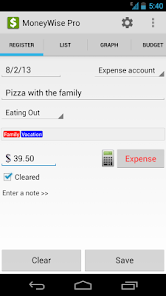
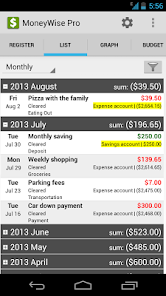
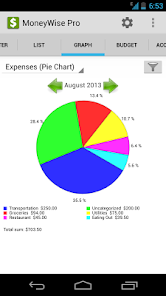
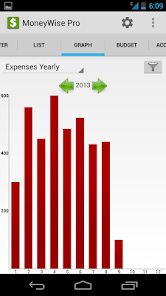
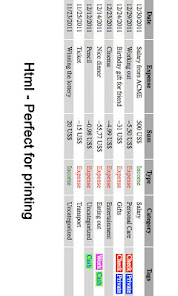
With MoneyWise Pro it's easy to register your expenses on the go. Using graphs and filters you get an overview of spending patterns and can also drill down to see details. For more in-depth analysis of your financial situation you can easily export all data to your computer and import it to a spreadsheet application such as Excel. Data can also be exported as HTML reports for printing.
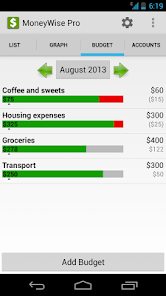
Setting a budget is the best way to get a grip of your spendings and make sure your expenses are in line with your target. Popular budgets items are "Grocery expenses", "Transportation" and "Eating out". Budgets can be set on a monthly, weekly or biweekly bases with the option to shift the starting day of month or week. You decide yourself which transactions are included in each budget item using a filter.
MoneyWise Pro is the only money management app that supports tagging transactions with labels. You should always assign an expense category to each transaction to get a good structure of your spending, but labels add a whole new dimension when filtering the data. Example of labels are "work", "private", "charity", "vacation", project codes or client names.
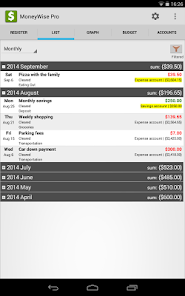
Recurring transactions such as your biweekly paycheck or paying the monthly rent can be automated. Simply create a new transaction, open the transaction details in the list view and mark it as "recurring".
Please backup your data to keep it safe. MoneyWise supports local backups to the SD card as well as cloud storage to DropBox. Using DropBox is also a convenient way to migrate your transaction history to a new phone.
Feature overview:
✔ Doesn't require internet access, no registration
✔ Translated into English, German, Spanish, Portuguese, Korean, Russian, French, Italian, Swedish and Norwegian
✔ Supports all currencies (e.g. $, €, £, ₩, ¥, kr, R$) including currency conversion with manually configured exchange rates
✔ Multiple accounts
✔ Budgets with weekly, biweekly or monthly budget periods and configurable starting day
✔ Password protection
✔ Recurring transactions
✔ Transfer between accounts
✔ Graph expenses over time
✔ Graph expenses by category
✔ Tag expenses using labels
✔ Filter by categories and labels
✔ View by day/week/month/year
✔ Monitor account balances
✔ Backup to SD card or DropBox
✔ Import data to a spreadsheet application (such as Excel)
✔ Mark transactions as cleared by the bank
✔ Split a transaction over multiple categories
✔ Use sub categories
✔ Batch operations
✔ Calculator
✔ Ad free
With MoneyWise Pro it's easy to register your expenses on the go. Using graphs and filters you get an overview of spending patterns and can also drill down to see details. For more in-depth analysis of your financial situation you can easily export all data to your computer and import it to a spreadsheet application such as Excel. Data can also be exported as HTML reports for printing.
Setting a budget is the best way to get a grip of your spendings and make sure your expenses are in line with your target. Popular budgets items are "Grocery expenses", "Transportation" and "Eating out". Budgets can be set on a monthly, weekly or biweekly bases with the option to shift the starting day of month or week. You decide yourself which transactions are included in each budget item using a filter.
MoneyWise Pro is the only money management app that supports tagging transactions with labels. You should always assign an expense category to each transaction to get a good structure of your spending, but labels add a whole new dimension when filtering the data. Example of labels are "work", "private", "charity", "vacation", project codes or client names.
Recurring transactions such as your biweekly paycheck or paying the monthly rent can be automated. Simply create a new transaction, open the transaction details in the list view and mark it as "recurring".
Please backup your data to keep it safe. MoneyWise supports local backups to the SD card as well as cloud storage to DropBox. Using DropBox is also a convenient way to migrate your transaction history to a new phone.
Feature overview:
✔ Doesn't require internet access, no registration
✔ Translated into English, German, Spanish, Portuguese, Korean, Russian, French, Italian, Swedish and Norwegian
✔ Supports all currencies (e.g. $, €, £, ₩, ¥, kr, R$) including currency conversion with manually configured exchange rates
✔ Multiple accounts
✔ Budgets with weekly, biweekly or monthly budget periods and configurable starting day
✔ Password protection
✔ Recurring transactions
✔ Transfer between accounts
✔ Graph expenses over time
✔ Graph expenses by category
✔ Tag expenses using labels
✔ Filter by categories and labels
✔ View by day/week/month/year
✔ Monitor account balances
✔ Backup to SD card or DropBox
✔ Import data to a spreadsheet application (such as Excel)
✔ Mark transactions as cleared by the bank
✔ Split a transaction over multiple categories
✔ Use sub categories
✔ Batch operations
✔ Calculator
✔ Ad free
Updated on
Safety starts with understanding how developers collect and share your data. Data privacy and security practices may vary based on your use, region, and age. The developer provided this information and may update it over time.

No data shared with third parties
Learn more about how developers declare sharing

No data collected
Learn more about how developers declare collection
Ratings and reviews
4.3
2.39K reviews

Elliott Wilson
- Flag inappropriate
October 3, 2021
I've used this app for 7 years and it is all but perfect for me to keep track of my various accounts, budgets, and expenditures. It is extremely flexible and highly customizable. One feature request would be the ability to filter by a particular budget in addition to the existing filter for budget category.
12 people found this review helpful

Prokopyo Dakuykoy
- Flag inappropriate
- Show review history
December 22, 2023
Very good app. Paid version is worth it -- no ads. Wish to have additional features and improvements. 1. Exclude Tick Box on Text Filter. 2. Add a second Text Filter field (with AND/OR options). 3. Option to have pie graph of filtered sub-total expenses only aside from the filtered/unfiltered total. 4. Copy and save as custom filters. 5. Option to have yearly filter in transactions list.
6 people found this review helpful

Erik Brakkee
- Flag inappropriate
- Show review history
June 9, 2020
Great app for taking control of your expenses. Quick and easy entry of expenses. Have been using it for years. Only the graphs can be improved. On my phone (Huawei mate 20 pro), the graphs don't change when I select a filter. Would also be good to add a stacked bar chart showing all categories. The filter in the graph view does not work. It does work in other views.
27 people found this review helpful
What's new
Adaptions for Android 14


