
陽信行動網銀
Contains ads
50K+
Downloads

Everyone
info

About this app
Yangxin Mobile Online Banking App is here!
The new "Yangxin Mobile Internet Banking" provides you with safer and more convenient mobile financial services, allowing you to use financial mobile services at any time regardless of time and location.
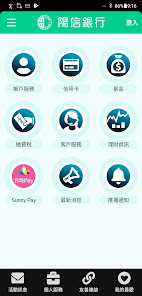
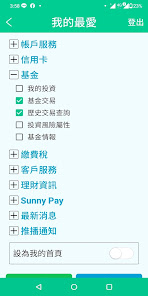
The new "Yangxin Mobile Internet Banking" provides you with the "My Favorite" service, immediately placing the functional items you need on the homepage, making financial management super convenient.
Yangxin Mobile Internet Banking【6 Features】
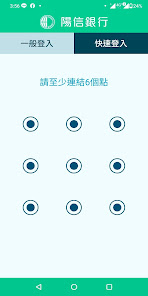
Yangxin Mobile Internet Banking【e-point login】: Replace password with fingerprint, face recognition and gesture graphics.
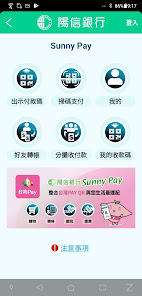
Yangxin Mobile Internet Banking [e-Scan Payment] : Combined with Taiwan Pay QR Code to provide convenient payment, bill payment, and tax payment scanning code transaction functions
Yangxin Mobile Internet Banking【e-start】: It is close to the community ecological activities and provides functions such as shared payment and red envelopes.
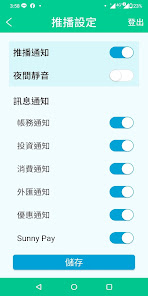
Yangxin Mobile Internet Banking【e Push】: Intimate push broadcast, account information is not missed.
Yangxin Mobile Internet Banking【e-page】: Flexible settings for the exclusive homepage, and common functions can be logged in immediately.
Yangxin Mobile Internet Banking【E-Buy Foreign Exchange】: The foreign exchange transaction is super smooth, and the exchange rate can be checked immediately without missing 【Service Function】
⬤Yangxin Mobile Internet Banking【Quick Login】
Activate Yangxin Mobile Internet Banking, click "Enable" → agree to terms → authorize password → SMS verification code → set quick login method → open successfully!
Start Yangxin Mobile Internet Banking Andriod version, there is also a convenient function of providing graphical login!
⬤Yangxin Mobile Internet Banking【Taiwan Dollar Transfer Function】
★Highlight 1: Display (account category) at the back of the transfer account for easy selection!
★Highlight 2: Display the available balance + the number of free transfers.
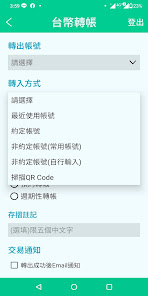
★Highlight 3: "Recently used account" is added to the transfer method, even if it is not added to the frequently used account, the 5 recent transfers
The transfer account can also be found here.
★Highlight 4: Keyword search is transferred to the bank. Find it at once!
★Highlight 5: After the transfer is completed, you can quickly proceed to the next transfer.
★Highlight 6: Check the transaction details immediately after the transfer is completed.
★Highlight 7: You can also use Line to notify your friends immediately!
⬤Yangxin Mobile Internet Banking【Credit Card Function】
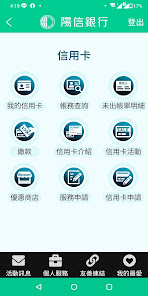
★Highlight 1: The amount paid in this period is clear at a glance. After the account is issued, the successive payment records will be added up and displayed.
★Highlight 2: Check and pay the detailed bill immediately.
★Highlight 3: Credit card consumption, immediately report to you.
⬤Yangxin Mobile Internet Banking【Check the exchange rate and buy it immediately】
When you see a good exchange rate, try it out and buy it right away!
⬤Yangxin Mobile Internet Banking【Non-Agreed Transfer】
Activate Yangxin Mobile Internet Banking, click Personal Services→Mobile Device Management→“Enable”→Authorization Password→SMS Verification Code→Open successfully!
In order to protect your transaction security, Yangxin Mobile Online Banking [Non-Agreed Transfer Function] needs to go to the counter to apply for opening, and activate the SMS OTP service in the Yangxin Mobile Online Banking App to complete the mobile device authentication. Remind you, in order to ensure the security of your account, please install protection software on your mobile device; at the same time, in order to ensure the operating quality of the Yangxin Mobile Internet Banking App, it is recommended that you use a device supported by Google to download the Yangxin Mobile Internet Banking App; If you encounter problems during the use of a google-certified mobile phone, it is recommended that you contact the mobile phone manufacturer for further support.
Yangxin Mobile Internet Banking【Disclaimer】
1. This information source service is a delayed quotation and is for reference only, not for the purpose of trading or investment advice for users. Users are responsible for their own risks, profits and losses, and this service does not take any responsibility.
2. This service is not responsible for the correctness and applicability of all information transmitted through this service, does not guarantee the accuracy of all information, and is not responsible for any loss caused by any inaccuracies or errors.
3. This service is not guaranteed to be error-free and uninterrupted. If transmission interruption or failure occurs, causing inconvenience or inability to use, loss of data, errors, tampering or other economic losses, the service will not be used. bear any liability for compensation.
Please review the terms of use of Yangxin Mobile Internet Banking in detail, and by downloading or using this software, you are deemed to agree to these terms of use.
https://www.sunnybank.com.tw/net/Page/Tmenu/316
App related to Yangxin Bank: Yangxin Cloud Counter, Sunny Pay, Yangxin Shopping Street, Yangxin Securities - Action Smooth Pass
The new "Yangxin Mobile Internet Banking" provides you with safer and more convenient mobile financial services, allowing you to use financial mobile services at any time regardless of time and location.
The new "Yangxin Mobile Internet Banking" provides you with the "My Favorite" service, immediately placing the functional items you need on the homepage, making financial management super convenient.
Yangxin Mobile Internet Banking【6 Features】
Yangxin Mobile Internet Banking【e-point login】: Replace password with fingerprint, face recognition and gesture graphics.
Yangxin Mobile Internet Banking [e-Scan Payment] : Combined with Taiwan Pay QR Code to provide convenient payment, bill payment, and tax payment scanning code transaction functions
Yangxin Mobile Internet Banking【e-start】: It is close to the community ecological activities and provides functions such as shared payment and red envelopes.
Yangxin Mobile Internet Banking【e Push】: Intimate push broadcast, account information is not missed.
Yangxin Mobile Internet Banking【e-page】: Flexible settings for the exclusive homepage, and common functions can be logged in immediately.
Yangxin Mobile Internet Banking【E-Buy Foreign Exchange】: The foreign exchange transaction is super smooth, and the exchange rate can be checked immediately without missing 【Service Function】
⬤Yangxin Mobile Internet Banking【Quick Login】
Activate Yangxin Mobile Internet Banking, click "Enable" → agree to terms → authorize password → SMS verification code → set quick login method → open successfully!
Start Yangxin Mobile Internet Banking Andriod version, there is also a convenient function of providing graphical login!
⬤Yangxin Mobile Internet Banking【Taiwan Dollar Transfer Function】
★Highlight 1: Display (account category) at the back of the transfer account for easy selection!
★Highlight 2: Display the available balance + the number of free transfers.
★Highlight 3: "Recently used account" is added to the transfer method, even if it is not added to the frequently used account, the 5 recent transfers
The transfer account can also be found here.
★Highlight 4: Keyword search is transferred to the bank. Find it at once!
★Highlight 5: After the transfer is completed, you can quickly proceed to the next transfer.
★Highlight 6: Check the transaction details immediately after the transfer is completed.
★Highlight 7: You can also use Line to notify your friends immediately!
⬤Yangxin Mobile Internet Banking【Credit Card Function】
★Highlight 1: The amount paid in this period is clear at a glance. After the account is issued, the successive payment records will be added up and displayed.
★Highlight 2: Check and pay the detailed bill immediately.
★Highlight 3: Credit card consumption, immediately report to you.
⬤Yangxin Mobile Internet Banking【Check the exchange rate and buy it immediately】
When you see a good exchange rate, try it out and buy it right away!
⬤Yangxin Mobile Internet Banking【Non-Agreed Transfer】
Activate Yangxin Mobile Internet Banking, click Personal Services→Mobile Device Management→“Enable”→Authorization Password→SMS Verification Code→Open successfully!
In order to protect your transaction security, Yangxin Mobile Online Banking [Non-Agreed Transfer Function] needs to go to the counter to apply for opening, and activate the SMS OTP service in the Yangxin Mobile Online Banking App to complete the mobile device authentication. Remind you, in order to ensure the security of your account, please install protection software on your mobile device; at the same time, in order to ensure the operating quality of the Yangxin Mobile Internet Banking App, it is recommended that you use a device supported by Google to download the Yangxin Mobile Internet Banking App; If you encounter problems during the use of a google-certified mobile phone, it is recommended that you contact the mobile phone manufacturer for further support.
Yangxin Mobile Internet Banking【Disclaimer】
1. This information source service is a delayed quotation and is for reference only, not for the purpose of trading or investment advice for users. Users are responsible for their own risks, profits and losses, and this service does not take any responsibility.
2. This service is not responsible for the correctness and applicability of all information transmitted through this service, does not guarantee the accuracy of all information, and is not responsible for any loss caused by any inaccuracies or errors.
3. This service is not guaranteed to be error-free and uninterrupted. If transmission interruption or failure occurs, causing inconvenience or inability to use, loss of data, errors, tampering or other economic losses, the service will not be used. bear any liability for compensation.
Please review the terms of use of Yangxin Mobile Internet Banking in detail, and by downloading or using this software, you are deemed to agree to these terms of use.
https://www.sunnybank.com.tw/net/Page/Tmenu/316
App related to Yangxin Bank: Yangxin Cloud Counter, Sunny Pay, Yangxin Shopping Street, Yangxin Securities - Action Smooth Pass
Updated on
Safety starts with understanding how developers collect and share your data. Data privacy and security practices may vary based on your use, region, and age. The developer provided this information and may update it over time.


What's new
功能優化。
App support
phone
Phone number
+886277366689