
Photo Sorting: Gallery Cleaner
In-app purchases


Everyone
info
100+
Downloads

Everyone
Learn more


About this app
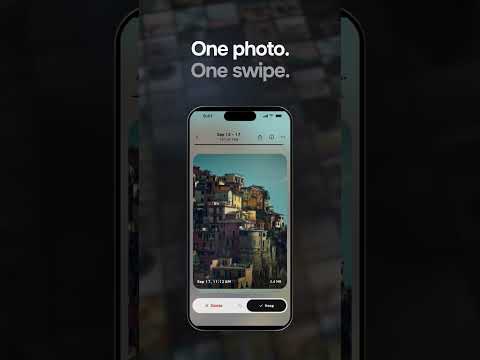
Photo Sorting turns a messy camera roll into a quick, calm routine. Swipe left to mark a photo for removal, swipe right to keep it, then move on to the next picture. No endless grid of thumbnails and no complicated menus: one photo, one decision at a time. Prefer buttons? Use the on-screen controls.
Looking for a photo cleaner that doesn't feel like homework? Each decision takes a second, and your storage gets lighter with every swipe.
SORT BY TRIPS, EVENTS AND ALBUMS
Most gallery cleaners hand you one long list. Photo Sorting groups your library into moments, trips and special days, so you clean up one memory at a time. Progress is saved after every swipe, so you can pause and pick up right where you left off.
Choose what to sort first:
- Moments and trips
- Months of the year
- Albums from your gallery
- Sources such as screenshots and downloads
HOW IT WORKS
1. Allow access to your gallery
2. Pick a moment, month, album or source
3. Swipe left to mark for removal, right to keep
4. Review the app's trash, then confirm when you are ready
DELETE SAFELY
Swiped the wrong way? Tap undo. Everything you mark goes to the trash inside the app first. Nothing leaves your library until you review that trash and confirm. On Android, the system may offer its own trash or recovery options, depending on your device and gallery app.
BUILT FOR BIG LIBRARIES
Tens of thousands of photos? Moments are gathered in the background, so you can start swiping right away. Pause the scan any time and resume later without losing progress. Photos and videos show up as cards, with file sizes, so you can see what's taking up the most room.
CLEAR OUT SCREENSHOTS AND CLUTTER
Screenshots, received pictures and downloads get their own place, so cleaning up your camera roll takes minutes instead of an evening. After each session you see how many items you kept, how many you marked for removal and how much storage you can get back.
PRIVATE BY DESIGN
Sorting happens on your device. Your photos and videos are never uploaded to our servers, and no account is needed. Works with full or limited gallery access.
PERFECT FOR
- Travelers with hundreds of shots from one trip
- Parents whose camera roll is always full
- Anyone whose phone keeps saying "storage full"
- People who want a tidy gallery without the stress
Install Photo Sorting, pick your first moment and clear a few dozen pictures in minutes. A calm, card-by-card way to declutter your camera roll, organize albums and make room for new memories.
Search terms: gallery cleaner, photo cleaner, photo organizer, delete photos, free up storage, clean up pictures, swipe to delete.
Gallery cleaner: swipe to delete or keep photos. Free up space, stay private.
Updated on
Safety starts with understanding how developers collect and share your data. Data privacy and security practices may vary based on your use, region, and age. The developer provided this information and may update it over time.


What’s new
• You can now skip photos
• Improved app interface
• Fixed known bugs
Everyone
Learn moreApp support
About the developer
Petr Lukovkin
plukovkin.de@gmail.com
Goethestraße 23
90409 Nürnberg
Germany
+49 163 1472716


