
Telechore SSH Terminal & Files
In-app purchases


Everyone
info
50+
Downloads

Everyone
Learn more


About this app
Telechore shows PDFs, Markdown, code and pictures, on this device or on your own servers over SSH, and opens a terminal on those servers. A PDF laid out in two or three columns can be shown one column at a time, at the screen's full width, and in dark mode its figures and scans can darken too. The terminal can keep fixed columns and rows that you pan and zoom, or see whole through a lens; its see-through keyboard sits behind the text, and commands you typed come back in two taps.
Nothing needs to be installed on the server. Telechore is in active development: it cannot yet edit or rename files, and more arrives with each update.
WHAT IT DOES
• Browse a folder as a tree and read the selected file beside it: code highlighted, Markdown with Mermaid diagrams and math, CSV as a table, JSON laid out, images and PDFs, and a .gz file unpacked.
• PDFs in single column view, or whole pages turned one at a time; full screen and pinch to zoom.
• Open a saved server and browse it the same way, over SSH. Upload to it, make folders, delete, and keep a folder on this device to read offline.
• Open a terminal on that server, in the folder you are browsing, and find anything it has printed. Keep it running while you look at the files, and come back to it as you left it.
• Full-screen programs such as vim, tmux and htop work, mouse included, and links in the output open.
• Make an SSH key here and install it on a server in one step, or import a key you already have. Passwords and two-factor prompts work too.
• Reach a server through another you saved, a jump host. A server with no file access still opens its terminal.
• Copy servers in from an ssh config, jump hosts included.
• Size the terminal to fit the window, to a type size or to fixed columns and rows.
• Folders you choose are starred, to open again at once.
• Copy saved servers and the keys this app made to another device with a QR code, with no account; a code that carries a password or a key is encrypted under a password.
• Light or dark, or follow the system; JetBrains Mono, the same on every device; built-in help that works offline.
• Classic terminal games — 2048, Sudoku, Mines, Snake and more — to play with no server and no signal, kept running like a terminal.
ON A PHONE OR TABLET
• The terminal keeps its size while the keyboard comes and goes. Two fingers pan and zoom, two held still reset the view, and the view follows the cursor.
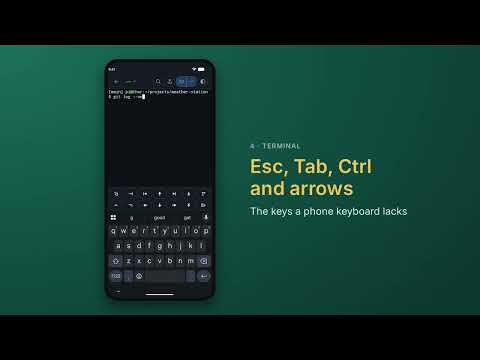
• The keys a phone keyboard lacks, Escape, Tab, Ctrl, Alt and the arrows, float over the terminal or sit above the system keyboard. They repeat when held and combine like a real keyboard's. The system keyboard's suggestions and corrections work, and a password is kept out of its view.
• Select text with a finger: hold, then drag; hold still for Copy and Paste.
• With the phone on its side, a full keyboard: Laptop keys, laid out like a laptop's, or Coder keys, with every punctuation mark on its own key and F1–F12 without Fn. Five sizes and a setup for each server.
• Open a PDF or Markdown file from another app, or save it to Files; send files out with Open with… or Share….
• Passwords and passphrases are saved only if you ask: encrypted by the Android Keystore or, where it will not open, in a file only the app can read, not encrypted. Never backed up.
Telechore reads only the folders you choose; it asks for no all-files permission.
PRO
Free: two saved servers, two kept terminals, 28 PDFs in single column view. Pro lifts all three: one payment, no subscription.
SERVERS
A saved server holds the host, port, user and key, never a password; a password or passphrase not saved is asked for again the next time the app opens. Host keys are checked and remembered like any SSH client does, and a server whose key has changed is refused.
WHAT IT DOES NOT DO
No account. No analytics, no crash reporting, no advertising ID, and nothing that reports on what you do. The only network traffic is the SSH connection you open, and the store you installed it from.
File viewer and SSH terminal: PDFs, Markdown and code, on the device or a server
Updated on
Safety starts with understanding how developers collect and share your data. Data privacy and security practices may vary based on your use, region, and age. The developer provided this information and may update it over time.
- No data shared with third partiesLearn more about how developers declare sharing
- No data collectedLearn more about how developers declare collection


What’s new
Recall a line you typed in a terminal in two taps.
Star the lines worth keeping, on every server.
Single column view for PDFs in columns, 28 in the free edition.
Figures and scans darken in dark mode.
Whole page turns a PDF's pages one at a time.
A PDF reopens where you left it.
One finger scrolls a PDF up and down only.
A PDF keeps its place when the phone is turned.
A chosen key replaces a server's login only once it gets in.
A password typed for a Test is kept only once it gets in.
Everyone
Learn moreApp support
About the developer
Hanhua Feng
dr4iota@gmail.com
5204 Scenic Dr
Perry Hall, MD 21128-8940
United States


