
WeeNote Notes and Widget
Contains adsIn-app purchases
4.1star
36.7K reviews
10M+
Downloads

Rated for 3+
info


About this app
WeeNote is a memo notes and reminders organizer app and a widget for the home screen.
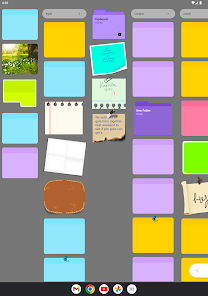
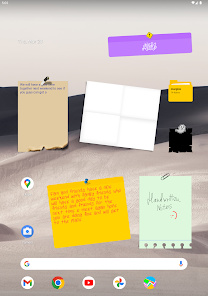
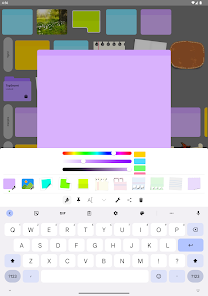
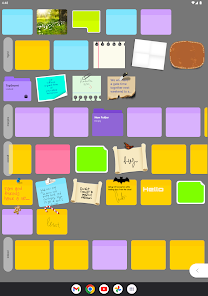
With WeeNote you will be able to create diverse colored notes and reminders, add notes to your home screen, resize notes and customize them to your liking. Your text will never be cut off, because the widgets will allow you to scroll the text in your notes. You will also be able to take handwritten notes and drawings, and stick them to your home screen. In addition to that, you can set notes transparency and rotation angle to achieve different looks, as well as set your own images as the notes background, and use custom fonts.
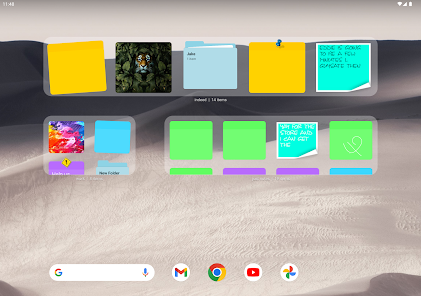
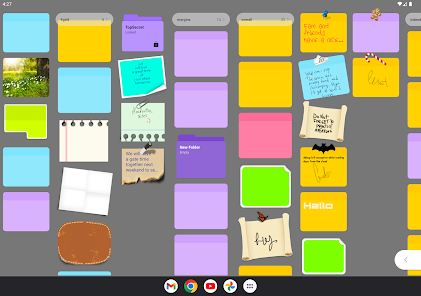
WeeNote notes organizer will let you categorize your stickies and keep them in a convenient colored sub folders system. You can keep them in an order that is suitable for your workflow, sort by various criteria, or manually drag and drop. Notes can be trashed, moved between folders, looked by a search term, shared as text , drawing or a screenshot.
Notes can also serve you as a timed reminders that you can schedule to appear as notifications right when you need them.
Protect your notes and folders with a password to keep them private.
The app also includes a customizable layout setup that will allow you to scroll through your notes in different directions, and view sub folders contents simultaneously. This feature can be useful for storyboarding, visualizing, planning, outlining and so on.
Online data sync and backup feature is available for app subscribers. You will be able to synchronize notes between multiple devices, and never worry about loosing your data.
Hope you enjoy WeeNote as much as we enjoyed working on it, and feel welcome to contact us if you have any questions or suggestions, or need technical support.
Here is how to put notes on your home screen:
Go to your home screen, tap and hold a free space, and select the widget option.
With WeeNote you will be able to create diverse colored notes and reminders, add notes to your home screen, resize notes and customize them to your liking. Your text will never be cut off, because the widgets will allow you to scroll the text in your notes. You will also be able to take handwritten notes and drawings, and stick them to your home screen. In addition to that, you can set notes transparency and rotation angle to achieve different looks, as well as set your own images as the notes background, and use custom fonts.
WeeNote notes organizer will let you categorize your stickies and keep them in a convenient colored sub folders system. You can keep them in an order that is suitable for your workflow, sort by various criteria, or manually drag and drop. Notes can be trashed, moved between folders, looked by a search term, shared as text , drawing or a screenshot.
Notes can also serve you as a timed reminders that you can schedule to appear as notifications right when you need them.
Protect your notes and folders with a password to keep them private.
The app also includes a customizable layout setup that will allow you to scroll through your notes in different directions, and view sub folders contents simultaneously. This feature can be useful for storyboarding, visualizing, planning, outlining and so on.
Online data sync and backup feature is available for app subscribers. You will be able to synchronize notes between multiple devices, and never worry about loosing your data.
Hope you enjoy WeeNote as much as we enjoyed working on it, and feel welcome to contact us if you have any questions or suggestions, or need technical support.
Here is how to put notes on your home screen:
Go to your home screen, tap and hold a free space, and select the widget option.
Updated on
Safety starts with understanding how developers collect and share your data. Data privacy and security practices may vary based on your use, region, and age. The developer provided this information and may update it over time.

No data shared with third parties
Learn more about how developers declare sharing

This app may collect these data types
Device or other IDs

Data is encrypted in transit

You can request that data be deleted
Ratings and reviews
4.1
33.1K reviews

Jean Kaniewski
- Flag inappropriate
September 29, 2025
used to love but I'm not sure if it's an update or what has happened, but you can no longer lock your notes. it used to have an option to lock your note on your phone and only be able to open it with a six-digit PIN number. now all notes are open for public viewing if you just tap on them. not good and want the ability to lock it back.
1 person found this review helpful
SYM Coding
September 30, 2025
Hello Jean, we have replied to you by an email, did you try to lock your note from the edit menu? If that still did not work, please don't hesitate to email us again, and we will guide you step by step.

Mario Rodriguez
- Flag inappropriate
November 18, 2025
I've used this for years and I liked it a lot untill just today some of my notes are gone containing important data. I don't see a trash or recover feature so I guess it is unreliable now and I'll switch :(

Loo Roo
- Flag inappropriate
November 8, 2025
App no longer works the app opens and automatically closes instantly. I have so much info I need in the app. any advise would be great, I really dont want to lose it all.
SYM Coding
December 1, 2025
Hi, please contact us at symcoding@gmail.com and share your Android version and device details. We will reach out to you with assistance.
What’s new
Import local data to online account issue fixed.
Other minor bug fixes.
Other minor bug fixes.
App support
About the developer
Alina Vetrov
symcoding@gmail.com
3957 New Brunswick 515
Sainte-Marie-de-Kent, NB E4S 2C5
Canada


