
Liquid Lock Screen: KaLock
Contains ads

star
12.3K reviews

Everyone
info
1M+
Downloads


About this app
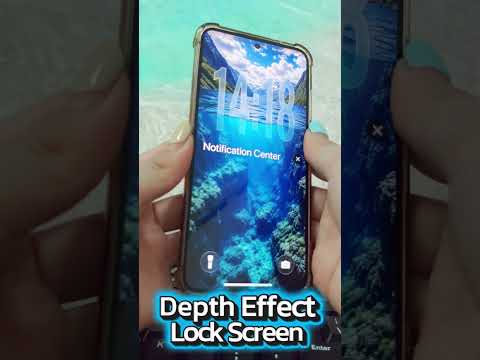
KaLock is a lock screen customization app that upgrades your phone interface and makes it come alive with stunning themes, animated widgets and stylish notification experience.
Customize your screen lock with ready-made themes or create your own using your photos — with KaLock.
KaLock key features:
- Aesthetic themes: 30+ ready-to-use themes including cyberpunk, cute, minimalist, nature, kawaii, sport, girly, and more.
- Photo lock screen maker: create lock screen from your own photos. Simply select one from your gallery and customize it your way.
- Lock screen widgets: Add up to 4 widgets and personalize your lock screen with fun stickers
- Customize theme: change text color, clock style or date format
- Liquid glass clock style: Enable liquid glass effect to blend the clock seamlessly with your wallpaper for a more aesthetic look. Turn it off if you like.
- App shortcuts: quickly turn on the flash or open camera from screen lock
Get the best experience of KaLock app:
- Hold on the Kalock lock screen and swipe left or right to quickly change wallpaper
- Allow KaLock to run in the background to keep your custom lock screen working properly
Accessibility Service
This app uses the Android Accessibility Service to provide its lock screen functionality and related features.
The Accessibility Service is used to:
- Display the app's lock screen when the device is locked.
- Provide user-requested controls such as music and volume controls.
- Support other functions required for the app's lock screen experience.
The Accessibility Service is used only to provide these features. This app does not use the Accessibility Service to collect, store, sell, or share personal or sensitive user data.
You can enable or disable the Accessibility Service at any time through your device's Accessibility settings.
To use the lock screen features, go to Settings > Accessibility > Installed Services > Kalock and enable the service.
If you like KaLock screen lock app, please rate and share it with others. Please do not hesitate to contact us if you have any questions or problems!
Customize your screen lock with ready-made themes or create your own using your photos — with KaLock.
KaLock key features:
- Aesthetic themes: 30+ ready-to-use themes including cyberpunk, cute, minimalist, nature, kawaii, sport, girly, and more.
- Photo lock screen maker: create lock screen from your own photos. Simply select one from your gallery and customize it your way.
- Lock screen widgets: Add up to 4 widgets and personalize your lock screen with fun stickers
- Customize theme: change text color, clock style or date format
- Liquid glass clock style: Enable liquid glass effect to blend the clock seamlessly with your wallpaper for a more aesthetic look. Turn it off if you like.
- App shortcuts: quickly turn on the flash or open camera from screen lock
Get the best experience of KaLock app:
- Hold on the Kalock lock screen and swipe left or right to quickly change wallpaper
- Allow KaLock to run in the background to keep your custom lock screen working properly
Accessibility Service
This app uses the Android Accessibility Service to provide its lock screen functionality and related features.
The Accessibility Service is used to:
- Display the app's lock screen when the device is locked.
- Provide user-requested controls such as music and volume controls.
- Support other functions required for the app's lock screen experience.
The Accessibility Service is used only to provide these features. This app does not use the Accessibility Service to collect, store, sell, or share personal or sensitive user data.
You can enable or disable the Accessibility Service at any time through your device's Accessibility settings.
To use the lock screen features, go to Settings > Accessibility > Installed Services > Kalock and enable the service.
If you like KaLock screen lock app, please rate and share it with others. Please do not hesitate to contact us if you have any questions or problems!
Personalize lock screen with unique themes, depth effect wallpapers, fun widgets
Updated on
Safety starts with understanding how developers collect and share your data. Data privacy and security practices may vary based on your use, region, and age. The developer provided this information and may update it over time.
- No data shared with third partiesLearn more about how developers declare sharing
- No data collectedLearn more about how developers declare collection
- Data is encrypted in transit
- Data can’t be deleted


Ratings and reviews
12K reviews

The Broken World
- Flag inappropriate
September 6, 2026
Absolutely wonderful app, the best of its kind really! But Im only gonna give it 4 stars becauuusee for the uh liquid glass time widget, the proportions look kinda wonky, with and without enlarging it. Andd if possible, try to add a feature to remove silent background notifications or just remove them in general. If any developers are reading this, really really nice work but, try fixing the proportions of the liquid glass (first) clock widget for the custom wallpapers, it'll be PERFECT!
58 people found this review helpful
3D Viet Ha
September 7, 2026
Thank you so much for the detailed feedback and 4-star rating! We’re really happy you love the app. 😊 We’ll work on improving the proportions of the Liquid Glass clock widget. For notifications, you can turn them off anytime in the app’s Settings if you don’t want them. Thanks for your support!

Ashish Kumar
- Flag inappropriate
September 3, 2026
Everything good just few minor things i want to report if somehow it can be improved. 1. some notifications don't disappear from lockscreen even after clearing manually 2. Music panel layout on top just below clock feels annoying. (please make it in bottom if possible) 3. Overlay randomly disappears so that can be fixed. rest is good 9/10
10 people found this review helpful
3D Viet Ha
September 4, 2026
Thank you so much for the detailed feedback and 9/10 rating! We really appreciate you taking the time to report these issues. We’ll look into the notification behavior, music panel position, and overlay stability. Your suggestions are very helpful for making the app better!

Rawaz Rip Niassuh
- Flag inappropriate
October 19, 2026
Guys, i looked for every app, every website but i did'nt got the IOS Lock ...😭 Then i just searched it in play store, and opened to check out... i was expecting that this app is also useless but then i realize that this is literally fire! Trust me, download it and try it! Cuz this app is so good, i just woke up and when i see this app my mood eventually become like so far better..... Idk why, but this app is best app for IOS lockscreen btw...! Have funn! 💗 Byee! ⭐×5
33 people found this review helpful
What’s new
🪄 New Liquid Glass lock screen experience
🎨 Added fresh wallpapers and backgrounds
⏰ Improved Liquid Glass clock appearance
🧩 Enhanced widgets and lock screen customization
⚡ Better performance and smoother animations
🐛 Fixed minor bugs and improved overall stability
Update now and give your Android lock screen a fresh, stylish look! 💎
🎨 Added fresh wallpapers and backgrounds
⏰ Improved Liquid Glass clock appearance
🧩 Enhanced widgets and lock screen customization
⚡ Better performance and smoother animations
🐛 Fixed minor bugs and improved overall stability
Update now and give your Android lock screen a fresh, stylish look! 💎
App support
About the developer
Nguyen Quang Nguyen
vietha3dsieunet@gmail.com
Khu 3, Bao Yen, Thanh Thuy
Phu Tho
Phú Thọ 35000
Vietnam


