
ArduinoDroid - Arduino/ESP IDE
Contains adsIn-app purchases
3.3star
14.2K reviews
1M+
Downloads

Everyone
info






About this app
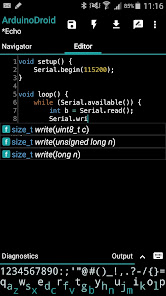
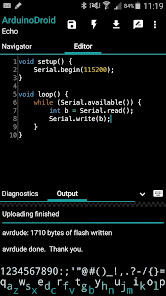
Write with code complete and libraries, compile, upload Arduino or ESP8266/ESP32 sketches over USB or WiFi and monitor your board right from your Android device with ArduinoDroid. No internet connection, no cloud service account is required.
Important:
The app takes about 500Mb in internal storage as it contains IDE, compiler and uploader for AVR and ESP8266/ESP32. Make sure you have enough free space and it can't be currently installed on sd card because of Android security policy.
Features:
* onboarding
* open/edit Arduino/ESP8266/ESP32 sketches
* example sketches and libraries included
* code syntax highlighting with themes support *
* code complete *
* real-time diagnostics (errors and warnings) and fixes *
* file navigator *
* tiny built-in software keyboard *
* compile sketches (no root required)
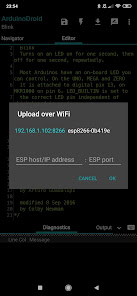
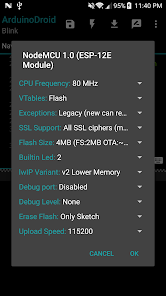
* upload sketches over USB (all ESP8266 boards, all ESP32 boards, Arduino Uno/Uno_r3, Duemilanove, Nano, Mega 2560, Leonardo, Micro/Pro Micro, Pro, Pro Mini, Yun, Esplora, Robot Control, Robot Motor boards are supported, android devices with USB-host support required) and WiFi (OTA for ESP8266/ESP32)
* serial monitor
* works offline (no internet connection required)
* Dropbox support
* Google Drive support
* material design
App blog:
https://www.arduinodroid.app
Troubleshooting:
https://www.arduinodroid.app/p/troubleshooting.html
Advanced paid features (marked with *) review:
https://www.arduinodroid.app/p/advanced-features.html
Note: this is NOT an official Arduino team application, but a 3rd-party mobile application with the same functionality developed and supported by an independent developer.
© "Arduino" is a trademark of Arduino team.
Important:
The app takes about 500Mb in internal storage as it contains IDE, compiler and uploader for AVR and ESP8266/ESP32. Make sure you have enough free space and it can't be currently installed on sd card because of Android security policy.
Features:
* onboarding
* open/edit Arduino/ESP8266/ESP32 sketches
* example sketches and libraries included
* code syntax highlighting with themes support *
* code complete *
* real-time diagnostics (errors and warnings) and fixes *
* file navigator *
* tiny built-in software keyboard *
* compile sketches (no root required)
* upload sketches over USB (all ESP8266 boards, all ESP32 boards, Arduino Uno/Uno_r3, Duemilanove, Nano, Mega 2560, Leonardo, Micro/Pro Micro, Pro, Pro Mini, Yun, Esplora, Robot Control, Robot Motor boards are supported, android devices with USB-host support required) and WiFi (OTA for ESP8266/ESP32)
* serial monitor
* works offline (no internet connection required)
* Dropbox support
* Google Drive support
* material design
App blog:
https://www.arduinodroid.app
Troubleshooting:
https://www.arduinodroid.app/p/troubleshooting.html
Advanced paid features (marked with *) review:
https://www.arduinodroid.app/p/advanced-features.html
Note: this is NOT an official Arduino team application, but a 3rd-party mobile application with the same functionality developed and supported by an independent developer.
© "Arduino" is a trademark of Arduino team.
Updated on
Safety starts with understanding how developers collect and share your data. Data privacy and security practices may vary based on your use, region, and age. The developer provided this information and may update it over time.

No data shared with third parties
Learn more about how developers declare sharing

No data collected
Learn more about how developers declare collection
Ratings and reviews
3.5
12.7K reviews

Soni Singh
- Flag inappropriate
- Show review history
March 12, 2026
There is a red colored bar appearing at the bottom of the editor of this app, half an inch long. There was no such fault before the update, after the update it has started appearing like this. Please correct it then I will give five stars again.
4 people found this review helpful
PE Smirnov Anton Sergeevich
March 6, 2026
Hi, Soni. Thank you so much for the review! We appreciate your feedback. Feel free to support the development with Premium subscription or one-time payment and get all the features without limitations and ads for the price of a cup of coffee once a month. More on this: https://www.arduinodroid.app/p/premium.html Have a nice day!

Leo
- Flag inappropriate
- Show review history
February 10, 2026
Can not connect to ESP32 via softAP. There is no connection display or menu, you have to click through the options for uploading -> find .bin (does not remember locations/last files) -> says no connection. I have not found a different way to check connection status or any way to debug it. Given that I directly connected to the device and nothing else, I am not sure why/how it fails. Tryed this since ArduinoOTA needs a proper router. It messes with the keyboard, swiping stops working in the app.
3 people found this review helpful
PE Smirnov Anton Sergeevich
February 11, 2026
Hi, Leo. Thanks for your feedback. There could be multiple reasons on the issue. Please follow https://www.arduinodroid.app/p/troubleshooting.html#checklist to exclude possible reasons one-by-one. Can you provide the details about keyboard and swiping, please?

Yogesh Kumar Nayak
- Flag inappropriate
- Show review history
March 16, 2026
A BIG SUGGESTION, but it can be hard - You can add AI to the app, like can select board type and sensors used + we have a chatbot inside the app we type "the board hosts an AP named 'Happy Diwali' without any password, whenever someone connects to it, the device automatically opens a webpage greeting the user HAPPY DIWALI" and the chatbot provides the code + wiring + problems and if the code has any problem, you should see a "CHECK MISTAKE" button and AI recreates the code with solving that prob
1 person found this review helpful
PE Smirnov Anton Sergeevich
March 17, 2026
Hi, Yogesh. Thank you for the review. Feel free to suggest the improvements. UPD: Thanks for the suggestion! We do have something similar on our roadmap (https://www.arduinodroid.app/p/arduinodroid-pro.html) and we're open to any suggestions.
What’s new
* Migrated to dynamic SDK support (download once needed, works offline later)
* Updated ESP8266 core to 3.1.2
* Updated ESP32 SDK to 3.3.5
* Added ESP32C3 support (including Zero board)
* Added ESP32S3 Zero board support
* Improved sketch dependencies detection (faster compilation for ESP targets)
* Fixed: Library Manager not showing ESP8266-only and ESP32-only libs
* Fixed: sketch names sanitizing (not accepting/showing sketched with leading digit in filename, including libs examples)
* Updated ESP8266 core to 3.1.2
* Updated ESP32 SDK to 3.3.5
* Added ESP32C3 support (including Zero board)
* Added ESP32S3 Zero board support
* Improved sketch dependencies detection (faster compilation for ESP targets)
* Fixed: Library Manager not showing ESP8266-only and ESP32-only libs
* Fixed: sketch names sanitizing (not accepting/showing sketched with leading digit in filename, including libs examples)
App support
About the developer
Anton Smirnov Sergei, IE
support@arduinodroid.app
75, Atchemyan str.
Yerevan 0005
Armenia
+374 99 221025


