
CapCut - Video Editor
การซื้อในแอป
3.4star
12.2M รีวิว
1B+
ดาวน์โหลด
โดนใจบก.

วัยรุ่น
info



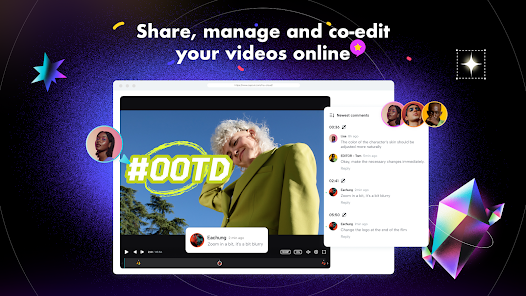
เกี่ยวกับแอปนี้
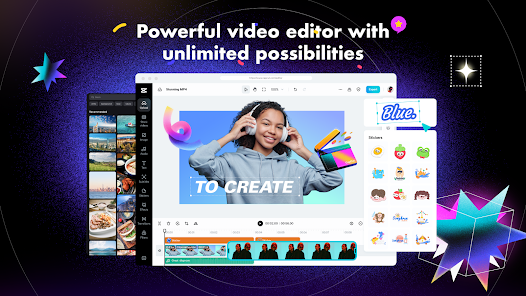
CapCut offers easy-to-use video editing functions, in-APP fonts and effects, advanced features such as keyframe animation, smooth slow-motion, chroma key, and stabilization, to help you capture and snip moments.
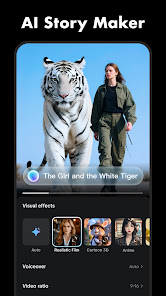
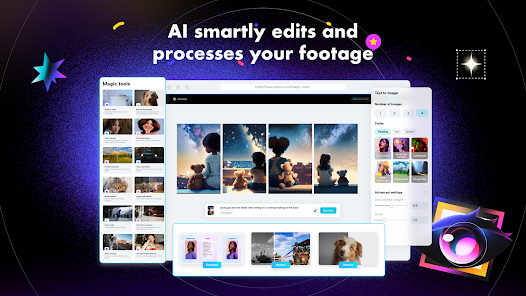
Create fancy videos with other unique features: auto captions, text-to-speech, motion tracking, and background removal. Show your personality and go viral on TikTok, YouTube, Instagram, WhatsApp, and Facebook!
FEATURES
Basic video editing
• Trim and shorten clips and split or merge videos.
• Adjust video speed from 0.1x to 100x, and apply speed curves to clips.
• Animate video clips with incredible zoom in/out effects.
• Highlight the best moments with the freeze feature.
• Explore transition options with awesome effects on and between clips.
Advanced video editor
• Keyframe video animation is available for all settings.
• Edit videos to create smooth slow-motion with the optical flow feature and speed curve tool.
• Use the chroma key to remove specific colors from videos.
• Easy to arrange and preview clips on multi-track timeline.
• The stabilizing feature keeps video footage steady.
Intelligent features
• Auto captions: automate speech recognition and subtitles in videos.
• Text-to-speech: apply text-to-speech in multiple languages and voices.
• Background removal: automatically remove backgrounds.
Text & Stickers
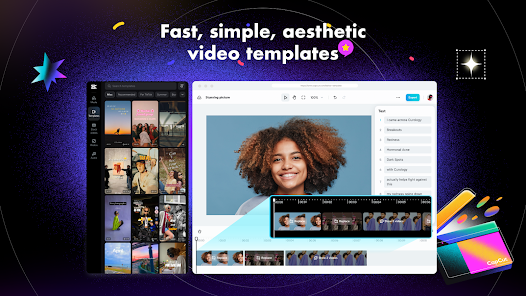
• Add text to videos with different fonts and styles, choose unique text templates. Fonts can be imported locally.
• Subtitles can be added to the timeline of video tracks and can be moved and adjusted in one step.
Trending Effects & Filters
• Match video content with diverse filters that are updated weekly with the latest trends.
• Edit videos with hundreds of trending effects, including Glitch, Blur, 3D, etc.
• Add movie-style video filters or adjust video brightness, contrast, etc.
Music & Sound Effects
• Add millions of music clips and sound effects to videos.
• Extract audio, clips, and recordings from videos.
Easy to Share
• Custom video export resolution, HD video editor supports 4K 60fps exports and smart HDR.
• Adjust the format and share with your friends on social media platforms.
CapCut is an all-in-one video editor and video maker application with everything you need to create stunning, high-quality videos. Beginners can get started with CapCut in a matter of seconds, while advanced users can enjoy all the functions they need to edit videos.
Terms of Service —
https://www.capcut.com/clause/terms-of-service
Privacy Policy —
https://www.capcut.net/clause/privacy
Contact Us
Any questions about CapCut? Please contact us at capcut.support@bytedance.com.
Facebook: CapCut
Instagram: CapCut
YouTube: CapCut
TikTok: CapCut on TikTok
Create fancy videos with other unique features: auto captions, text-to-speech, motion tracking, and background removal. Show your personality and go viral on TikTok, YouTube, Instagram, WhatsApp, and Facebook!
FEATURES
Basic video editing
• Trim and shorten clips and split or merge videos.
• Adjust video speed from 0.1x to 100x, and apply speed curves to clips.
• Animate video clips with incredible zoom in/out effects.
• Highlight the best moments with the freeze feature.
• Explore transition options with awesome effects on and between clips.
Advanced video editor
• Keyframe video animation is available for all settings.
• Edit videos to create smooth slow-motion with the optical flow feature and speed curve tool.
• Use the chroma key to remove specific colors from videos.
• Easy to arrange and preview clips on multi-track timeline.
• The stabilizing feature keeps video footage steady.
Intelligent features
• Auto captions: automate speech recognition and subtitles in videos.
• Text-to-speech: apply text-to-speech in multiple languages and voices.
• Background removal: automatically remove backgrounds.
Text & Stickers
• Add text to videos with different fonts and styles, choose unique text templates. Fonts can be imported locally.
• Subtitles can be added to the timeline of video tracks and can be moved and adjusted in one step.
Trending Effects & Filters
• Match video content with diverse filters that are updated weekly with the latest trends.
• Edit videos with hundreds of trending effects, including Glitch, Blur, 3D, etc.
• Add movie-style video filters or adjust video brightness, contrast, etc.
Music & Sound Effects
• Add millions of music clips and sound effects to videos.
• Extract audio, clips, and recordings from videos.
Easy to Share
• Custom video export resolution, HD video editor supports 4K 60fps exports and smart HDR.
• Adjust the format and share with your friends on social media platforms.
CapCut is an all-in-one video editor and video maker application with everything you need to create stunning, high-quality videos. Beginners can get started with CapCut in a matter of seconds, while advanced users can enjoy all the functions they need to edit videos.
Terms of Service —
https://www.capcut.com/clause/terms-of-service
Privacy Policy —
https://www.capcut.net/clause/privacy
Contact Us
Any questions about CapCut? Please contact us at capcut.support@bytedance.com.
Facebook: CapCut
Instagram: CapCut
YouTube: CapCut
TikTok: CapCut on TikTok
อัปเดตเมื่อ
กิจกรรมและข้อเสนอ

ความปลอดภัยเริ่มต้นด้วยความเข้าใจเกี่ยวกับวิธีที่นักพัฒนาแอปรวบรวมและแชร์ข้อมูล แนวทางปฏิบัติด้านความเป็นส่วนตัวและความปลอดภัยของข้อมูลอาจแตกต่างกันไปตามการใช้งาน ภูมิภาค และอายุของคุณ นักพัฒนาแอปได้ให้ข้อมูลนี้ไว้และอาจอัปเดตข้อมูลในส่วนนี้เมื่อเวลาผ่านไป

ไม่มีการแชร์ข้อมูลกับบุคคลที่สาม
ดูข้อมูลเพิ่มเติมเกี่ยวกับวิธีที่นักพัฒนาแอปประกาศเรื่องการแชร์ข้อมูล

แอปนี้อาจรวบรวมข้อมูลประเภทต่างๆ เหล่านี้
ตำแหน่ง ข้อมูลส่วนบุคคล และข้อมูลอื่นๆ อีก 5 ประเภท

ระบบจะเข้ารหัสข้อมูลขณะส่ง

คุณขอให้ลบข้อมูลได้
การให้คะแนนและรีวิว
3.4
11.9M รีวิว

Juthamast tuangthong
- แจ้งว่าไม่เหมาะสม
- แสดงประวัติของรีวิว
29 พฤศจิกายน 2568
เหมือนจะดีแต่ก็ไม่ดี ฉันแค่ถ่ายสต๊อปโมชั่นแล้วให้แค่ทำรวมเป็นคลิปเอง ไม่ใส่เสียง ไม่มีเอฟเฟค ขยันเด้งออกเก่งมาก พอถึง77.7%เด้งออกทุกครั้ง มันเป็นอะไร ไม่ใช่อินเตอร์เน็ตแน่ๆ เพราะ5Gแรงโครตๆ ความจำเหลือๆตั้ง30GB แล้วรูปนำเข้าแอพแทนที่จะเรียง1234ตามลำดับ ดันคิดแทนให้เรียง128465เพื่อ? รูปถ่ายตามลำดับก็เรียงตามลำดับ ต้องมาเสียเวลาเรียงใหม่ เรื่องควรพัฒนาไม่พัฒนา เรื่องที่ไม่ต้องพัฒนาดันพัฒนา คือถ้าแค่นี้ยังมีปัญหา ต่อไปอาจจะแพ้ให้กับAI คนจะไปหันไปให้แอพAIทำแทน เตรียมตัวโบกมือบายๆได้เลยค่ะ
52 คนพบว่ารีวิวนี้มีประโยชน์

Jdvg Dhdd
- แจ้งว่าไม่เหมาะสม
- แสดงประวัติของรีวิว
11 พฤศจิกายน 2568
ผมอยากให้เปลี่ยนระบบเครื่องมือแก้ใขรูปภาพกลับเป็นแบบเดิมครับ เพราะแบบก่อนเข้าใจง่าย สะดวกกว่า และสามารถแก้ใขรูปภาพได้ทุกแนว แต่ตอนนี้ระบบเพิ่มภาพเพิ่มเติม(ระบบที่เพิ่มภาพเข้าไปในภาพที่เราตัดอยู่) ภาพที่ไม่ใช่รูปคนก็ลบพื้นหลังไม่ได้(หรือมันลบได้แต่ผมไม่รู้ก็ขอโทษด้วยครับ แต่ระบบมันงงมาก สำหรับผม) แต่เมื่อก่อนมันลบได้และเข้าใจง่ายกว่าเยอะ และเรื่องโฆษณาที่ขึ้นบ่อยอีก ประเด็นสำคัญก็คือช่วยเปลี่ยนหรือแก้ไขให้ระบบ บางอย่าง เช่น การลบพื้นหลังภาพเพิ่มเติม ให้สามารถทำได้แบบเมื่อก่อนด้วยครับ
248 คนพบว่ารีวิวนี้มีประโยชน์

Alex
- แจ้งว่าไม่เหมาะสม
20 พฤศจิกายน 2568
ทำสนุกมากเลยครับตัดต่อง่ายแอบมีแม่แบบด้วยผมตัดต่อไม่ค่อยเป็นแต่ตอนเจอ app ตัดต่อที่มีแม่แบบแบบนี้ก็ทำง่ายไปเลยครับใช้ง่ายมากที่สุดกว่าapp ตัดต่ออื่นๆตัดต่อไปสนุกมากเลยครับมาใช้กันเยอะๆนะ
230 คนพบว่ารีวิวนี้มีประโยชน์
มีอะไรใหม่
"- แก้ไขแก้ไขปัญหาที่ทราบบางรายการ - ปรับปรุงประสบการณ์การตัดแต่ง
เราขอขอบคุณที่สนับสนุน CapCut และหวังว่าจะได้สร้างช่วงเวลาที่งดงามด้วยกัน"
การสนับสนุนของแอป
เกี่ยวกับนักพัฒนาแอป
BYTEDANCE PTE. LTD.
capcut.support@bytedance.com
1 Raffles Quay #26-10
Singapore 048583
+44 20 8059 9766


