
Clicker Presentation Control
Contains adsIn-app purchases
4.1star
1.35K reviews
100K+
Downloads

Everyone
info

About this app
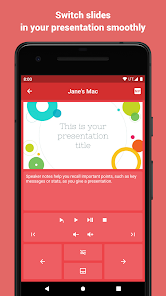
Clicker turns your phone or tablet into a remote presentation controller.
We support all popular desktop operating systems and presentation software.
GETTING STARTED
1. Download and run the Clicker Desktop app (https://bit.ly/clicker-desktop) on your computer.
2. Connect your computer and your phone to the same WiFi network.
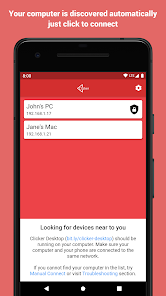
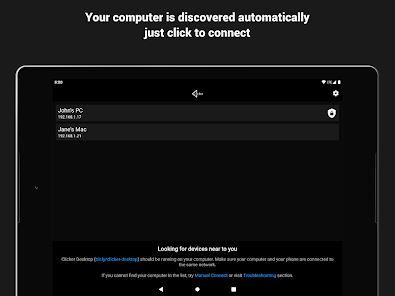
3. Run the app on your phone. Your computer will be discovered automatically.
FEATURES
- automatically finds available computers in the local network
- connect manually to computer in the remote network
- works all popular desktop operating systems
- lightweight protocol makes sure there are no lags when you click
- play videos with mouse click support (remote trackpad)
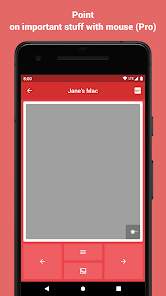
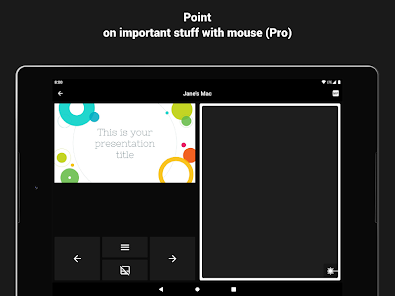
- point on important stuff with mouse (remote trackpad)
- remote volume control (presentations with audio and video)
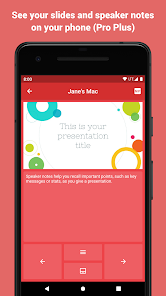
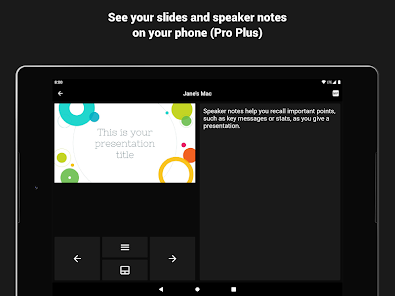
- slides preview
- speaker notes
- use S Pen to control presentations (requires S Pen 2018 or newer, with bluetooth support)
- and additions actions supported by the presentation software you use
QUESTIONS
If you have any questions or face any issues, please feel free to write to the developer email.
FEEDBACK
Your feedback is what helps us improve the app with every update. So we kindly ask you to share with us what you think about the app either here or via email.
We support all popular desktop operating systems and presentation software.
GETTING STARTED
1. Download and run the Clicker Desktop app (https://bit.ly/clicker-desktop) on your computer.
2. Connect your computer and your phone to the same WiFi network.
3. Run the app on your phone. Your computer will be discovered automatically.
FEATURES
- automatically finds available computers in the local network
- connect manually to computer in the remote network
- works all popular desktop operating systems
- lightweight protocol makes sure there are no lags when you click
- play videos with mouse click support (remote trackpad)
- point on important stuff with mouse (remote trackpad)
- remote volume control (presentations with audio and video)
- slides preview
- speaker notes
- use S Pen to control presentations (requires S Pen 2018 or newer, with bluetooth support)
- and additions actions supported by the presentation software you use
QUESTIONS
If you have any questions or face any issues, please feel free to write to the developer email.
FEEDBACK
Your feedback is what helps us improve the app with every update. So we kindly ask you to share with us what you think about the app either here or via email.
Updated on
Safety starts with understanding how developers collect and share your data. Data privacy and security practices may vary based on your use, region, and age. The developer provided this information and may update it over time.

No data shared with third parties
Learn more about how developers declare sharing

No data collected
Learn more about how developers declare collection
Ratings and reviews
4.2
1.3K reviews

A Google user
- Flag inappropriate
March 4, 2019
Such an fantastic app that does everything it should quickly, efficiently and with only the minimal permissions it needs. That puts the app/dev in the top 1% in my book. The app is a much better option than spending $25+ on a wireless USB remote (with questionable Chinese drivers) when you can just use the phone that you already have. As a Note9 user, being able to control the slides with just the S Pen in my hand is sweeeeet! There is also virtually no lag. With my Win10 laptop, I can click through the PowerPoint slides on the S Pen just as fast as using a mouse. Per some of the reviews, if you have any issues with the app connecting to your desktop/laptop, make sure both are on the same (WiFi) network and that you don't have a firewall/antivirus on the desktop/laptop blocking the connection. Try disabling the fw/av temporarily to see if it connects. It does work well when it isn't blocked.
40 people found this review helpful

Kent West
- Flag inappropriate
November 10, 2022
You need two pieces: this software on your cellphone, and "Clicker Desktop" on the presenting computer (which can be Windows, Mac, or Linux; I tested this on the most recent Debian GNU/Linux release). The software is free to download and install and use, with limited functionality. A one-time purchase can get you a more functional version (two levels of the more functional versions are available). Started both; Desktop piece reported IP; I plugged IP into cell piece. Product worked very well.
5 people found this review helpful
A Google user
- Flag inappropriate
March 3, 2019
Great app. I am using it as an office remote replacement. Works just as good. I have only 2 gripes, and they may be impossible to do, which is why I did not take a star off. If the latency of the mouse could be reduced that would be awesome. Also, if this app could interface with PowerPoint mobile to allow the user to see slides on their phone as they present that would easily make this app a home run.
32 people found this review helpful
What’s new
- Support for Android 12
- Bug fixes
- Bug fixes
App support
About the developer
Viktor Kifer
viktor.kifer.dev@gmail.com
39 Lesya Ukrainka Str
Zhyznymyr
Тернопільська область
Ukraine
48432
