Notebloc Scanner - Scan to PDF
Contains adsIn-app purchases
4.2star
122K reviews
10M+
Downloads

Everyone
info
Enjoy this app for free, and many more free of ads and in-app purchases, with a Google Play Pass subscription. Learn more
About this app
Download Notebloc scanner app to scan, save & share your notes, sketches, drawings, and other documents. You can export your scanned documents to PDF or JPEG files. Also enjoy our fast OCR for typed texts.
• Notebloc® is a 100% free scanner app with OCR supporting unlimited usage, developed by a notebook company in Barcelona.
• Notebloc scanner app is fast, small in size, reliable and safe.
• Use Notebloc to scan any type of notes, paper documents, drawings, sketches or images.
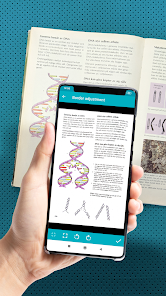
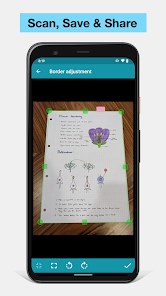
• The app will automatically detect the corners and correct the perspective of the image. Making it appear as if it was taken with a 90 degrees angle.
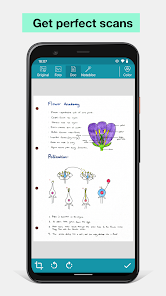
• Any shadows or similar will disappear.
• You can crop a document or image directly inside the app.
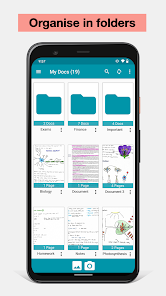
• Documents can be classified in folders, subfolders, and/or shared through email, Whatsapp, Dropbox, etc.
• No watermarks in your scanned images.
With the Notebloc® app:
Correct the perspective of your captured piece of paper: Notebloc geometrically fits your photos (see example above), making that the image on the screen completely straight, as if you had taken the picture in a perfect 90 degree angle.
Eliminate any trace of shade in your photos: Imagine you could have the perfect light intensity to digitize your notes in any circumstance, time and place. That may seem impossible, but with the Notebloc app your digitized notes will look perfect, clean, without any imperfection due to light and shadow. In your digital image you will only get what you've written or drawn on a completely white background.
- When used in conjunction with our Notebloc® notebooks, you get optimal results. The gridlines and background of our paper will magically disappear.
Within the application you can:
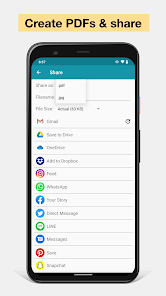
- Create documents and save them as PDF or JPG.
- Share documents online: e-mail, instant messaging, social networks, etc.
- Rename documents.
- Classify documents by date of creation or edition.
- Choose in what size of PDF you want to keep your notes.
- Digitise images or other documents that you may want to save along with your Notebloc notes.
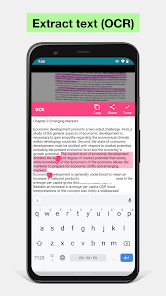
- Extract text from images using OCR.
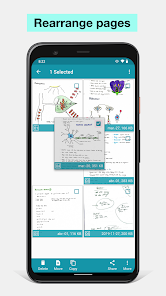
- Add, copy and order pages within the same document.
- Create folders to better organize your files.
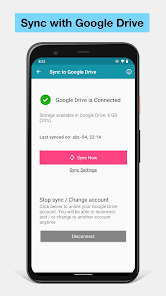
- Create backup files.
------------------
About Notebloc®:
Notebloc is a brand of digitizable paper notebooks, born in Barcelona in 2013. All Notebloc products are compatible with our mobile app that allows your ideas, notes, drawings and sketches from your Notebloc to be converted to digital.
Message from the Notebloc development team:
We work constantly to make the best scanner app for our users. Please rate the Notebloc app if you like it. Also, please get in touch with us via email if you have any feedback or any idea of how to improve the app.
• Notebloc® is a 100% free scanner app with OCR supporting unlimited usage, developed by a notebook company in Barcelona.
• Notebloc scanner app is fast, small in size, reliable and safe.
• Use Notebloc to scan any type of notes, paper documents, drawings, sketches or images.
• The app will automatically detect the corners and correct the perspective of the image. Making it appear as if it was taken with a 90 degrees angle.
• Any shadows or similar will disappear.
• You can crop a document or image directly inside the app.
• Documents can be classified in folders, subfolders, and/or shared through email, Whatsapp, Dropbox, etc.
• No watermarks in your scanned images.
With the Notebloc® app:
Correct the perspective of your captured piece of paper: Notebloc geometrically fits your photos (see example above), making that the image on the screen completely straight, as if you had taken the picture in a perfect 90 degree angle.
Eliminate any trace of shade in your photos: Imagine you could have the perfect light intensity to digitize your notes in any circumstance, time and place. That may seem impossible, but with the Notebloc app your digitized notes will look perfect, clean, without any imperfection due to light and shadow. In your digital image you will only get what you've written or drawn on a completely white background.
- When used in conjunction with our Notebloc® notebooks, you get optimal results. The gridlines and background of our paper will magically disappear.
Within the application you can:
- Create documents and save them as PDF or JPG.
- Share documents online: e-mail, instant messaging, social networks, etc.
- Rename documents.
- Classify documents by date of creation or edition.
- Choose in what size of PDF you want to keep your notes.
- Digitise images or other documents that you may want to save along with your Notebloc notes.
- Extract text from images using OCR.
- Add, copy and order pages within the same document.
- Create folders to better organize your files.
- Create backup files.
------------------
About Notebloc®:
Notebloc is a brand of digitizable paper notebooks, born in Barcelona in 2013. All Notebloc products are compatible with our mobile app that allows your ideas, notes, drawings and sketches from your Notebloc to be converted to digital.
Message from the Notebloc development team:
We work constantly to make the best scanner app for our users. Please rate the Notebloc app if you like it. Also, please get in touch with us via email if you have any feedback or any idea of how to improve the app.
Updated on
Safety starts with understanding how developers collect and share your data. Data privacy and security practices may vary based on your use, region and age. The developer provided this information and may update it over time.

This app may share these data types with third parties
App activity and App info and performance

No data collected
Learn more about how developers declare collection

Data is encrypted in transit

Data can’t be deleted
Ratings and reviews
4.2
119K reviews

Juliet Wittwer
- Flag inappropriate
15 February 2026
I've used this app for several years to scan my art. It has way too many ads to be convenient to use- a video will pop up that you have to sit through after editing or saving each photo. In recent months, the app also crashes whenever I try to save an image to my gallery, causing me to finally switch to another app. It'd be awesome if it also allowed you to edit the contrast of a picture in-app because sketches can get very washed out and lose detail. But I'd rather look for that in a new app.

Phil Ingram
- Flag inappropriate
9 February 2026
This is a very nice scanner app to create PDF's that look professional. After a slight learning curve, I was able to photograph some paperwork, straighten the images, and email them to an associate. The app saves to storage, and can also sync with Google Cloud. My only wish is that support for an SD card be provided to save storage space.

Peter Vanderhaden
- Flag inappropriate
20 July 2023
I used this app yesterday with no problem. Today when I used it, I got a message stating that going forward, files could no longer be stored on the app & you'd have to make a backup. No problem. BUT, the app had already deleted all of my files before warning me of the change. I had PAID for this app. They should have given us warning BEFORE blowing away important files! No way can this developer ever be trusted again unless he can restore those files.
60 people found this review helpful
Notebloc Scanner
21 July 2023
Hi Peter, we have just read your email and sent you a reply. We have not deleted your files, it may be that they didn't transfer correctly to the new storage location (so they are still in the old folder). Please, contact us again by email! Kind Regards
What's new
NEW feature! Now you can use the Notebloc app in dark mode.
Also, enjoy some UI updates, improved stability and bug corrections.
App support
About the developer
NOTEBLOC SCANNER SCP
hola@notebloc.com
CALLE TAMARIT, 154 - 2 4
08015 BARCELONA
Spain
+34 640 38 90 67


