
Pure Writer - Writing & Notes
In-app purchases
4.1star
19.8K reviews
1M+
Downloads

Everyone
info


About this app
Writing connects us with the past and lets us imagine the future. However, have you ever experienced some writing software: slow to start, causing inspiration to slip away? Frequently errors lead to wasted words? Lack of many necessary features and aids for writing feels inconvenient?
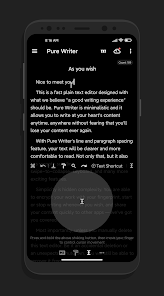
Pure Writer can solve all these problems. It's a super-fast plain text editor, and we hope that writing can return to its original form: pure, secure, anytime, without losing content, and with a good writing experience.
Peace of Mind
The icon of Pure Writer is a projection of a time machine, implying that words can take us through time and space, and also corresponds to the "history record" and "automatic backup" features specially provided by Pure Writer. With these protections, even if you accidentally delete the text, or your phone suddenly loses power and shuts down, your document can still be completely saved or found in the history record. Over the years, Pure Writer has provided a reassuring, secure writing experience, achieving the rare feat of no loss, and has been widely praised.
Smooth and Fluid
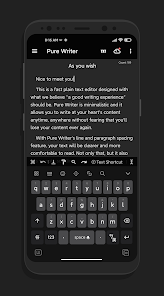
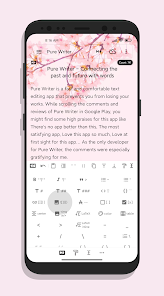
In addition to achieving the most important security guarantee, the UI interface and various writing aids of Pure Writer can also make users feel that this application is really pleasing to the eye and smooth. Pure Writer has adapted the soft keyboard interface of Android 11, allowing your fingers to smoothly control the rise and fall of the soft keyboard. At the same time, it also provides a breathing cursor, the cursor is no longer just flashing, but like human breathing, gradually fading in and out. Many such details, Pure Writer has polished to the extreme, while it has many writing aids, such as "automatically completing paired symbols", deleting paired symbols when pressing delete, pressing the enter key to jump out of the quotation range when completing dialogue content... Many such aids will feel timely and natural, when you compare with other editor applications, you will find Pure Writer does it better, smoother, and more meticulous.
Simplicity in Complexity
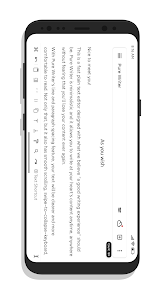
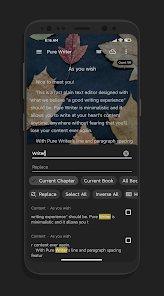
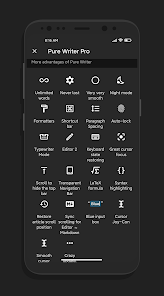
Many basic features that an editor should have, Pure Writer has not missed, such as quick input bar, multi-device cloud sync, paragraph indentation, paragraph spacing, generating beautiful long images, undo, word count, dual editor side by side, one-click format adjustment, find and replace, Markdown, computer version... and some very creative features, such as: using the TTS voice engine to read out the text you input in real time, helping you check in a different sensory way whether the input text is correct. For example, it has achieved "unlimited word count", as long as your phone's performance allows, there is no word limit. Even so, Pure Writer still maintains a minimalist design style, follows Material Design, and is both useful and beautiful.
You can reach the inspiration page at super fast speed, and you can interrupt and continue writing anytime, anywhere. Pure Writer has done all this for you. A reassuring and smooth writing experience, this is Pure Writer, please enjoy writing!
Some features:
• Support smooth animation of Android 11 soft keyboard, allowing smooth control of the rise and fall of the soft keyboard with your fingertips
• Support unlimited words
• Breathing cursor effect
• Support automatic completion of symbols in pairs
• Support automatic deletion of symbol pairs
• Support reformat...
Privacy Policy:
https://raw.githubusercontent.com/PureWriter/PureWriter/master/PrivacyPolicy
Pure Writer can solve all these problems. It's a super-fast plain text editor, and we hope that writing can return to its original form: pure, secure, anytime, without losing content, and with a good writing experience.
Peace of Mind
The icon of Pure Writer is a projection of a time machine, implying that words can take us through time and space, and also corresponds to the "history record" and "automatic backup" features specially provided by Pure Writer. With these protections, even if you accidentally delete the text, or your phone suddenly loses power and shuts down, your document can still be completely saved or found in the history record. Over the years, Pure Writer has provided a reassuring, secure writing experience, achieving the rare feat of no loss, and has been widely praised.
Smooth and Fluid
In addition to achieving the most important security guarantee, the UI interface and various writing aids of Pure Writer can also make users feel that this application is really pleasing to the eye and smooth. Pure Writer has adapted the soft keyboard interface of Android 11, allowing your fingers to smoothly control the rise and fall of the soft keyboard. At the same time, it also provides a breathing cursor, the cursor is no longer just flashing, but like human breathing, gradually fading in and out. Many such details, Pure Writer has polished to the extreme, while it has many writing aids, such as "automatically completing paired symbols", deleting paired symbols when pressing delete, pressing the enter key to jump out of the quotation range when completing dialogue content... Many such aids will feel timely and natural, when you compare with other editor applications, you will find Pure Writer does it better, smoother, and more meticulous.
Simplicity in Complexity
Many basic features that an editor should have, Pure Writer has not missed, such as quick input bar, multi-device cloud sync, paragraph indentation, paragraph spacing, generating beautiful long images, undo, word count, dual editor side by side, one-click format adjustment, find and replace, Markdown, computer version... and some very creative features, such as: using the TTS voice engine to read out the text you input in real time, helping you check in a different sensory way whether the input text is correct. For example, it has achieved "unlimited word count", as long as your phone's performance allows, there is no word limit. Even so, Pure Writer still maintains a minimalist design style, follows Material Design, and is both useful and beautiful.
You can reach the inspiration page at super fast speed, and you can interrupt and continue writing anytime, anywhere. Pure Writer has done all this for you. A reassuring and smooth writing experience, this is Pure Writer, please enjoy writing!
Some features:
• Support smooth animation of Android 11 soft keyboard, allowing smooth control of the rise and fall of the soft keyboard with your fingertips
• Support unlimited words
• Breathing cursor effect
• Support automatic completion of symbols in pairs
• Support automatic deletion of symbol pairs
• Support reformat...
Privacy Policy:
https://raw.githubusercontent.com/PureWriter/PureWriter/master/PrivacyPolicy
Updated on
Safety starts with understanding how developers collect and share your data. Data privacy and security practices may vary based on your use, region, and age. The developer provided this information and may update it over time.

No data shared with third parties
Learn more about how developers declare sharing

No data collected
Learn more about how developers declare collection

Data is encrypted in transit

Data can’t be deleted

Committed to follow the Play Families Policy
Ratings and reviews
4.1
18.8K reviews

Chris Bowling
- Flag inappropriate
February 13, 2025
I've had this app for over a year and always loved it. I use it daily and pay monthly for pro. But I've recently started having a problem. The app data has always remained under 400mb. But yesterday it suddenly went to 1gb. It continues to grow a couple hundred mbs every time I do even a little bit of writing. I've cleared the history records, but it barely takes it down any room at all. At this rate, it's unsustainable for my phone to have that much room. Can you please help me with this?
17 people found this review helpful

C Jay
- Flag inappropriate
March 21, 2026
I've been using Purewriter since 2022 and love it, I even bought the pro version. Managing notebooks and chapters is fantastic, you can put the chapters in collapsible folders. Cloud sync and local save have always worked for me. The one thing holding the app back is that it doesn't support italics and bold formatting, so I have to finalize formatting in a different word processor. I also wish there was a way to check previous years' statistics with the Year in Review feature.

BorkWolf
- Flag inappropriate
- Show review history
March 23, 2026
For the most part, this app is great. I love the options it has for organization, and it's what I primarily use for the writing of my stories. However, lately I've been noticing a bug that has been particularly annoying and only makes me feel like putting the app down: The cursor will move unprompted to a different line as I edit a text, and completely mess up what I'm doing. Sometimes the Undo button work, either, leaving me to have to edit it back manually. Please fix this issue soon.
What’s new
* For the latest update log, please check Changelog in the Settings screen
• Add Save as Word .docx
• Support PureWriterDesktop
• AI Writing Assistant & Copilot
• Free Cloud Sync
• Unlimited Words for a single chapter
• Auto-complete for paired symbols
• Deleting symbols in pairs
• Synchronized Animating soft keyboard
• Smooth Cursor!
• Support Enter ⏎ to jump out of blue input block
• Read-only Mode: double-clicking to place cursor
• Faster launching, silky smooth writing experience
• Add Save as Word .docx
• Support PureWriterDesktop
• AI Writing Assistant & Copilot
• Free Cloud Sync
• Unlimited Words for a single chapter
• Auto-complete for paired symbols
• Deleting symbols in pairs
• Synchronized Animating soft keyboard
• Smooth Cursor!
• Support Enter ⏎ to jump out of blue input block
• Read-only Mode: double-clicking to place cursor
• Faster launching, silky smooth writing experience
App support
About the developer
DRAKEET CO., LTD.
drakeet@drakeet.com
648-8, ZENSHOINCHO, KAMIGYO-KU
SAINTPAULIA 101
KYOTO, 京都府 602-0006
Japan
+81 70-3893-0621


