
PC Remote
Contains adsIn-app purchases

3.3star
54.2K reviewsinfo
10M+
Downloads

PEGI 3
info


About this app
Elevate your PC experience with Monect PC Remote, a versatile and free app designed to give you full control of your computer — whether you're nearby or miles away.
Key Features:
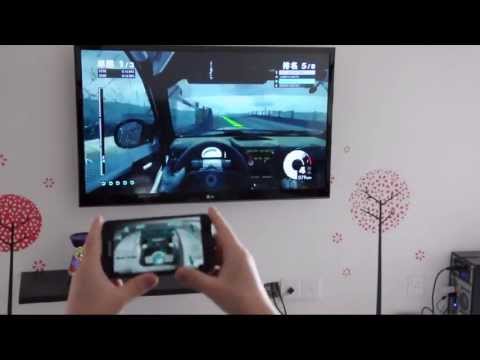
* Enhanced Gaming: Immerse yourself in PC gaming with custom button layouts and onboard sensors. Tailor them to your preferences for an unbeatable gaming experience.
* Real-time Screen and Camera Sharing: Share your PC screen and camera feed seamlessly with your smartphone. Experience your PC as if it's right in your hand.
* Virtual Camera: Use your phone’s high-quality camera as a virtual webcam on your PC. Perfect for video calls, streaming, and online meetings with crystal-clear visuals.
* Mouse and Keyboard Control: Use your phone as a wireless mouse and keyboard for your PC. Navigate, type, and control your computer effortlessly from anywhere.
* Multi-Display Capabilities: Expand your workspace by adding up to 4 virtual displays to your PC, boosting productivity and multitasking.
* Digital Artistry: Turn your device into a graphics drawing tablet with support for pressure-sensitive stylus pens. Unleash your creativity in software like Adobe Photoshop.
* Effortless File Transfer: Seamlessly transfer files between your devices for ultimate convenience.
* Top-Notch Security: Rest easy with our 256 Bit AES Session Encoding for secure remote network connections.
How to Use:
1. Installation: Download Monect PC Remote from Google Play and the PC Remote Receiver from [https://www.monect.com/](https://www.monect.com/) on your computer.
2. Connect Your Device: Choose from multiple connection options:
* Local Wi-Fi (on the same network)
* Remote Wi-Fi (across different networks)
* USB tethering from your device
* Share your device's Wi-Fi hotspot
* Bluetooth
Note: Adobe Photoshop is a registered trademark of Adobe in the United States and other countries.
Experience the freedom and control that Monect PC Remote offers, making your PC a truly versatile and powerful tool for work, play, and creativity — now with Virtual Camera and wireless Mouse & Keyboard control for even more possibilities.
Key Features:
* Enhanced Gaming: Immerse yourself in PC gaming with custom button layouts and onboard sensors. Tailor them to your preferences for an unbeatable gaming experience.
* Real-time Screen and Camera Sharing: Share your PC screen and camera feed seamlessly with your smartphone. Experience your PC as if it's right in your hand.
* Virtual Camera: Use your phone’s high-quality camera as a virtual webcam on your PC. Perfect for video calls, streaming, and online meetings with crystal-clear visuals.
* Mouse and Keyboard Control: Use your phone as a wireless mouse and keyboard for your PC. Navigate, type, and control your computer effortlessly from anywhere.
* Multi-Display Capabilities: Expand your workspace by adding up to 4 virtual displays to your PC, boosting productivity and multitasking.
* Digital Artistry: Turn your device into a graphics drawing tablet with support for pressure-sensitive stylus pens. Unleash your creativity in software like Adobe Photoshop.
* Effortless File Transfer: Seamlessly transfer files between your devices for ultimate convenience.
* Top-Notch Security: Rest easy with our 256 Bit AES Session Encoding for secure remote network connections.
How to Use:
1. Installation: Download Monect PC Remote from Google Play and the PC Remote Receiver from [https://www.monect.com/](https://www.monect.com/) on your computer.
2. Connect Your Device: Choose from multiple connection options:
* Local Wi-Fi (on the same network)
* Remote Wi-Fi (across different networks)
* USB tethering from your device
* Share your device's Wi-Fi hotspot
* Bluetooth
Note: Adobe Photoshop is a registered trademark of Adobe in the United States and other countries.
Experience the freedom and control that Monect PC Remote offers, making your PC a truly versatile and powerful tool for work, play, and creativity — now with Virtual Camera and wireless Mouse & Keyboard control for even more possibilities.
Updated on
Safety starts with understanding how developers collect and share your data. Data privacy and security practices may vary based on your use, region, and age. The developer provided this information and may update it over time.


Ratings and reviews
3.3
52K reviews

A Google user
- Flag inappropriate
December 13, 2025
I prefer to disable the touchpad on my laptop for when I'm typing. This means that I have to remember my wireless mouse at all times, I thought that this would be a great alternative since I pretty much always have my phone on me. I'm not subscribing to use my phone as a mouse. Small one time fee? Sure. Recurring subscription? Out of your mind.
20 people found this review helpful

Chris Devl
- Flag inappropriate
January 1, 2026
works great, quick and easy to set up and use, and has all the features i would want. ONE BIG ANNOYANCE THOUGH is why tf is the banner ad at the BOTTOM instead of the top taking up space for buttons?? and then the full screen ads have their close button at the TOP instead of the BOTTOM so i cant even reach it with my thumb! completely backwards, so damn annoyi g. would be a perfect 5/5 if it wasnt for that.
1 person found this review helpful

Fafoflou
- Flag inappropriate
January 3, 2026
I'm not one of those paid reviewers... I'll tell you the truth, this app rocks. Fixed all my problems and I can game from my laptop with my phone. I totally and a 100% worth it. The ads are well timed and everything is just great...
3 people found this review helpful
What’s new
Virtual Camera is here!
Turn your phone into a powerful webcam for your PC — stream, meet, and create with ease!
Plus:
• Better subscription experience
• Fixed soft keyboard issue
• Added "Sign in with Google"
App support
About the developer
魔控信息技术(苏州)有限公司
support@monect.com
中国
江苏省苏州市
中国(江苏)自由贸易试验区苏州片区苏州工业园区新发路1号的一号楼三楼AG5509室
邮政编码: 215000
+86 138 6206 5187


