
Code Editor - Compiler & IDE
Contains adsIn-app purchases
4.0star
12.1K reviewsinfo
1M+
Downloads

PEGI 3
info
About this app
Code editor is an optimized text editor that focuses on coding. It is a handy tool for development on Android. It contains all the necessary features for coding, includes syntax highlighting, auto indention, code assist, auto completion, compilation and execution, etc.
If you need a plain text editor, please search for and download QuickEdit Text Editor.
Features:
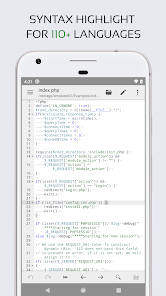
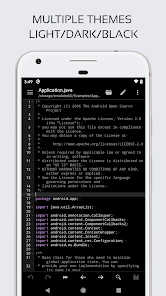
★ Syntax highlighting for over 110 languages (C++, Java, JavaScript, HTML, Markdown, PHP, Perl, Python, Lua, Dart, etc).
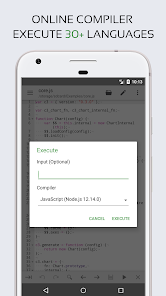
★ Include online compiler, can compile and run over 30 common languages (Python, PHP, Java, JS/NodeJS, C/C++, Rust, Pascal, Haskell, Ruby, etc).
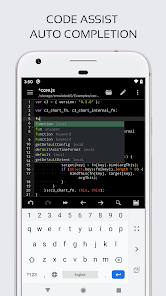
★ Code assist, folding and auto completion.
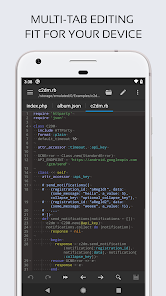
★ Easily navigate between multiple tabs.
★ Undo and redo changes without limit.
★ Search and replace with regular expressions.
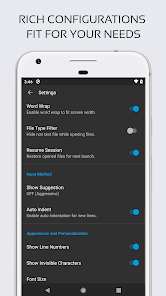
★ Show or hide line numbers.
★ Highlight matching parentheses.
★ Automatic indent and outdent.
★ Displays invisible characters.
★ Open files from recently opened or added file collections.
★ Preview HTML and Markdown files.
★ Includes Emmet support for web development.
★ Evaluate JavaScript code with built-in JavaScript console.
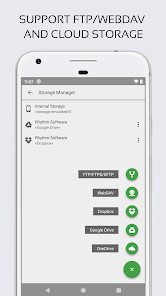
★ Access files from FTP, FTPS, SFTP and WebDAV.
★ Integrate and easy access to GitHub and GitLab.
★ Access files from Google Drive, Dropbox, and OneDrive.
★ Physical keyboard support, including key combinations.
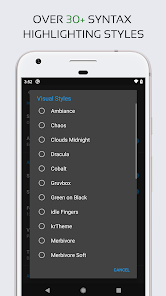
★ Three application themes and over 30 syntax highlighting themes.
If you can help to translate this application into your native language, please contact us at support@rhmsoft.com
If you encounter any issues or have any suggestions, please feel free to contact us at support@rhmsoft.com
If you need a plain text editor, please search for and download QuickEdit Text Editor.
Features:
★ Syntax highlighting for over 110 languages (C++, Java, JavaScript, HTML, Markdown, PHP, Perl, Python, Lua, Dart, etc).
★ Include online compiler, can compile and run over 30 common languages (Python, PHP, Java, JS/NodeJS, C/C++, Rust, Pascal, Haskell, Ruby, etc).
★ Code assist, folding and auto completion.
★ Easily navigate between multiple tabs.
★ Undo and redo changes without limit.
★ Search and replace with regular expressions.
★ Show or hide line numbers.
★ Highlight matching parentheses.
★ Automatic indent and outdent.
★ Displays invisible characters.
★ Open files from recently opened or added file collections.
★ Preview HTML and Markdown files.
★ Includes Emmet support for web development.
★ Evaluate JavaScript code with built-in JavaScript console.
★ Access files from FTP, FTPS, SFTP and WebDAV.
★ Integrate and easy access to GitHub and GitLab.
★ Access files from Google Drive, Dropbox, and OneDrive.
★ Physical keyboard support, including key combinations.
★ Three application themes and over 30 syntax highlighting themes.
If you can help to translate this application into your native language, please contact us at support@rhmsoft.com
If you encounter any issues or have any suggestions, please feel free to contact us at support@rhmsoft.com
Updated on
Safety starts with understanding how developers collect and share your data. Data privacy and security practices may vary based on your use, region, and age. The developer provided this information and may update it over time.

No data shared with third parties
Learn more about how developers declare sharing

This app may collect these data types
App activity and App info and performance

Data is encrypted in transit

Data can’t be deleted
Ratings and reviews
4.1
11.2K reviews

Jocom Firesin
- Flag inappropriate
November 29, 2024
Been flipping through these one by one. I've got a rather small amount of coding experience and skills rn. So I don't know if this will always be my favorite but so many other services of this nature are just not enough. At the same time I'm four in. So maybe I'll find another but between two completely broken ones, one I hate, and another that just feels like I'm drowning in features that wants me to pay.
118 people found this review helpful

Mixtape Messiah (The Mixtape Messiah)
- Flag inappropriate
March 8, 2026
Great IDE and quickly stands out as one of the easiest to use. Paid and upgraded immediately. Could use a few more options. like the ability to hide files and directories from your file menu (such as __pycache__ or to allow the menu to skip over dotfiles.) and the ability to open a new file would be really handy on the bottom bar. Right now I have to drop into a shell to make one with touch. First world issues. Fantastic App 10/10 happy supporter.
3 people found this review helpful

Gideon Onyegbula
- Flag inappropriate
February 13, 2026
So I just realized that I could link my Git Repos and push commits directly from here which has been really helpful. I've used this application since a young age, for years now, I love the UI. 5 Stars well deserved, also, I'm about to make payment to remove ads, hope it's one-off.
1 person found this review helpful
What’s new
✓ Added a new option to control live code completion.
App support
About the developer
Rhythm Software
support@rhmsoft.com
2108 N St Ste N
Sacramento, CA 95816-5712
United States
+1 657-234-3602


