
micro:bit

3.3star
1.88K reviewsinfo
500K+
Downloads

PEGI 3
info




About this app
The best bits
• Create games on your phone then ‘flash’ them on to your micro:bit to get playing – no wires or cables needed!
• Snap a selfie by connecting your phone or tablet, and use your micro:bit as a remote control
• Never miss your mates again – now you can code your micro:bit to wake up and tell you when you’re getting a call or text
What’s in the app?
There are four areas to explore:
Discover takes you to the official website where you can find code ideas from other micro:bit fans. There’s loads of cool stuff to try out.
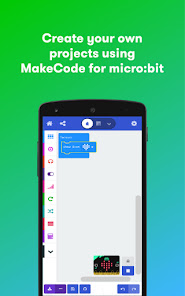
Create Code allows you to use the micro:bit MakeCode editor. You can also go back and edit code you’ve already created.
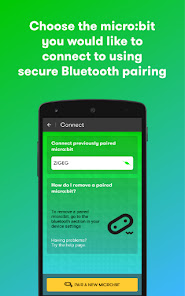
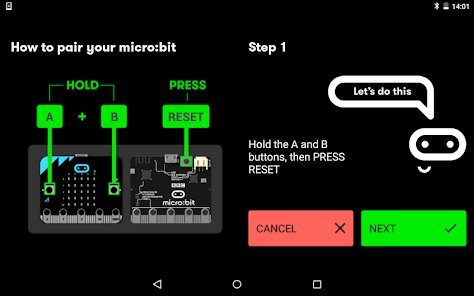
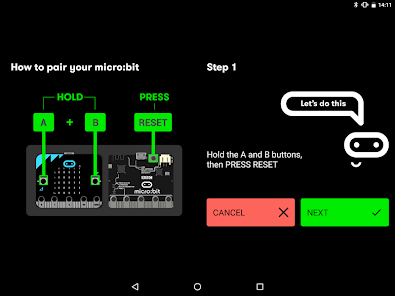
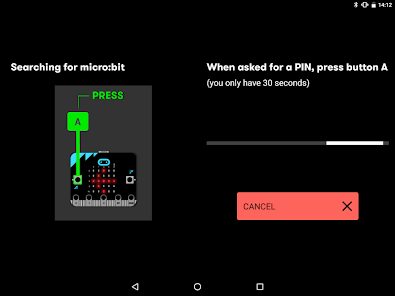
Connect is where you can go to pair your phone or tablet to your micro:bit. Choose the device you’d like to connect to through a secure Bluetooth pairing.
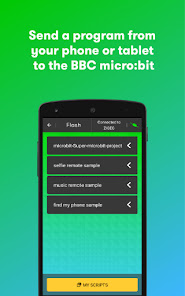
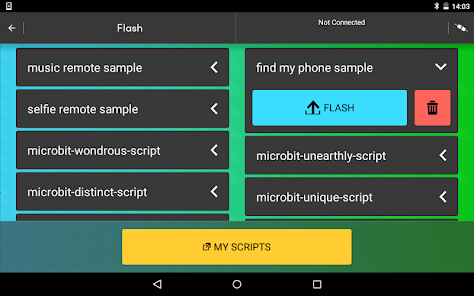
Flash is where the fun begins: send a program from your phone or tablet and see it on your micro:bit!
Permissions
read phone status and identity - This permission is used to allow the micro:bit to read basic state information of the phone. The user can write code on the micro:bit to react to these different states e.g. whether the display is on or off or a call or SMS message is received
receive text messages (SMS) - The micro:bit can react to different events on the phone and vice versa. This permission allows the user to make the micro:bit react in the event the user receives an SMS message. The message contents and details are not used or stored by the application.
take pictures and videos - The user can programme the micro:bit to send events to the phone to launch the camera or take a picture or video.
approximate location (network-based) – The application has to find and connect to the micro:bit over Bluetooth low energy. Scanning for Bluetooth low energy devices needs the approximate location service.
modify or delete the contents of your USB storage and read the contents of your USB storage - The application will save scripts, photos and any content you may have created to your USB storage. The application must be able to read, write and delete these files.
full network access and view Wi-Fi connections - The application needs access to the internet to access the micro:bit website so that the user can download code samples, access the code editors and to send usage statistics.
access Bluetooth settings and pair with Bluetooth devices - The application can discover, pair and connect to the micro:bit over secure Bluetooth.
draw over other apps - The user can program the micro:bit to display alerts on the phone or find the phone.
control flashlight, control vibration and prevent phone from sleeping - This permission is used to send a visual cue that a photo or video is being captured, to send events to make the phone vibrate and to prevent your phone from sleeping when it is flashing your micro:bit. "
• Create games on your phone then ‘flash’ them on to your micro:bit to get playing – no wires or cables needed!
• Snap a selfie by connecting your phone or tablet, and use your micro:bit as a remote control
• Never miss your mates again – now you can code your micro:bit to wake up and tell you when you’re getting a call or text
What’s in the app?
There are four areas to explore:
Discover takes you to the official website where you can find code ideas from other micro:bit fans. There’s loads of cool stuff to try out.
Create Code allows you to use the micro:bit MakeCode editor. You can also go back and edit code you’ve already created.
Connect is where you can go to pair your phone or tablet to your micro:bit. Choose the device you’d like to connect to through a secure Bluetooth pairing.
Flash is where the fun begins: send a program from your phone or tablet and see it on your micro:bit!
Permissions
read phone status and identity - This permission is used to allow the micro:bit to read basic state information of the phone. The user can write code on the micro:bit to react to these different states e.g. whether the display is on or off or a call or SMS message is received
receive text messages (SMS) - The micro:bit can react to different events on the phone and vice versa. This permission allows the user to make the micro:bit react in the event the user receives an SMS message. The message contents and details are not used or stored by the application.
take pictures and videos - The user can programme the micro:bit to send events to the phone to launch the camera or take a picture or video.
approximate location (network-based) – The application has to find and connect to the micro:bit over Bluetooth low energy. Scanning for Bluetooth low energy devices needs the approximate location service.
modify or delete the contents of your USB storage and read the contents of your USB storage - The application will save scripts, photos and any content you may have created to your USB storage. The application must be able to read, write and delete these files.
full network access and view Wi-Fi connections - The application needs access to the internet to access the micro:bit website so that the user can download code samples, access the code editors and to send usage statistics.
access Bluetooth settings and pair with Bluetooth devices - The application can discover, pair and connect to the micro:bit over secure Bluetooth.
draw over other apps - The user can program the micro:bit to display alerts on the phone or find the phone.
control flashlight, control vibration and prevent phone from sleeping - This permission is used to send a visual cue that a photo or video is being captured, to send events to make the phone vibrate and to prevent your phone from sleeping when it is flashing your micro:bit. "
Updated on
Safety starts with understanding how developers collect and share your data. Data privacy and security practices may vary based on your use, region, and age. The developer provided this information and may update it over time.


Ratings and reviews
3.8
1.65K reviews

Benson Baker
- Flag inappropriate
August 20, 2025
I am loving coding projects on my microbit on PC and I thought it would be fun to do it on mobile, but I can't for the life of me figure out pairing, I'm fine coding on PC but it would be nice if pairing was explained a little better, same with connecting it to scratch, I couldn't get pairing to work, other than that, VERY fun software to make little programs, so interactive, so user friendly for beginners, and more advanced programmers, and nothing beats seeing the little red pixels light up.
3 people found this review helpful

Will Pearson
- Flag inappropriate
January 10, 2021
Difficult to pair to the microbit as it requires location to be on. Once paired, it basically opens the MakeCode website with all the flaws that site has. It refuses to compile basic Python code that can compile in Mu. Refuses to import the audio module. Refuses to accept "else" may not be near an "if" statement, or indeed that "else" is not required for "if" statements. Fails to find pins or accelerometer. If you are not using the blocks to create the code, I wouldn't bother.
46 people found this review helpful

A Google user
- Flag inappropriate
October 26, 2019
App lacks basic functionality found in iOS version. I've used the microbit with many different computers and apple products with little to no issue. On Android, there are constantly issues pairing the device, and because the coding software is not embedded in the app as it is for iOS, I cannot even flash code to the microbit. I can code in the browser and download the code with no trouble, but there is no way to get the code into the app in order to flash it to the device. Essentially useless.
46 people found this review helpful
What’s new
- Update to support Android 15 devices
- Fix project download for Lenovo M10
- Fix project download for Lenovo M10
App support
About the developer
MICRO:BIT EDUCATIONAL FOUNDATION
help@microbit.org
12 New Fetter Lane
LONDON
EC4A 1JP
United Kingdom
+44 7756 396212


