
Communication Bridge Pro
In-app purchases
4.3star
37 reviews
1K+
Downloads

Everyone
info





About this app
OVERVIEW
This app enables communication between devices that use different communication technologies. With this app, your smartphone acts as a protocol converter and creates a communication bridge between remote devices that cannot communicate directly.
Currently supported:
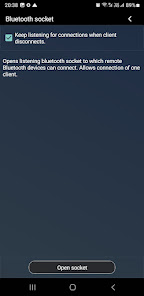
- Classic Bluetooth: Bluetooth modules (HC-05, HC-06), other smartphone running Bluetooth terminal apps, PCs or any other device capable of opening Bluetooth serial port. The app can also create listening port for incoming connections
- BLE (Bluetooth low energy / Bluetooth 4.0): devices such as BLE Bluetooth modules(HM-10, MLT-BT05), smart sensors (heart rate monitors, thermostats, etc.)
- USB-serial devices: supported chipsets: CP210x, CDC, FTDI, PL2303 and CH34x
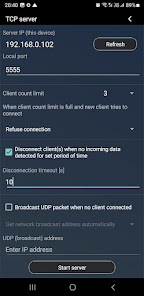
- TCP server: creates listening TCP server socket to which you can connect up to 3 clients
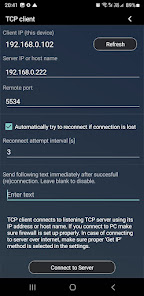
- TCP client
- UDP socket
- MQTT client
UNSUPPORTED
- Bluetooth speakers and headphones
- Some variants of listed chipsets with suffix in the name (like PL2303G, PL2303A, etc.) may not be supported
FEATURES
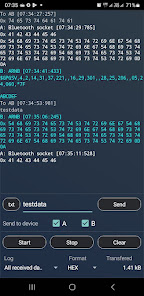
- Built-in packet terminal
- Real-time data logging
- Send data directly from the app to connected devices
- Bridge traffic between any two supported protocols
- Ideal for testing, debugging, and integrating custom hardware
USER GUIDE
For detailed documentation, supported protocols, and connection examples, visit:
https://sites.google.com/view/communication-utilities/bridge-user-guide
SUPPORT
Found a bug? Missing feature? Just email the developer. Your feedback is greatly appreciated.
masarmarek.fy@gmail.com
This app enables communication between devices that use different communication technologies. With this app, your smartphone acts as a protocol converter and creates a communication bridge between remote devices that cannot communicate directly.
Currently supported:
- Classic Bluetooth: Bluetooth modules (HC-05, HC-06), other smartphone running Bluetooth terminal apps, PCs or any other device capable of opening Bluetooth serial port. The app can also create listening port for incoming connections
- BLE (Bluetooth low energy / Bluetooth 4.0): devices such as BLE Bluetooth modules(HM-10, MLT-BT05), smart sensors (heart rate monitors, thermostats, etc.)
- USB-serial devices: supported chipsets: CP210x, CDC, FTDI, PL2303 and CH34x
- TCP server: creates listening TCP server socket to which you can connect up to 3 clients
- TCP client
- UDP socket
- MQTT client
UNSUPPORTED
- Bluetooth speakers and headphones
- Some variants of listed chipsets with suffix in the name (like PL2303G, PL2303A, etc.) may not be supported
FEATURES
- Built-in packet terminal
- Real-time data logging
- Send data directly from the app to connected devices
- Bridge traffic between any two supported protocols
- Ideal for testing, debugging, and integrating custom hardware
USER GUIDE
For detailed documentation, supported protocols, and connection examples, visit:
https://sites.google.com/view/communication-utilities/bridge-user-guide
SUPPORT
Found a bug? Missing feature? Just email the developer. Your feedback is greatly appreciated.
masarmarek.fy@gmail.com
Updated on
Safety starts with understanding how developers collect and share your data. Data privacy and security practices may vary based on your use, region, and age. The developer provided this information and may update it over time.


Ratings and reviews
4.2
30 reviews

Charles B
- Flag inappropriate
June 18, 2020
Never be happier with a $1.49 purchase on anything, especially the Play store! Thank you for a no BS, straight, clean app that just works! Solved a simple problem that wasn't so simple with no plan B for this particular mobile test rig. I just thought "maybe there's a serial port bridging app for Android?" Low and behold, here it is!
18 people found this review helpful

Michael Mohr
- Flag inappropriate
November 7, 2023
Works as described. There is a specific set of supported hardware and the program author specifically calls this out in the app description. I have just one issue: the network port is opened to the entire LAN. Please provide an option to bind to localhost instead of the device IP. This is useful to protect devices which are intended for on-device usage only.
1 person found this review helpful
Marek Masár
November 9, 2023
Good suggestion. I will include this feature in next releases.

Piet Le Roux
- Flag inappropriate
- Show review history
March 25, 2021
"I needed it to connect my Meade telescope to the Stellaruim App on my phone. The connection goes from a serial port to a USB converter to the App. Pro BT/USB/TCP does the USB and TCP part excellently!" Not anymore ! in Ver. 3.3 I cannot edit the IP address ? The default is 192.168.0.101 and I keep on losing my connection. I have a Samsung S9 with Android 10 using a USB to serial connection to control a Meade telescope but it keeps on losing connection, if restart the USB device it works
8 people found this review helpful
Marek Masár
March 31, 2021
You can`t edit IP address of your phone. You can only enter IP address of the remote TCP server to which you want to connect from TCP client. When you creating TCP server, address of your device is used and you can only specify port number.
What’s new
v11.1
- App localization: de, en, fr, es, sk
- BLE: fixed app freezing during transmission error
- BLE: option to change default MTU
- Bugs and other improvements
- App localization: de, en, fr, es, sk
- BLE: fixed app freezing during transmission error
- BLE: option to change default MTU
- Bugs and other improvements
App support
About the developer
Marek Masár
masarmarek.fy@gmail.com
331
01835 Horná Poruba
Slovakia


