Call Recorder - Auto Recording
Contains adsIn-app purchases
3.9star
321K reviews
50M+
Downloads

Teen
info

About this app
Automatic Call Recorder is a simple and smart auto telephone voice recorder for all android phones like Samsung S20, S10, S9, Android Pie, Android 10... to easily get phone recorded from both sides with clear voice anytime.
Our App is globally available helping thousands of users to record phone calls.
Automatic Call Recorder Features
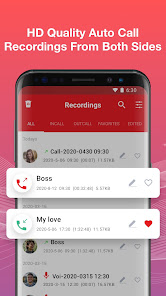
★Phone Call Recording
✔Auto record any incoming & outgoing calls
✔Clear HD quality recording on both sides
✔Enable/Disable call recording to your needs
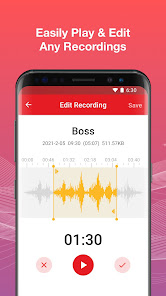
✔Play recorded calls anytime
✔Quick search recordings
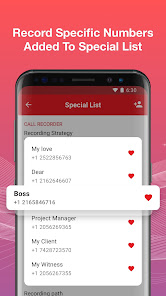
★Special List
✔Add numbers to the special list, set the “Default record” to “special list”
✔You will be able to only record calls between these numbers
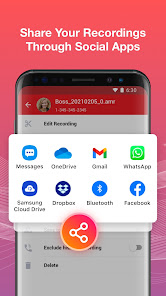
★Share & Manage Recordings
✔ Share recording to anyone via social apps
✔ Delete, rename telephone recording
✔Get all caller detail from recordings
★Add Recordings to Favorites
✔ Add important phone call recording to favorites
✔ Helpful for your business & life
★Multiple Audio Formats & Source
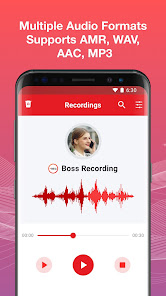
✔ Supports AMR, WAV, AAC, MP3 to record
✔ Supports auto, own voice, opponent voice etc
✔ More phone recording formats coming soon
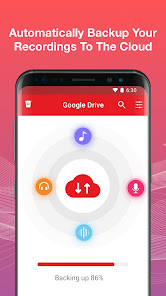
★Back up to The Cloud
✔ Automatically back up your telephone recordings to the cloud
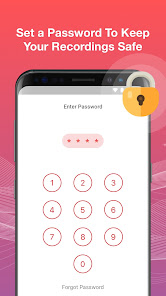
★App Lock
✔ Set your recordings to private mode
✔ Easy to find your passwords when forget
★Voice Recorder
✔ Record voice notes and memos
✔ Edit, delete, backup, playback, share the voice recordings through social apps
★ More Special Features in Automatic Call Recorder
✔ Lighting fast speed with smooth experience
✔ Simple to operate and use
✔ Material Design User Interface
✔ Shows caller data on Home Page
✔ First phone call recorder with no restrictions on length of call recording
✔ Less RAM Consumption (Call Recorder works in background)
✔ Small APK Size
✔ Less Power Consumption
This call recorder pro app works on phone like:
Samsung Galaxy S20, S10, S9
Samsung Galaxy Note10, Note9
Samsung Galaxy A30, A20, A10
Samsung Galaxy J7, J6, J2...
Notice:
Some third-party apps prevent Call Recorder working, as a result some of your calls will not be recorded. Usually you need to add Call Recorder into their “White List”. Please close or delete all other recording apps.
Facebook: https://www.facebook.com/Call-Recorder-1852426421672444/
Email: bestrecordercall@gmail.com
Our App is globally available helping thousands of users to record phone calls.
Automatic Call Recorder Features
★Phone Call Recording
✔Auto record any incoming & outgoing calls
✔Clear HD quality recording on both sides
✔Enable/Disable call recording to your needs
✔Play recorded calls anytime
✔Quick search recordings
★Special List
✔Add numbers to the special list, set the “Default record” to “special list”
✔You will be able to only record calls between these numbers
★Share & Manage Recordings
✔ Share recording to anyone via social apps
✔ Delete, rename telephone recording
✔Get all caller detail from recordings
★Add Recordings to Favorites
✔ Add important phone call recording to favorites
✔ Helpful for your business & life
★Multiple Audio Formats & Source
✔ Supports AMR, WAV, AAC, MP3 to record
✔ Supports auto, own voice, opponent voice etc
✔ More phone recording formats coming soon
★Back up to The Cloud
✔ Automatically back up your telephone recordings to the cloud
★App Lock
✔ Set your recordings to private mode
✔ Easy to find your passwords when forget
★Voice Recorder
✔ Record voice notes and memos
✔ Edit, delete, backup, playback, share the voice recordings through social apps
★ More Special Features in Automatic Call Recorder
✔ Lighting fast speed with smooth experience
✔ Simple to operate and use
✔ Material Design User Interface
✔ Shows caller data on Home Page
✔ First phone call recorder with no restrictions on length of call recording
✔ Less RAM Consumption (Call Recorder works in background)
✔ Small APK Size
✔ Less Power Consumption
This call recorder pro app works on phone like:
Samsung Galaxy S20, S10, S9
Samsung Galaxy Note10, Note9
Samsung Galaxy A30, A20, A10
Samsung Galaxy J7, J6, J2...
Notice:
Some third-party apps prevent Call Recorder working, as a result some of your calls will not be recorded. Usually you need to add Call Recorder into their “White List”. Please close or delete all other recording apps.
Facebook: https://www.facebook.com/Call-Recorder-1852426421672444/
Email: bestrecordercall@gmail.com
Updated on
Safety starts with understanding how developers collect and share your data. Data privacy and security practices may vary based on your use, region, and age. The developer provided this information and may update it over time.


Ratings and reviews
3.9
319K reviews

Wilson Torres Jr
- Flag inappropriate
- Show review history
June 29, 2025
This is a great app. It records very well and clear for both sides of tbe conversation. Recordings can be saved as mp3's, so they can be played and heard with any audio media player. An issue I have with this app is the excessive use of ads and unfortunately, only an ongoing subscription service will get rid of the ads instead of a one-time payment to buy the app. Let me buy the app instead of subscribe and I'll give it 5 stars.
47 people found this review helpful

K Walker
- Flag inappropriate
April 17, 2023
I got this while dealing with a custody battle, but the quality was so awful. If you got audio at all, you could hardly hear the other person, or you would only hear your side of the call. I used the tips recommended, but it remained very hit or miss. I decided to use the free trial, but it added in a step that you had to call a specific number, then merge in the call you wanted recorded. If you don't do that, then it won't record at all, which defeated the purpose of auto recording my calls.
549 people found this review helpful

A Google user
- Flag inappropriate
June 25, 2019
Too many ads, for starters. I understand the need for ads in order to continue with a free option, but come one. I click out of the ad at the d of a call, try making another call and another ad pops UP. During playback, I can't hear the caller, it's lower than a whisper, even with headphones. I shouldn't have to put all my calls to speaker in order to record calls, it's the only time I can hear the caller during playback. There are some calls that the whole world doesn't need to hear. UNINSTALED
61 people found this review helpful
Call Recorder by Call Team
July 10, 2019
Thank you for your support, we will fix this issue soon.
App support
About the developer
Rainy Autumn Limited
bestrecordercall@gmail.com
Rm 602 6/F KAI YUE COML BLDG
2C ARGYLE ST
旺角
Hong Kong
+852 6555 9818


