radio watch sync
Contains adsIn-app purchases
4.9star
5.49K reviews

Everyone
info
100K+
Downloads

Everyone
Learn more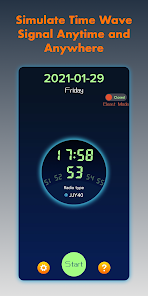
About this app
I have a Casio G-Series radio watch, but it is always unable to receive radio waves from time signal station, so I started to write an application to solve this problem.
After some research, I finally wrote this application, which can perfectly simulate the timing signal and happily calibrate the time.
Usage method:
1. Adjust the volume of phone to the maximum.
2. Switch the radio controlled watch / clock to manual wave receiving mode.
3. Click the "start" button.
4. Place the watch / clock near the phone speakers.
5. The synchronization process generally takes 3-10 minutes, please wait patiently.
Matters needing attention:
1. Please try to use the software in a quiet environment to avoid signal interference.
2. The volume of the mobile phone must be adjusted to the maximum. It's too small and the effect is not good.
Characteristic:
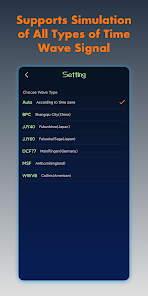
1. Supports simulation of all types of Time Wave Signal:
* China BPC
* USA WWVB
* Japan JJY40 / JJY60
* Germany DCF77
* British MSF
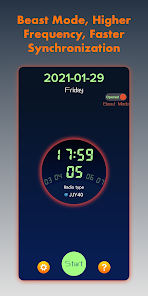
2. The unique "Beast Mode" provides higher frequency simulation signals and faster sync.
Contact information:
Please contact me if you have any use questions
*QQ: 3364918353
*Email: 3364918353@qq.com
After some research, I finally wrote this application, which can perfectly simulate the timing signal and happily calibrate the time.
Usage method:
1. Adjust the volume of phone to the maximum.
2. Switch the radio controlled watch / clock to manual wave receiving mode.
3. Click the "start" button.
4. Place the watch / clock near the phone speakers.
5. The synchronization process generally takes 3-10 minutes, please wait patiently.
Matters needing attention:
1. Please try to use the software in a quiet environment to avoid signal interference.
2. The volume of the mobile phone must be adjusted to the maximum. It's too small and the effect is not good.
Characteristic:
1. Supports simulation of all types of Time Wave Signal:
* China BPC
* USA WWVB
* Japan JJY40 / JJY60
* Germany DCF77
* British MSF
2. The unique "Beast Mode" provides higher frequency simulation signals and faster sync.
Contact information:
Please contact me if you have any use questions
*QQ: 3364918353
*Email: 3364918353@qq.com
Updated on
Safety starts with understanding how developers collect and share your data. Data privacy and security practices may vary based on your use, region, and age. The developer provided this information and may update it over time.


Ratings and reviews
4.9
5.29K reviews

Saji Abraham
- Flag inappropriate
June 28, 2024
It took a few tries of positioning each of them but I was able to sync up my 3 Casio watches. After syncing the first one and reading the reviews, I knew what I was getting into in terms of payment and how many times I'd be adjusting the position of my other watches, I opted to pay upfront. Easy to use interface. The noises are high pitched and can be annoying but the app worked for me.
16 people found this review helpful

Justin
- Flag inappropriate
August 20, 2022
I tried a few other apps and this one provides the loudest signal that helps my Casio watches grab the signal better and usually faster! The interface is very simple and even provides tips for each brand of watch in case you have issues. I definitely recommend this app to keep your Casio watches synced without having to face it in a certain direction or make sure there aren't trees in the way. Good job!
16 people found this review helpful

israel simons
- Flag inappropriate
January 29, 2022
I'm shocked. I didn't actually think this would work but it did. I live on the east coast and I probably get my watches to sync maybe 3 days a week which I've always been happy with but sometimes they don't for a week or so. Well I figured I would try this and it worked. Took just a couple minutes and my watch was synced to the exact second. Very very happy!!
5 people found this review helpful
What’s new
bug fix
Everyone
Learn moreApp support
About the developer
Jin Ning
lanyu2014sc@163.com
玉山镇
雍景湾南苑3幢507室
昆山市, 苏州市, 江苏省
China
225766


