Turn Off Screen - Screen Lock
Contains adsIn-app purchases
4.5star
38.8K reviews
5M+
Downloads

Everyone
info

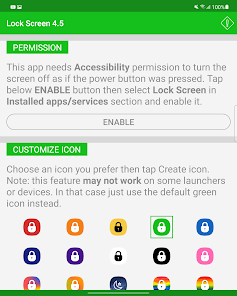
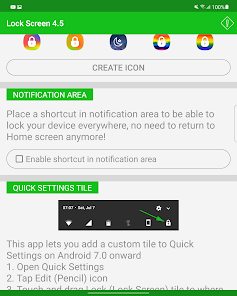
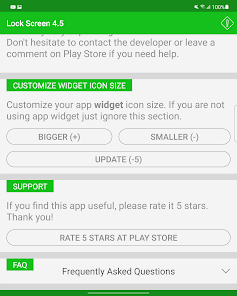
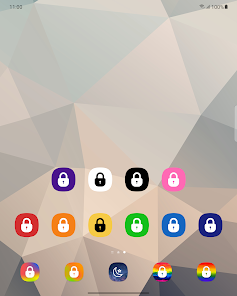
About this app
Turn Off Screen (Screen Lock) is a small, simple, fast and beautiful app that helps you turn your phone screen off and lock it without using the power button. Most importantly, it's well-optimized for almost every single manufacturer.
If your power button is broken, this is a must-have app. Even if your power button works fine, this screen lock app is still incredibly useful — it lets you turn off the screen instantly with just one tap, protecting your power button and extending your phone's lifespan.
★ FEATURES ★
✓ Just one tap to lock screen, one tap to turn off screen
✓ FLOATING BUTTON — a screen-off button that stays on top of all apps. Drag it anywhere, tap to lock screen instantly. More convenient than ever!
✓ Works with fingerprint sensor and Smart Lock (bluetooth, trusted devices, trusted face, trusted location, on-body detection...)
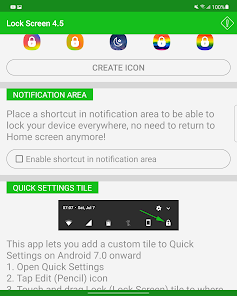
✓ Turn screen off from notification panel — notification won't show on your lockscreen
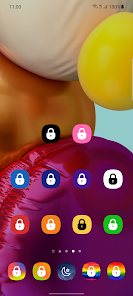
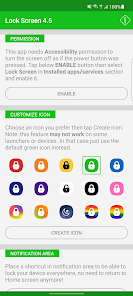
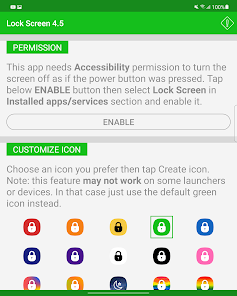
✓ Various icon colors to choose from (red, orange, yellow, green, blue, indigo, purple, white, black, pink...)
✓ Support dark theme for Android 9 onwards — automatically follows system theme
✓ Works flawlessly on foldable phones
✓ Well-optimized for every single manufacturer: Samsung, Xiaomi, OPPO, Vivo, Realme, Huawei, Google Pixel...
✓ Support Widget on home screen and lock screen
✓ Adaptive icon on Android 8 onwards
✓ Turn screen off and lock IMMEDIATELY — can still unlock with fingerprint on Android 9+
★ MULTIPLE WAYS TO LOCK ★
◆ Floating Button — always visible on screen, tap to lock, drag anywhere
◆ Home Screen Icon — tap the icon to turn off screen
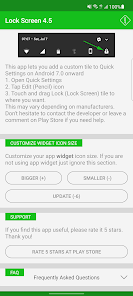
◆ Widget — place a lock widget anywhere on your screen
◆ Notification Panel — swipe down and tap to turn off screen quickly
★ WHY CHOOSE THIS APP? ★
◆ One-tap screen lock — faster than pressing the power button
◆ Floating button — always ready on any screen, no need to go home first
◆ Protect your power button — reduce hardware wear, extend phone life
◆ Ultra-light — no battery drain, no memory usage
◆ Free — full features, no limitations
★ PERMISSION ★
Android 9 onwards: This app requires Accessibility permission to turn screen off and lock screen as pressing power button.
Note: If the app is killed (removed from memory/force stop), that permission will be revoked and you will need to grant it again. Please don't kill this application to avoid being asked permission repeatedly.
Android 8 and below: This app uses the Device Administrator permission to turn the screen off and lock screen.
Note: Once you granted that permission, in order to uninstall the app please open the app's settings, find and tap the Deactivate button to revoke this permission first.
★ HELP, FEEDBACK and BUG REPORT ★
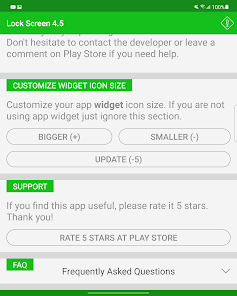
Please open the app, find FAQ section then tap on Feedback and bug report to send an email to the developer. Thank you.
If your power button is broken, this is a must-have app. Even if your power button works fine, this screen lock app is still incredibly useful — it lets you turn off the screen instantly with just one tap, protecting your power button and extending your phone's lifespan.
★ FEATURES ★
✓ Just one tap to lock screen, one tap to turn off screen
✓ FLOATING BUTTON — a screen-off button that stays on top of all apps. Drag it anywhere, tap to lock screen instantly. More convenient than ever!
✓ Works with fingerprint sensor and Smart Lock (bluetooth, trusted devices, trusted face, trusted location, on-body detection...)
✓ Turn screen off from notification panel — notification won't show on your lockscreen
✓ Various icon colors to choose from (red, orange, yellow, green, blue, indigo, purple, white, black, pink...)
✓ Support dark theme for Android 9 onwards — automatically follows system theme
✓ Works flawlessly on foldable phones
✓ Well-optimized for every single manufacturer: Samsung, Xiaomi, OPPO, Vivo, Realme, Huawei, Google Pixel...
✓ Support Widget on home screen and lock screen
✓ Adaptive icon on Android 8 onwards
✓ Turn screen off and lock IMMEDIATELY — can still unlock with fingerprint on Android 9+
★ MULTIPLE WAYS TO LOCK ★
◆ Floating Button — always visible on screen, tap to lock, drag anywhere
◆ Home Screen Icon — tap the icon to turn off screen
◆ Widget — place a lock widget anywhere on your screen
◆ Notification Panel — swipe down and tap to turn off screen quickly
★ WHY CHOOSE THIS APP? ★
◆ One-tap screen lock — faster than pressing the power button
◆ Floating button — always ready on any screen, no need to go home first
◆ Protect your power button — reduce hardware wear, extend phone life
◆ Ultra-light — no battery drain, no memory usage
◆ Free — full features, no limitations
★ PERMISSION ★
Android 9 onwards: This app requires Accessibility permission to turn screen off and lock screen as pressing power button.
Note: If the app is killed (removed from memory/force stop), that permission will be revoked and you will need to grant it again. Please don't kill this application to avoid being asked permission repeatedly.
Android 8 and below: This app uses the Device Administrator permission to turn the screen off and lock screen.
Note: Once you granted that permission, in order to uninstall the app please open the app's settings, find and tap the Deactivate button to revoke this permission first.
★ HELP, FEEDBACK and BUG REPORT ★
Please open the app, find FAQ section then tap on Feedback and bug report to send an email to the developer. Thank you.
Updated on
Safety starts with understanding how developers collect and share your data. Data privacy and security practices may vary based on your use, region, and age. The developer provided this information and may update it over time.


Ratings and reviews
4.5
37.3K reviews

Victor Phalani
- Flag inappropriate
- Show review history
March 31, 2026
Great App. It has met my needs the only terrible part is ads in settings but can't stop me from rating 5-Stars because to it's function, it works with no distractions. Please in the next update include "double tap" feature/option to wake it up but be careful when making some updates, it shouldn't start malfunction.
1 person found this review helpful

A Google user
- Flag inappropriate
- Show review history
December 16, 2018
The best locking screen!! Works perfectly with my Mi A2 just the way I wanted, which I couldn't find in other apps. I don't understand the complain of others. This app is small, works with the fingerprint scanner, and it can also create a locking button under the notification!! Most importantly it's not just making the screen to black, but it really does lock the screen!! Five stars!!
48 people found this review helpful
A Google user
- Flag inappropriate
January 17, 2019
Best locking app that works with finger scanner but found an issue! This app had no flaws, until I decided to use the "Youtube Red" app with the video minimized playing in the background and decided to lock my screen. It turned the screen black but the video stayed minimized and playing. NOT locking my phone just making the background black. Even after a couple of minutes. This is not a problem if you don't use the "Unlock" with fingerprint option.
6 people found this review helpful
What’s new
- New feature: support floating button, something like Assessive Touch
- Update UI
- Fix Quick setting tile issue
- Update UI
- Fix Quick setting tile issue
App support
About the developer
Van Hoang Phuong
droidmaster07@gmail.com
X. Điền Hòa, H. Phong Điền
Phong Điền
Thừa Thiên–Huế 70000
Vietnam


