Voice Recorder
Contains adsIn-app purchases
4.7star
361K reviews

Everyone
info
10M+
Downloads
Enjoy this app for free, plus many more free of ads and in-app purchases, with a Google Play Pass subscription. Learn more

About this app
Voice recorder - Audio recorder
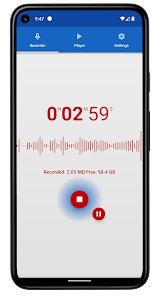
Voice Recorder is free, full-featured, beautifully designed and easy to use audio recording app for android.
Our sound recorder provides high quality recordings without limits of time (only limited by memory size).
You can use it as a regular dictaphone for record voice notes and memos, business meetings, interviews, lectures, speeches, concerts, sleep talking :) or anything else.
This audio recorder works well on smartphones and tablets, with and without external storage.
More features and details
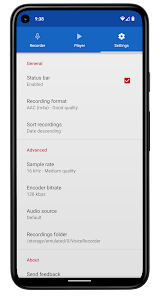
• 4 Different audio formats: MP3, high quality PCM (wav), good quality AAC (m4a/mp4) and AMR (3gp) to save space
• Adjustable sample rate from phone quality (8 kHz) up to CD quality (44 kHz)
• Changeable bitrate from 32 up to 320 kbps
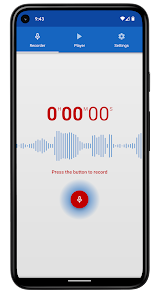
• Live audio spectrum analyzer
• Recording in background even when screen is off
• Customizable recordings folder
• Selectable audio source (microphones or phone call)
NOTE: This app is not dedicated call recorder and may not work properly on some devices.
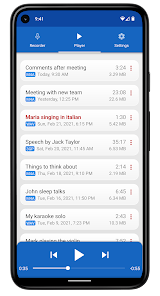
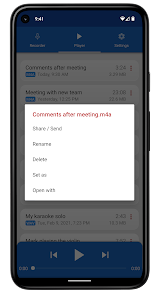
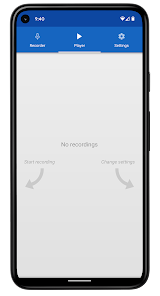
• Built-in user-friendly media player like in a regular mp3 player
• Send and share via e-mail and other apps
• Rename and delete your recordings
• Set recording as ringtone, alarm or notification sound
• Open with option allows you to play and edit sounds in other apps
• Control recorder and player from the status bar
• Blinking LED notification during recording and playing when screen is off (for devices with notifiation LED)
• Automatic stop when out of memory
• Sorting recordings by date, name, size and duration
• Saving sounds to android media library
About Us
• Visit SplendApps.com: http://splendapps.com/
• Our Privacy Policy: http://splendapps.com/privacy-policy
• Contact Us: http://splendapps.com/contact-us
Follow Us
• Facebook: https://www.facebook.com/SplendApps/
• Instagram: https://www.instagram.com/splendapps/
• Twitter: https://twitter.com/SplendApps
Voice Recorder is free, full-featured, beautifully designed and easy to use audio recording app for android.
Our sound recorder provides high quality recordings without limits of time (only limited by memory size).
You can use it as a regular dictaphone for record voice notes and memos, business meetings, interviews, lectures, speeches, concerts, sleep talking :) or anything else.
This audio recorder works well on smartphones and tablets, with and without external storage.
More features and details
• 4 Different audio formats: MP3, high quality PCM (wav), good quality AAC (m4a/mp4) and AMR (3gp) to save space
• Adjustable sample rate from phone quality (8 kHz) up to CD quality (44 kHz)
• Changeable bitrate from 32 up to 320 kbps
• Live audio spectrum analyzer
• Recording in background even when screen is off
• Customizable recordings folder
• Selectable audio source (microphones or phone call)
NOTE: This app is not dedicated call recorder and may not work properly on some devices.
• Built-in user-friendly media player like in a regular mp3 player
• Send and share via e-mail and other apps
• Rename and delete your recordings
• Set recording as ringtone, alarm or notification sound
• Open with option allows you to play and edit sounds in other apps
• Control recorder and player from the status bar
• Blinking LED notification during recording and playing when screen is off (for devices with notifiation LED)
• Automatic stop when out of memory
• Sorting recordings by date, name, size and duration
• Saving sounds to android media library
About Us
• Visit SplendApps.com: http://splendapps.com/
• Our Privacy Policy: http://splendapps.com/privacy-policy
• Contact Us: http://splendapps.com/contact-us
Follow Us
• Facebook: https://www.facebook.com/SplendApps/
• Instagram: https://www.instagram.com/splendapps/
• Twitter: https://twitter.com/SplendApps
Updated on
Safety starts with understanding how developers collect and share your data. Data privacy and security practices may vary based on your use, region, and age. The developer provided this information and may update it over time.

No data shared with third parties
Learn more about how developers declare sharing

No data collected
Learn more about how developers declare collection

Data is encrypted in transit

Data can’t be deleted
Ratings and reviews
4.7
346K reviews

A Google user
- Flag inappropriate
October 22, 2019
Very clear and accurate recordings! Picks up a roomful of musicians! Easy to set up for recording. I recorded an hour-long performance and wish I knew how to cut the songs into individual units. Also, I'm not too tech savvy so it took awhile for me to figure out how to share my recording with others via messenger or email. The problem was that my file was so large, I couldn't share it as is, so I had to create a link.
720 people found this review helpful

Sanjida Sharmin
- Flag inappropriate
June 24, 2020
Very useful recorder app and easy to work with. I downloaded it because I would be able to record all my incoming & outgoing calls as well as use it as a voice recorder. The app is easy to use, and the recordings have good sound quality. There are some ads but they are not very intrusive. However, sometimes when I'm recording with this app, the recording will stop for no reason. I get frustrated because whenever this happens, I have to start the song I'm singing completely over.
554 people found this review helpful

brajesh kumar Singh
- Flag inappropriate
April 20, 2026
after updaing split view has become disable because in earlier version split view was available
1 person found this review helpful
What’s new
Usability improvements and minor bug fixes.
App support
About the developer
MSIT MATEUSZ SEIFERT
splendapps@gmail.com
20-11 Al. Śliwowa
54-106 Wrocław
Poland
+48 785 788 248


