
DevCheck Device & System Info
4.6star
28.7K reviews
10M+
Downloads

Everyone
info


About this app
Monitor your hardware in real time and get complete information about your device, including model, CPU, GPU, memory, battery, camera, storage, network, sensors, and operating system. DevCheck presents all essential hardware and system information in a clear, accurate, and well-organized way.
DevCheck provides some of the most detailed CPU and System-on-a-Chip (SoC) information available on Android. View specifications for Bluetooth, GPU, RAM, storage, and other hardware in your phone or tablet. See detailed Wi-Fi and mobile network information, including dual-SIM support. Monitor sensors in real time and learn about your device’s operating system and architecture. Rooted devices and Shizuku are supported for accessing additional system information on compatible devices.
Dashboard:
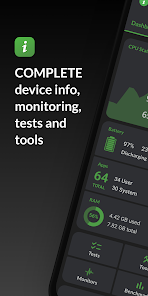
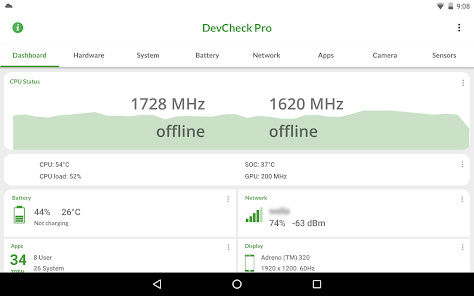
A comprehensive overview of critical device and hardware information, including real-time monitoring of CPU frequencies, memory usage, battery statistics, deep sleep, and uptime, with summaries and shortcuts to system settings.
Hardware:
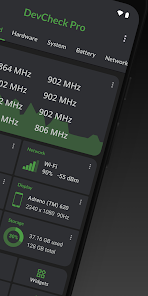
Detailed specifications for your SoC, CPU, GPU, memory, storage, Bluetooth, and other hardware, including chip names and manufacturers, architecture, processor cores and configuration, manufacturing process, frequencies, governors, storage capacity, input devices, and display specifications.
System:
Complete system and software information, including device codename, brand, manufacturer, bootloader, radio, Android version, security patch level, and kernel. DevCheck can also check root, BusyBox, KNOX status, and other operating system details.
Battery:
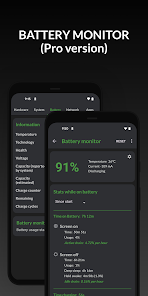
Real-time battery information including status, temperature, level, technology, health, voltage, current, power, and capacity. The Pro version adds detailed battery usage tracking with screen-on and screen-off statistics using the Battery Monitor service.
Network:
Detailed information about Wi-Fi and mobile/cellular connections, including IPv4 and IPv6 addresses, connection details, operator, phone and network type, public IP address, and one of the most complete dual-SIM implementations available.
Apps:
Detailed information and management for all installed apps.
Camera:
Advanced camera specifications including aperture, focal length, ISO range, RAW capability, 35mm equivalents, resolution (megapixels), crop factor, field of view, focus modes, flash modes, JPEG quality and image formats, and available face detection modes.
Sensors:
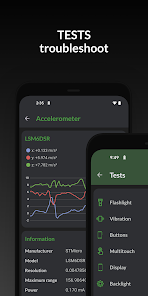
A complete list of all sensors on the device, including type, manufacturer, power usage, and resolution, with real-time graphical data for accelerometer, step detector, gyroscope, proximity, light, and more.
Tests:
Flashlight, vibrator, buttons, multitouch, display, backlight, charging, speakers, headset, earpiece, microphone, and biometric scanners (the last six tests require the Pro version).
Tools:
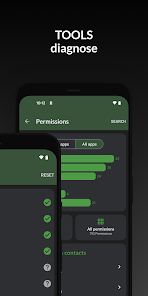
Root Check, Bluetooth Scan, CPU Analysis, Integrity Check (Pro), Permissions Summary (Pro), Wi-Fi Scan (Pro), Network Mapper (Pro), Usage Stats (Pro), GPS tools (Pro), and USB Check (Pro).
Widgets (Pro):
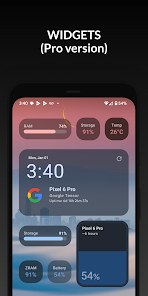
Modern, customizable widgets for your home screen. Monitor battery, RAM, storage, and other stats at a glance.
Floating Monitors (Pro):
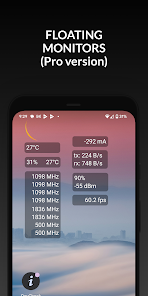
Customizable, movable, always-on-top transparent overlays that display real-time information such as CPU frequencies and temperatures, battery status, network activity, and more while using other apps.
Pro Version
Available via in-app purchase.
The Pro version unlocks all tests and tools, benchmarking, Battery Monitor, home screen widgets, floating monitors, and custom color schemes.
Permissions & Privacy
DevCheck requires various permissions to display detailed device information.
No personal data is ever collected or shared.
Your privacy is always respected.
DevCheck is completely ad-free.
DevCheck provides some of the most detailed CPU and System-on-a-Chip (SoC) information available on Android. View specifications for Bluetooth, GPU, RAM, storage, and other hardware in your phone or tablet. See detailed Wi-Fi and mobile network information, including dual-SIM support. Monitor sensors in real time and learn about your device’s operating system and architecture. Rooted devices and Shizuku are supported for accessing additional system information on compatible devices.
Dashboard:
A comprehensive overview of critical device and hardware information, including real-time monitoring of CPU frequencies, memory usage, battery statistics, deep sleep, and uptime, with summaries and shortcuts to system settings.
Hardware:
Detailed specifications for your SoC, CPU, GPU, memory, storage, Bluetooth, and other hardware, including chip names and manufacturers, architecture, processor cores and configuration, manufacturing process, frequencies, governors, storage capacity, input devices, and display specifications.
System:
Complete system and software information, including device codename, brand, manufacturer, bootloader, radio, Android version, security patch level, and kernel. DevCheck can also check root, BusyBox, KNOX status, and other operating system details.
Battery:
Real-time battery information including status, temperature, level, technology, health, voltage, current, power, and capacity. The Pro version adds detailed battery usage tracking with screen-on and screen-off statistics using the Battery Monitor service.
Network:
Detailed information about Wi-Fi and mobile/cellular connections, including IPv4 and IPv6 addresses, connection details, operator, phone and network type, public IP address, and one of the most complete dual-SIM implementations available.
Apps:
Detailed information and management for all installed apps.
Camera:
Advanced camera specifications including aperture, focal length, ISO range, RAW capability, 35mm equivalents, resolution (megapixels), crop factor, field of view, focus modes, flash modes, JPEG quality and image formats, and available face detection modes.
Sensors:
A complete list of all sensors on the device, including type, manufacturer, power usage, and resolution, with real-time graphical data for accelerometer, step detector, gyroscope, proximity, light, and more.
Tests:
Flashlight, vibrator, buttons, multitouch, display, backlight, charging, speakers, headset, earpiece, microphone, and biometric scanners (the last six tests require the Pro version).
Tools:
Root Check, Bluetooth Scan, CPU Analysis, Integrity Check (Pro), Permissions Summary (Pro), Wi-Fi Scan (Pro), Network Mapper (Pro), Usage Stats (Pro), GPS tools (Pro), and USB Check (Pro).
Widgets (Pro):
Modern, customizable widgets for your home screen. Monitor battery, RAM, storage, and other stats at a glance.
Floating Monitors (Pro):
Customizable, movable, always-on-top transparent overlays that display real-time information such as CPU frequencies and temperatures, battery status, network activity, and more while using other apps.
Pro Version
Available via in-app purchase.
The Pro version unlocks all tests and tools, benchmarking, Battery Monitor, home screen widgets, floating monitors, and custom color schemes.
Permissions & Privacy
DevCheck requires various permissions to display detailed device information.
No personal data is ever collected or shared.
Your privacy is always respected.
DevCheck is completely ad-free.
Updated on
Safety starts with understanding how developers collect and share your data. Data privacy and security practices may vary based on your use, region, and age. The developer provided this information and may update it over time.

No data shared with third parties
Learn more about how developers declare sharing

No data collected
Learn more about how developers declare collection

Data is encrypted in transit
Ratings and reviews
4.6
27.5K reviews

ᴀʟʟᴇɴ ᴅᴀʏᴀᴏ
- Flag inappropriate
- Show review history
March 21, 2026
This app is very helpfull as you can see to check what stats or temps you wanted to see for your phone real-time. Especially the widgets are very helpfull Although, the new version removed my lifetime subscription and pressing the "restore purchases" doesn't do anything. Edit: The devs replied and helped on the issue too! Big thanks!
5 people found this review helpful
flar2
March 21, 2026
It's a problem with google play. wipe google play store data and reboot

Maynard Marcelino
- Flag inappropriate
- Show review history
April 5, 2026
except battery temp, all other temperature especially cpu and soc temp not showing after update. (the location of it in dashboard are replaced with "upload device data", already submit that but nothing changes). tried older version (5.40) and it show the other temp normally, but other thing looks blurry so not using it and change back to this version.
1 person found this review helpful
flar2
April 5, 2026
You should go to the temperature screen and reset. If it shows on the old version, it will also show on the new version. Temperature sensors are never removed, only added

Dare Browne
- Flag inappropriate
- Show review history
March 20, 2026
Good app. But please can you add options like CPU load/usage and GPU load? B'cos the load monitor, which I guess is the system monitor, doesn't give info about the GPU usage. And please can you add a few more benchmarks for the CPU and GPU benchmarks? Thanks & good work.
4 people found this review helpful
What’s new
6.31/6.32/6.34:
-support new hardware
-bug fixes
-target API 36
6.30:
-support new hardware
-Network usage (PRO)
-improve camera, battery, codec and cpu info
-bug fixes and improvements
6.28:
-Screen Time (PRO)
-bug fixes
6.19/6.24:
-improve battery, network, and other hardware info
-updated and improved some UI elements
-new temperature screen
-Network Mapper (PRO)
6.17:
-Shizuku support
-task manager (requires Shizuku and PRO)
-improve temperature, battery, GPU, vulkan and OpenGL info
-support new hardware
-bug fixes
-target API 36
6.30:
-support new hardware
-Network usage (PRO)
-improve camera, battery, codec and cpu info
-bug fixes and improvements
6.28:
-Screen Time (PRO)
-bug fixes
6.19/6.24:
-improve battery, network, and other hardware info
-updated and improved some UI elements
-new temperature screen
-Network Mapper (PRO)
6.17:
-Shizuku support
-task manager (requires Shizuku and PRO)
-improve temperature, battery, GPU, vulkan and OpenGL info
App support
About the developer
Ex Solutions Inc.
elementalxcontact@gmail.com
9093 West Ridge Line
Blenheim, ON N0P 1A0
Canada
+1 613-796-8715


