
Pixlr AI Photo & Video Editor




About this app
Unleash your creativity with Pixlr AI Art Photo Editor (formerly Pixlr Express) – your go-to free photo editor powered by advanced AI technology. Join over 18 million creators worldwide who trust Pixlr to transform their images with ease and precision. Whether you're a beginner or a seasoned photographer, Pixlr provides an intuitive platform to create stunning visuals with just a few clicks.
Capture any moment and let your creativity shine with over 2 million combinations of FREE effects, overlays, and filters. Seamlessly share your photos with friends or followers through email, Instagram, Facebook, TikTok, or any other social network.
New AI-Powered Features
- AI Generative Fill – Highlight any area in your photo and watch as Pixlr's AI-powered generator seamlessly fills it with objects.
- AI Remove Object – Effortlessly remove any object from your image, and let our AI intelligently fill in the blanks.
- AI Remove Background – Enjoy pixel-perfect background removal, thanks to our cutting-edge AI editor.
Comprehensive Photo Editing Features
- Explore seasonally updated multi-layered Social Media templates designed to elevate your digital content.
- Create stunning photo collages effortlessly with a variety of preset collage designs, grid styles, customized ratios, and backgrounds.
- Instantly adjust the color of your photos in one click using Auto Fix, making your images pop with vibrant hues.
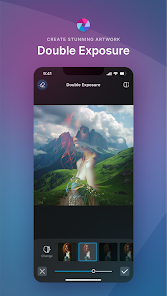
- Experiment with Double Exposure to create breathtaking effects using layers and adjustable transparency.
- Add artistic flair to your images with Stylize effects like pencil sketch, poster, watercolor, and more.
- Remove blemishes, red-eye, smoothen skin, or whiten teeth effortlessly with simple and precise tools.
- Highlight specific colors in your photo using the Color Splash effect, or create depth with Focal Blur.
- Choose from a wide range of effect packs to give your photos the look and feel you desire.
- Adjust the tone of your photos using overlays – amplify, cool down, or add surreal shades to your images.
- Easily add text to your photos with a variety of fonts, ensuring your message stands out.
- Complete your editing with the perfect border – select a style that complements your photo.
- Keep your content fresh with our growing library of additional effects, overlays, and border packs.
- Save time by keeping track of your favorite effects and overlays with the convenient Favorites button.
- Quickly crop and resize images to your desired dimensions before saving and sharing.
Connect with Us
We value your feedback and ideas, as they help us make Pixlr the best photo editor experience possible. Connect with us on Instagram (@pixlr), TikTok (@pixlrofficial), or Facebook (/Pixlr) to stay updated with the latest features and news.
For support or bug reporting, feel free to reach out to us at info@pixlr.com.


Ratings and reviews

- Flag inappropriate
- Show review history

- Flag inappropriate
- Show review history

- Flag inappropriate
What’s new
- 🎨 New layer management: Organise, select, reorder and manage multiple layers directly from your mobile device.
- ✍️ New text styling tools: Customise text with more formatting and styling options.
- 🛠️ Bug fixes and performance improvements for a smoother and more reliable editing experience.


