
B-Folders Password Manager
In-app purchases
4.3star
3.9K reviewsinfo
100K+
Downloads

PEGI 3
info
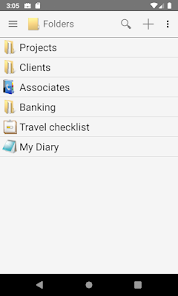
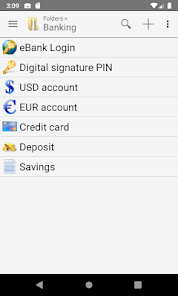

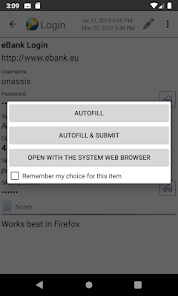
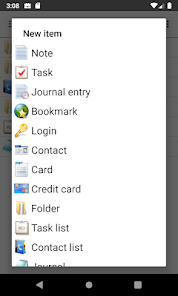

About this app
The password manager and secure notes organizer that syncs across devices directly, without any cloud services.
Trusted by more than 400,000 users on Google Play, Amazon App store and local app stores.
Totally secure your data
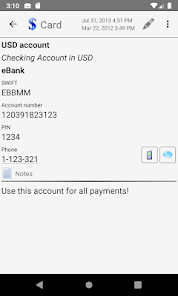
Keeps your secure notes, passwords, PINs, bank account numbers, credit card info, contacts, tasks, journals and bookmarks safe like in a vault.
All your data is fully encrypted with a strong, password-based, government-grade 256-bit AES cipher. This way your information is protected from unauthorized access by thieves, hackers and malware.
Easily sync all your devices
The unique sync technology of B-Folders allows you to securely keep your data in sync on multiple computers and mobile devices without a central server so you never have to store your private information on the Web.
All-in-one, secure and integrated
* password manager
* notepad
* task manager
* bookmark manager
* journal
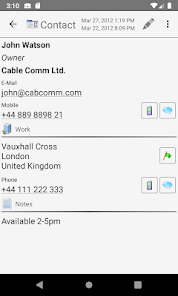
* contact manager
Editions:
* Desktop Edition for Windows, Mac and Linux (paid)
* Android Edition for smartphones and tablets (free with in-app purchases)
Special features:
* organize a lot of passwords and other items in a hierarchy of folders
* autofills usernames and passwords
* virtual keypad for easy entry of numeric passwords
* Password generator
* Clipboard auto-clear
* Self-destruct function (optional)
* Master password guessing protection (progressive delay)
By using the desktop edition, you can import data from:
* Password managers eWallet, Spb Wallet, SplashID
* BlackBerry MemoPad, Contacts and Tasks
* Palm Desktop memos and addresses/contacts
* CSV and TSV files
And more...
* instantly log in to web sites
* keep bank accounts, memberships, identity documents, serial numbers
* use it as an outliner to brainstorm and organize ideas
* keep checklists and shopping items
* keep track of projects and sub-projects
Trusted by more than 400,000 users on Google Play, Amazon App store and local app stores.
Totally secure your data
Keeps your secure notes, passwords, PINs, bank account numbers, credit card info, contacts, tasks, journals and bookmarks safe like in a vault.
All your data is fully encrypted with a strong, password-based, government-grade 256-bit AES cipher. This way your information is protected from unauthorized access by thieves, hackers and malware.
Easily sync all your devices
The unique sync technology of B-Folders allows you to securely keep your data in sync on multiple computers and mobile devices without a central server so you never have to store your private information on the Web.
All-in-one, secure and integrated
* password manager
* notepad
* task manager
* bookmark manager
* journal
* contact manager
Editions:
* Desktop Edition for Windows, Mac and Linux (paid)
* Android Edition for smartphones and tablets (free with in-app purchases)
Special features:
* organize a lot of passwords and other items in a hierarchy of folders
* autofills usernames and passwords
* virtual keypad for easy entry of numeric passwords
* Password generator
* Clipboard auto-clear
* Self-destruct function (optional)
* Master password guessing protection (progressive delay)
By using the desktop edition, you can import data from:
* Password managers eWallet, Spb Wallet, SplashID
* BlackBerry MemoPad, Contacts and Tasks
* Palm Desktop memos and addresses/contacts
* CSV and TSV files
And more...
* instantly log in to web sites
* keep bank accounts, memberships, identity documents, serial numbers
* use it as an outliner to brainstorm and organize ideas
* keep checklists and shopping items
* keep track of projects and sub-projects
Updated on
Safety starts with understanding how developers collect and share your data. Data privacy and security practices may vary based on your use, region, and age. The developer provided this information and may update it over time.

No data shared with third parties
Learn more about how developers declare sharing

No data collected
Learn more about how developers declare collection
Ratings and reviews
4.3
3.64K reviews

James DuPuy
- Flag inappropriate
May 1, 2025
This is without a doubt the best database app for storing all your passwords, and credit cards and anything you want to keep safe. It's been around for many years and has worked flawlessly on every device I've had it on. Syncing is simple and almost instant. I've used it for at least 10+ years and am super satisfied!
4 people found this review helpful

Jay Brodbar
- Flag inappropriate
- Show review history
November 27, 2025
Have used (originally PC) version since its inception. Sadly the PC version may have fatal flaw and they do not answer their support email. Is the company still functioning? (update) Support in terms of contact has gotten better. It is a fabulous program, but hasn't materially updated in many years.

NAB1
- Flag inappropriate
- Show review history
November 22, 2025
Samsung S23 Ultra. Since the update on 22/11/25 I cannot see the back button and home button etc. The bar at the bottom of the screen is bright white and so are the icons! before the update the icons were grey so they stood out.
10 people found this review helpful
What’s new
This version lets you change your database password by confirming with your fingerprint instead of your old password. It also includes stability and UX improvements and aligns with Android 16 changes.
App support
About the developer
JOINTLOGIC EOOD
support@jointlogic.com
20 Zvezda str.
4001 Plovdiv
Bulgaria
+359 88 532 7070