
Add Text: Text on Photo Editor
Contains adsIn-app purchases
4.7star
161K reviewsinfo
10M+
Downloads

PEGI 3
info









About this app
Hello & Welcome!
Add Text app is the all-in-one tool for text creation. Texts can be added to a photo, gradient, solid color or a transparent background.
HIGHLIGHTS
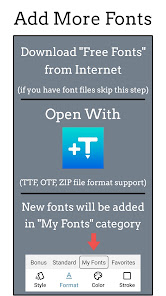
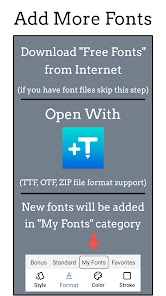
• 1800+ fonts, + ability to add unlimited number of your custom fonts (including emoji fonts)
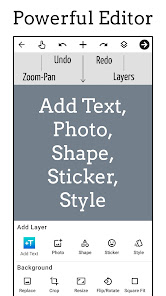
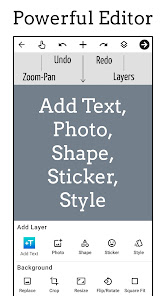
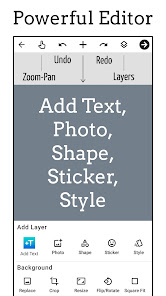
• Add layers: texts, photos, shapes, stickers and saved text styles
• Design parts of the text separately: supported in Font, Format, Color, Stroke, Highlight tools
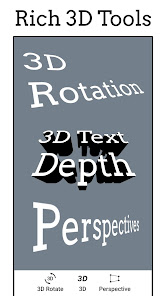
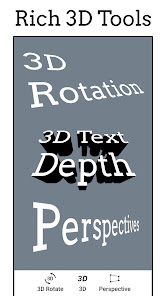
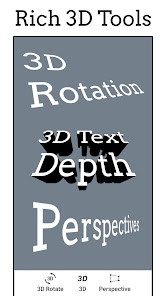
• 3D text tools: 3D Rotate, 3D Depth, Perspective
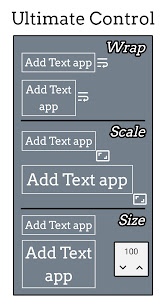
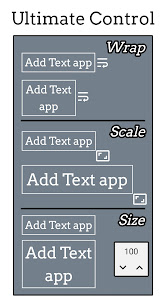
• Change text size, wrapping and scale to get any type of text layout
• Layers view: reorder layers (overlays), change visibility, lock/unlock for each layer
• Tools for background: Effects, Crop, Resize, Flip/Rotate, Square Fit
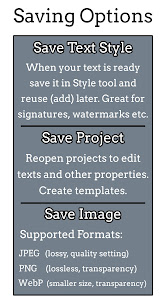
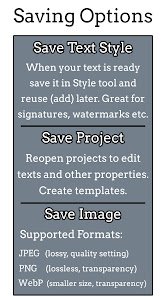
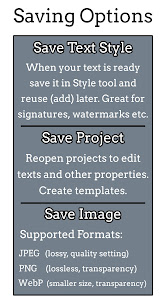
• Save your text creation in Style tool to reuse later for watermarks, signatures, branding etc
• Save project to edit & reuse later, create templates
• Save image as JPEG, PNG or WebP file
• Dark mode to reduce eye strain and save battery life
• Professional support for all users: hi@addtextapp.com
• Constantly maintained according to our users' feedback
FEATURES
• Add multiple texts (and overlays) on photo, edit each one without losing final preview
• Move, scale, rotate, edit, copy, delete (for overlays) and wrap the text by text-box handles
• Font and Format tools: change font, alignment, text size, with bold, italic, underlined & strikethrough options
• Change text color & opacity: can be applied on each word/letter separately
• Add Stroke (Outline) to text with colors and stroke width
• Highlight the whole text or separate parts with different colors & opacity
• Letter & Line spacing
• Positioning grid with snapping option, flip overlay horizontally and/or vertically
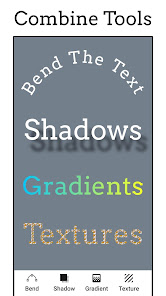
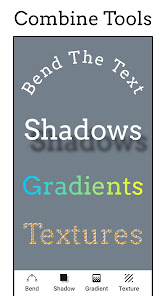
• Bend the text: text along a curve
• Shadow with colors, opacity, blur and positioning
• Predefined Gradients: edit start/end colors and gradient angle
• Texture by adding any photo and make any type of transformation with it
• Opacity and Blend with background
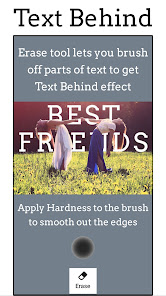
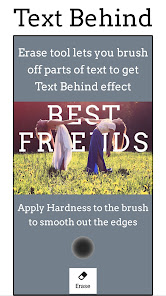
• Erase tool: Clear parts of text with brush to achieve Text Behind effect (see screenshot)
• Color tools have eyedropper, color picker and predefined colors
• Add Stickers/Emojis, hundreds of them arranged in 8 categories
• Add any photo from your phone as an overlay
• Add 100+ shapes: with both filled and outlined versions
• Tools for other overlays: Opacity, Position, Perspective, Crop, Shape color, stroke & width
• Change the background without starting your work from scratch
• Pan mode: move canvas with one finger & pinch to zoom without worrying to accidentally touch overlays
• Pin mode: pins the background so that you won't accidentally change its position
• Fit: bring canvas to its original position (fit to screen)
• Undo & Redo history
• Fast sharing: showing recent apps you shared your work to
• All these and more in a small sized APK
If you come across any problem or have a suggestion please contact at hi@addtextapp.com
Spread the word to make this free tool available for everyone. Inspire us for the next releases. And rate us in Play Store.
So go ahead and create a meme, quote, Instagram story, Youtube thumbnail, banner, cover photo with captions, word art, poster, flyer, invitation, logo etc.
Stay Young at Heart!
Nareck
Add Text app is the all-in-one tool for text creation. Texts can be added to a photo, gradient, solid color or a transparent background.
HIGHLIGHTS
• 1800+ fonts, + ability to add unlimited number of your custom fonts (including emoji fonts)
• Add layers: texts, photos, shapes, stickers and saved text styles
• Design parts of the text separately: supported in Font, Format, Color, Stroke, Highlight tools
• 3D text tools: 3D Rotate, 3D Depth, Perspective
• Change text size, wrapping and scale to get any type of text layout
• Layers view: reorder layers (overlays), change visibility, lock/unlock for each layer
• Tools for background: Effects, Crop, Resize, Flip/Rotate, Square Fit
• Save your text creation in Style tool to reuse later for watermarks, signatures, branding etc
• Save project to edit & reuse later, create templates
• Save image as JPEG, PNG or WebP file
• Dark mode to reduce eye strain and save battery life
• Professional support for all users: hi@addtextapp.com
• Constantly maintained according to our users' feedback
FEATURES
• Add multiple texts (and overlays) on photo, edit each one without losing final preview
• Move, scale, rotate, edit, copy, delete (for overlays) and wrap the text by text-box handles
• Font and Format tools: change font, alignment, text size, with bold, italic, underlined & strikethrough options
• Change text color & opacity: can be applied on each word/letter separately
• Add Stroke (Outline) to text with colors and stroke width
• Highlight the whole text or separate parts with different colors & opacity
• Letter & Line spacing
• Positioning grid with snapping option, flip overlay horizontally and/or vertically
• Bend the text: text along a curve
• Shadow with colors, opacity, blur and positioning
• Predefined Gradients: edit start/end colors and gradient angle
• Texture by adding any photo and make any type of transformation with it
• Opacity and Blend with background
• Erase tool: Clear parts of text with brush to achieve Text Behind effect (see screenshot)
• Color tools have eyedropper, color picker and predefined colors
• Add Stickers/Emojis, hundreds of them arranged in 8 categories
• Add any photo from your phone as an overlay
• Add 100+ shapes: with both filled and outlined versions
• Tools for other overlays: Opacity, Position, Perspective, Crop, Shape color, stroke & width
• Change the background without starting your work from scratch
• Pan mode: move canvas with one finger & pinch to zoom without worrying to accidentally touch overlays
• Pin mode: pins the background so that you won't accidentally change its position
• Fit: bring canvas to its original position (fit to screen)
• Undo & Redo history
• Fast sharing: showing recent apps you shared your work to
• All these and more in a small sized APK
If you come across any problem or have a suggestion please contact at hi@addtextapp.com
Spread the word to make this free tool available for everyone. Inspire us for the next releases. And rate us in Play Store.
So go ahead and create a meme, quote, Instagram story, Youtube thumbnail, banner, cover photo with captions, word art, poster, flyer, invitation, logo etc.
Stay Young at Heart!
Nareck
Updated on
Safety starts with understanding how developers collect and share your data. Data privacy and security practices may vary based on your use, region, and age. The developer provided this information and may update it over time.


Ratings and reviews
4.7
153K reviews

Jhumur Ghosh
- Flag inappropriate
November 28, 2025
The best app I have ever tried! I want to tell that if someone have to edit any type of document on any type of picture that can be fixed then they should use this app it has a amazing feature that gives you power that you can match the colour of the document so you don't have to find the exact colour for hours and hours the developers are GOATED!

Solcito Martinez
- Flag inappropriate
November 11, 2025
absolutely useful and easy to use. Won't ask you to pay for anything if you really need to do some simple stuff
5 people found this review helpful

Muzikayise Mlondo
- Flag inappropriate
- Show review history
November 26, 2025
This is the best app to edit and create just about anything! The limit is your imagination.
1 person found this review helpful
What’s new
Support for Android 15 devices.
If you find any problem, please report: hi@addtextapp.com
Thank You!
If you find any problem, please report: hi@addtextapp.com
Thank You!
App support
About the developer
Narek Khachatryan
hi@addtextapp.com
Gyulbenkyan 19/1, 50
Yerevan 0019
Armenia
undefined


