Voice Notify
3.8star
3.52K reviewsinfo
100K+
Downloads

PEGI 3
info




About this app
Voice Notify announces status bar notification messages using Text-To-Speech (TTS) so you don't need to look at the screen to know what a notification says.
FEATURES:
• Widget and quick settings tile to suspend Voice Notify
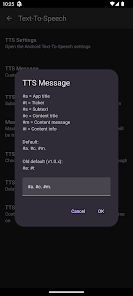
• Customizable TTS message
• Replace text to be spoken
• Ignore or enable for individual apps
• Ignore or require notifications containing specified text
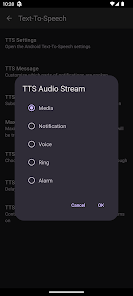
• Choice of TTS audio stream
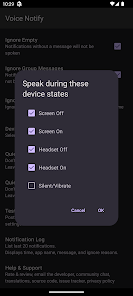
• Choice of speaking when screen or headset is on or off, or while in silent/vibrate mode
• Quiet Time
• Shake-to-silence
• Limit length of spoken message
• Repeat notifications at custom interval while screen off
• Custom delay of TTS after notification
• Most settings can be overridden per-app
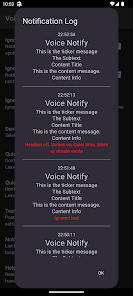
• Notification log
• Post a test notification
• Backup and restore settings as zip file
• Light and dark themes (follows system theme)
GETTING STARTED:
Voice Notify operates through Android's Notification Listener service and must be enabled in the Notification Access settings.
A shortcut to that screen is provided at the top of the main Voice Notify screen.
Some device brands, such as Xiaomi and Samsung among several others, have an additional permission that by default prevents apps like Voice Notify from auto-starting or running in the background.
When Voice Notify is opened on a known affected device and the service isn't running, a dialog will appear with instructions and in some cases can open directly into the relevant settings screen.
PERMISSIONS:
• Post Notifications - Required to post the test notification. This is typically the only permission that Android shows to the user.
• Query All Packages - Required to fetch a list of all installed apps for the App List and allow for per-app settings
• Bluetooth - Required to detect whether Bluetooth headset is connected
• Vibrate - Required for Test feature while device is in vibrate mode
• Modify Audio Settings - Required for improved wired headset detection
• Read Phone State - Required to interrupt TTS if a phone call becomes active [Android 11 and below]
ABOUT AUDIO STREAM OPTION:
Behavior of audio streams may vary by device or Android version, so I advise doing your own testing to determine which stream is right for you. The Media stream (default) should be good for most people.
DISCLAIMER:
Voice Notify developers are not responsible for the notifications that are announced. Options are provided to help prevent unwanted announcing of notifications. Use at your own risk!
PROBLEMS:
Please report issues at:
https://github.com/pilot51/voicenotify/issues
If necessary, you can install any version from the releases section on GitHub:
https://github.com/pilot51/voicenotify/releases
SOURCE CODE:
Voice Notify is open source under the Apache License. https://github.com/pilot51/voicenotify
Code contributor details can be found at https://github.com/pilot51/voicenotify/graphs/contributors
TRANSLATIONS:
The app is written in US English.
Translations are crowdsourced at https://hosted.weblate.org/projects/voice-notify
Given the nature of crowdsourcing and the continual updates to the app, most translations are only partially complete.
Translations (21):
Chinese (Simplified Han), Czech, Dutch, Finnish, French, German, Greek, Hebrew, Hindi, Hungarian, Indonesian, Italian, Japanese, Malay, Norwegian (Bokmål), Polish, Portuguese, Russian, Spanish, Tamil, Vietnamese
Thank you to all of the developers, translators, and testers who donated their time to help make Voice Notify better!
FEATURES:
• Widget and quick settings tile to suspend Voice Notify
• Customizable TTS message
• Replace text to be spoken
• Ignore or enable for individual apps
• Ignore or require notifications containing specified text
• Choice of TTS audio stream
• Choice of speaking when screen or headset is on or off, or while in silent/vibrate mode
• Quiet Time
• Shake-to-silence
• Limit length of spoken message
• Repeat notifications at custom interval while screen off
• Custom delay of TTS after notification
• Most settings can be overridden per-app
• Notification log
• Post a test notification
• Backup and restore settings as zip file
• Light and dark themes (follows system theme)
GETTING STARTED:
Voice Notify operates through Android's Notification Listener service and must be enabled in the Notification Access settings.
A shortcut to that screen is provided at the top of the main Voice Notify screen.
Some device brands, such as Xiaomi and Samsung among several others, have an additional permission that by default prevents apps like Voice Notify from auto-starting or running in the background.
When Voice Notify is opened on a known affected device and the service isn't running, a dialog will appear with instructions and in some cases can open directly into the relevant settings screen.
PERMISSIONS:
• Post Notifications - Required to post the test notification. This is typically the only permission that Android shows to the user.
• Query All Packages - Required to fetch a list of all installed apps for the App List and allow for per-app settings
• Bluetooth - Required to detect whether Bluetooth headset is connected
• Vibrate - Required for Test feature while device is in vibrate mode
• Modify Audio Settings - Required for improved wired headset detection
• Read Phone State - Required to interrupt TTS if a phone call becomes active [Android 11 and below]
ABOUT AUDIO STREAM OPTION:
Behavior of audio streams may vary by device or Android version, so I advise doing your own testing to determine which stream is right for you. The Media stream (default) should be good for most people.
DISCLAIMER:
Voice Notify developers are not responsible for the notifications that are announced. Options are provided to help prevent unwanted announcing of notifications. Use at your own risk!
PROBLEMS:
Please report issues at:
https://github.com/pilot51/voicenotify/issues
If necessary, you can install any version from the releases section on GitHub:
https://github.com/pilot51/voicenotify/releases
SOURCE CODE:
Voice Notify is open source under the Apache License. https://github.com/pilot51/voicenotify
Code contributor details can be found at https://github.com/pilot51/voicenotify/graphs/contributors
TRANSLATIONS:
The app is written in US English.
Translations are crowdsourced at https://hosted.weblate.org/projects/voice-notify
Given the nature of crowdsourcing and the continual updates to the app, most translations are only partially complete.
Translations (21):
Chinese (Simplified Han), Czech, Dutch, Finnish, French, German, Greek, Hebrew, Hindi, Hungarian, Indonesian, Italian, Japanese, Malay, Norwegian (Bokmål), Polish, Portuguese, Russian, Spanish, Tamil, Vietnamese
Thank you to all of the developers, translators, and testers who donated their time to help make Voice Notify better!
Updated on
Safety starts with understanding how developers collect and share your data. Data privacy and security practices may vary based on your use, region, and age. The developer provided this information and may update it over time.

No data shared with third parties
Learn more about how developers declare sharing

No data collected
Learn more about how developers declare collection
Ratings and reviews
3.8
3.37K reviews

Doctor Wizx
- Flag inappropriate
March 21, 2025
This app Works really great! It is a well developed app. Great options and easy to configure. It is free with no ads. No data is collected or transmitted. It doesn't get any better than this. I have tried a few others. This one is keeper!. I just wish it had silence by volume down. Like we all use to silence the phone ringer. Not a fan of shake. Afraid I might throw my phone :D
3 people found this review helpful

Ken Byrne
- Flag inappropriate
May 7, 2024
It took me a while to find how to set it to play only when connected to Bluetooth. In the settings, scroll down to DEVICE STATES, uncheck HEADSET OFF and check HEADSET ON. It now reads notifications only when connected to my truck, or when I am using comms on my motorcycle helmet. It would be nice if you could have custom settings for each Bluetooth device. I wish you could reply via speech to text, but that is asking a lot. But, it is a very good, reliable app with a clear speaking voice.
9 people found this review helpful

Nicky
- Flag inappropriate
- Show review history
March 5, 2025
App seems good but I can't seem to be able to get the audio through my headphones . .it plays through the phone speakers regardless of whether headphones are connected or not so sadly it isn't doing what I needed. UPDATE: seems it may be a glitch with my hardware/software, have tried again and seems to be okay now without changing any settings.
2 people found this review helpful
Pilot_51
March 4, 2025
Make sure Text-To-Speech -> TTS Audio Stream is set to Media (default). That should speak through most headsets, except perhaps some old Bluetooth headsets only meant for voice. If that doesn't work, try the other streams and run the test until you find one that uses the headphones. If it still doesn't work, please let me know the headphones model.
What’s new
v1.4.4 [2025-03-22]
- Fix crash when opening TTS screen
- Fix shake-to-silence always using default sensitivity
- Fix 'Do not log' only working while log dialog is open
- Fix restore often not working right if at all
- New translation: Tamil
See full release notes on GitHub
- Fix crash when opening TTS screen
- Fix shake-to-silence always using default sensitivity
- Fix 'Do not log' only working while log dialog is open
- Fix restore often not working right if at all
- New translation: Tamil
See full release notes on GitHub
App support
About the developer
Mark Injerd
pilota51@gmail.com
2535 Metamora Rd
Metamora, MI 48455-9348
United States
undefined


