
Velociraptor - Speed Limits &
In-app purchases
3.5star
4.22K reviewsinfo
500K+
Downloads

PEGI 3
info


About this app
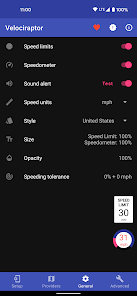
Velociraptor is a floating speed limit monitor and speedometer, a companion for any map or navigation app.
Speed limit data from OpenStreetMap:
• View on your computer: https://www.openstreetmap.org
Features:
• Polished Material Design
• Automatically displays in any apps you choose (e.g. Google Maps)
• Intelligent caching & fast refresh of speed limits
• Sound alert when speed limit is exceeded
• Customize style: US and International
• Speed limit tolerance: % and integer amounts
• Transparency, size, and tap to hide settings
Links
• GitHub (issues, feature requests): https://goo.gl/hL8O2d
• Translate the app to your language: https://goo.gl/lXNdkU
Note: Android Auto support is NOT included. Unfortunately, Google doesn't allow third-party apps to display custom elements on the car display unit. You can still use Velociraptor's speed limit sound alert functionality with Android Auto.
This app uses Accessibility services in order to detect foreground map apps and launch automatically. This app is not affiliated or endorsed by OpenStreetMap, HERE, TomTom, or Sygic. The developer does not bear responsibility for the accuracy of any information provided. All trademarks belong to their respective owners. Google Maps is used in screenshots for demonstration purposes only.
Speed limit data from OpenStreetMap:
• View on your computer: https://www.openstreetmap.org
Features:
• Polished Material Design
• Automatically displays in any apps you choose (e.g. Google Maps)
• Intelligent caching & fast refresh of speed limits
• Sound alert when speed limit is exceeded
• Customize style: US and International
• Speed limit tolerance: % and integer amounts
• Transparency, size, and tap to hide settings
Links
• GitHub (issues, feature requests): https://goo.gl/hL8O2d
• Translate the app to your language: https://goo.gl/lXNdkU
Note: Android Auto support is NOT included. Unfortunately, Google doesn't allow third-party apps to display custom elements on the car display unit. You can still use Velociraptor's speed limit sound alert functionality with Android Auto.
This app uses Accessibility services in order to detect foreground map apps and launch automatically. This app is not affiliated or endorsed by OpenStreetMap, HERE, TomTom, or Sygic. The developer does not bear responsibility for the accuracy of any information provided. All trademarks belong to their respective owners. Google Maps is used in screenshots for demonstration purposes only.
Updated on
Safety starts with understanding how developers collect and share your data. Data privacy and security practices may vary based on your use, region, and age. The developer provided this information and may update it over time.

No data shared with third parties
Learn more about how developers declare sharing

No data collected
Learn more about how developers declare collection

Data is encrypted in transit

Data can’t be deleted
Ratings and reviews
3.5
4.12K reviews

A Google user
- Flag inappropriate
- Show review history
November 5, 2018
I wanted speed limits displayed in Google Maps, and that's exactly what this app does. It has a setting to make it only show up when actually navigating so that it doesn't get in the way of menus when searching etc, but on my Moto Z2 Force that setting doesn't work, which is a shame. Also, the speed limits displayed are sometimes not correct when using the free database, but you can subscribe to a couple of paid services which are very cheap. I've yet to try them but I think it's safe to assume they will be better.
4 people found this review helpful
Daniel Ciao
November 8, 2018
Hi Antony, there are links in the app so you can check their coverage (in general HERE > TomTom > OpenStreetMap, but it depends on your area). The only-navigating option is definitely finicky - it relies on Google Maps' navigation notification, which is not always reliable. I'm trying to find better ways to detect it.

SpEd
- Flag inappropriate
October 22, 2024
During initial setup, there's a setting for accessibility services that mentions granting Velociraptor full control of your phone. Unless you grant it, you can't use this app. It's an all or nothing deal, so I think I'll just go with "nothing". It's one thing to allow it to write on top of a mapping app, I get that, but I can't get around full control. It's probably ok itself, but what happens in the event of a data breach? It might be nothing, but I dont want to find out the hard way.

Adam Bowles
- Flag inappropriate
- Show review history
April 1, 2024
Does what it says and everything I need. It's the extra stuff that gets in the way of a 5-star rating. No matter how many times I configure the app to launch in only the apps I need, every week or so it reconfigures itself to continue telling me how fast I am not going anywhere during Zoom meetings, buying public transportation tickets, or my snail-like hiking pace through the forest. The "Auto-launch in these apps" should be a permanent fix and not reset itself every week or so.
1 person found this review helpful
What’s new
1.7.2
• New settings interface (with dark mode)
• Fix crashes
• Update translations from OneSky
• New settings interface (with dark mode)
• Fix crashes
• Update translations from OneSky
App support
About the developer
Daniel Ciao
pluscubed@gmail.com
1605 Begen Ave
Mountain View, CA 94040-3720
United States
undefined

