

My Backup Pro
In-app purchases

3.9star
38.8K reviewsinfo
500K+
Downloads

PEGI 3
info






About this app
MyBackup Pro is the easiest, most reliable, and feature packed Android backup solution available.
Supporting the most content, and the most Android devices.
Find out why over 5 million people have chosen MyBackup as their secure source for a Backup Solution.
FEATURES:
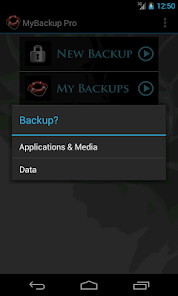
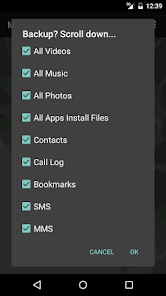
- Backup and Restore using your local device or SD card
* Backup and Restore using an On The Go (OTG) USB card
- Cloud backup to our online secure servers, or use your Dropbox account
- Cloud backup to your personal Google Drive Cloud account
- Migrate information directly between 2 devices
- Backup directly to your computer over the Internet!
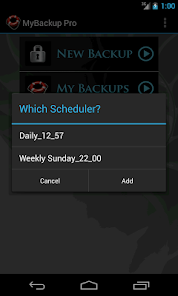
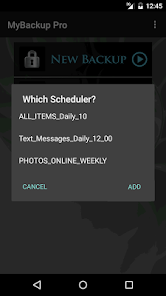
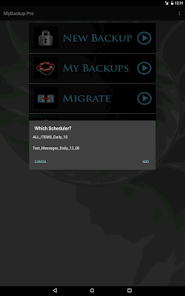
- Schedule multiple different backups to multiple locations
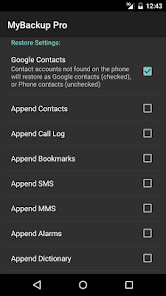
- Restore to an existing or new Android device
- View the backup in detail without having to restore
- All Android 1.6+ devices supported!
- Available in 16 languages
- Super easy backup with advanced features and settings
- BETA: Trigger a backup to begin on your device remotely from our website
SUPPORTED CONTENT:
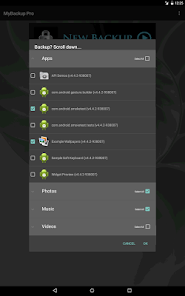
- Applications (Including Data if Rooted)
- Photos
- Music
- Videos
- Contacts
- Call log
- Text messages (SMS)
- Message attachments (MMS)
- Browser Bookmarks
- Home Screen Shortcuts and Wallpaper (Pre Android 4.4 KitKat)
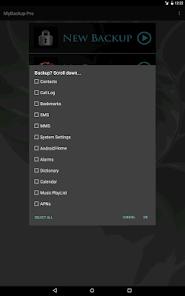
- System Settings
- Calendar events
- Alarms
- Dictionary
- Music Playlists
- APN settings
- And much more...
NEWS AND REVIEWS:
CNET TV recommends Android users to use MyBackup Pro to backup their personal data.
T-Mobile highlights MyBackup Pro in their quarterly magazine as "an application to have For the Security Minded."
TechHive (PCWorld) gives MyBackup Pro 4.5 stars and recommends Android users to use MyBackup Pro to backup and secure their phones.
HIGHLIGHTS:
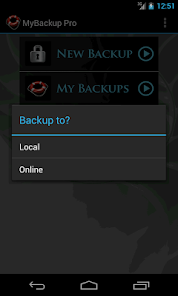
Cloud Backup (RerWare Cloud, Dropbox, Google Drive) or local backups to your device/SD card.
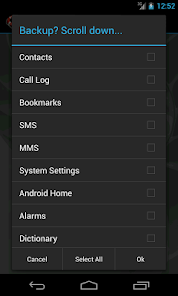
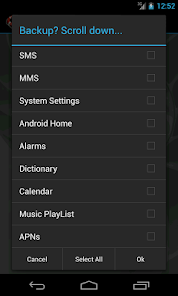
Supporting the most content including your Applications, Photos, Music, Videos, Contacts, Call log, Browser Bookmarks, SMS (text messages), MMS (message attachments), Calendar, System Settings, Home Screens (including shortcut positions), Alarms, Dictionary, Music Playlists, APNs, and more...
Restore your backup onto the same or new Android device.
Migrate feature allows you to move any and all supported content directly from one Device to another over WiFi.
View your Data, Apps and Media backups online by logging into the Web Viewer at the RerWare website.
MyBackup Pro will work on all Android mobile devices, regardless if they have root access or not.
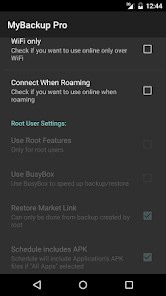
Users who have a rooted phone can backup APK and the Data/Setting of all applications
__ ROOT ONLY PHONE FEATURES BELOW __
MyBackup Pro now comes with all MyToolbox features for Free.
This application will allow Root users to select multiple applications and perform the following functions with batch operations:
- Freeze bloatware and system apps
- Defrost frozen applications
- Wipe Cache of applications
- Wipe Data of applications
- Uninstall applications
- Break the Link to Apps
- Link Apps
- Force Close applications
_______________________________
If you should have any questions or support needs, please do not hesitate to contact us using the support Email provided. We will get back to you as soon as we can.
We appreciate your business.
Supporting the most content, and the most Android devices.
Find out why over 5 million people have chosen MyBackup as their secure source for a Backup Solution.
FEATURES:
- Backup and Restore using your local device or SD card
* Backup and Restore using an On The Go (OTG) USB card
- Cloud backup to our online secure servers, or use your Dropbox account
- Cloud backup to your personal Google Drive Cloud account
- Migrate information directly between 2 devices
- Backup directly to your computer over the Internet!
- Schedule multiple different backups to multiple locations
- Restore to an existing or new Android device
- View the backup in detail without having to restore
- All Android 1.6+ devices supported!
- Available in 16 languages
- Super easy backup with advanced features and settings
- BETA: Trigger a backup to begin on your device remotely from our website
SUPPORTED CONTENT:
- Applications (Including Data if Rooted)
- Photos
- Music
- Videos
- Contacts
- Call log
- Text messages (SMS)
- Message attachments (MMS)
- Browser Bookmarks
- Home Screen Shortcuts and Wallpaper (Pre Android 4.4 KitKat)
- System Settings
- Calendar events
- Alarms
- Dictionary
- Music Playlists
- APN settings
- And much more...
NEWS AND REVIEWS:
CNET TV recommends Android users to use MyBackup Pro to backup their personal data.
T-Mobile highlights MyBackup Pro in their quarterly magazine as "an application to have For the Security Minded."
TechHive (PCWorld) gives MyBackup Pro 4.5 stars and recommends Android users to use MyBackup Pro to backup and secure their phones.
HIGHLIGHTS:
Cloud Backup (RerWare Cloud, Dropbox, Google Drive) or local backups to your device/SD card.
Supporting the most content including your Applications, Photos, Music, Videos, Contacts, Call log, Browser Bookmarks, SMS (text messages), MMS (message attachments), Calendar, System Settings, Home Screens (including shortcut positions), Alarms, Dictionary, Music Playlists, APNs, and more...
Restore your backup onto the same or new Android device.
Migrate feature allows you to move any and all supported content directly from one Device to another over WiFi.
View your Data, Apps and Media backups online by logging into the Web Viewer at the RerWare website.
MyBackup Pro will work on all Android mobile devices, regardless if they have root access or not.
Users who have a rooted phone can backup APK and the Data/Setting of all applications
__ ROOT ONLY PHONE FEATURES BELOW __
MyBackup Pro now comes with all MyToolbox features for Free.
This application will allow Root users to select multiple applications and perform the following functions with batch operations:
- Freeze bloatware and system apps
- Defrost frozen applications
- Wipe Cache of applications
- Wipe Data of applications
- Uninstall applications
- Break the Link to Apps
- Link Apps
- Force Close applications
_______________________________
If you should have any questions or support needs, please do not hesitate to contact us using the support Email provided. We will get back to you as soon as we can.
We appreciate your business.
Updated on
Safety starts with understanding how developers collect and share your data. Data privacy and security practices may vary based on your use, region, and age. The developer provided this information and may update it over time.

No data shared with third parties
Learn more about how developers declare sharing

This app may collect these data types
Personal info, Messages and 6 others

Data is encrypted in transit

You can request that data be deleted
Ratings and reviews
3.9
37.4K reviews

Jerry Perry
- Flag inappropriate
November 7, 2025
It just updated and now there's no way to login!!! The field to enter your username or email is gone and it keeps prompting for it. FRUSTRATED!! It's very easy to use the graphical interface is awesome and it takes up very little space or you can get more space on line I give this two thumbs up!
4 people found this review helpful

Evan Al-Chokhachy
- Flag inappropriate
- Show review history
November 21, 2025
Don't waste your time with this app... look elsewhere. The PERFECT STORM: The app is entire useless...no longer works at all and the author has completely ignored all requests for assistance from his users. This has been the state for weeks now. There are better alternatives...ones that actually work. My rating: 0 if I could!!
23 people found this review helpful

Eric Youngdale
- Flag inappropriate
November 26, 2025
Same problem as others have - unable to start a new backup. Workaround is to open the app with Windows phone-link - then you see the "new backup" option, and it does seem to actually work. Not good at all.
What’s new
v4.8.6
-Target SDK 35
- Misc fixes
v4.8.4
- Fixed Android 12+ issues
v4.8.0
- Fixed apps backup on Android 11+
v4.7.8
- Fixed Android 11+ issues
v4.7.7
- Fixed Dropbox issue
- Fixed Google Drive issue
v4.7.6
- Fixed SMS/MMS restore on Android 10
v4.7.4
- Fixed intent redirection vulnerability
v4.7.3
- Fixed Google Drive issues and Misc fixes.
v4.7.1
- Fixed Google Drive and Dropbox.
v4.7.0
- Misc fixes for Android 10.
v4.6.6
- Fixed device id on some devices.
- Misc fixes.
-Target SDK 35
- Misc fixes
v4.8.4
- Fixed Android 12+ issues
v4.8.0
- Fixed apps backup on Android 11+
v4.7.8
- Fixed Android 11+ issues
v4.7.7
- Fixed Dropbox issue
- Fixed Google Drive issue
v4.7.6
- Fixed SMS/MMS restore on Android 10
v4.7.4
- Fixed intent redirection vulnerability
v4.7.3
- Fixed Google Drive issues and Misc fixes.
v4.7.1
- Fixed Google Drive and Dropbox.
v4.7.0
- Misc fixes for Android 10.
v4.6.6
- Fixed device id on some devices.
- Misc fixes.
App support
About the developer
RERWARE LLC
support@rerware.com
345 Diversion St Ste 206
Rochester, MI 48307-6617
United States
+1 248-793-5022


