
Notes and Journaling - Folino
In-app purchases
4.7star
1.5K reviewsinfo
50K+
Downloads

PEGI 3
info


About this app
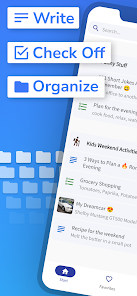
Organize your notes and sort them into any number of folders and subfolders. Create checklists or add your own pictures.
It's also great as a journal app.
With the newest update we have made the app even better:
Change creation date:
You can now flexibly adjust the creation date of your notes, perfect for better organization.
Sorting by creation date:
Notes can now be sorted not only by the modification date, but also by the creation date.
Customizable date display:
Choose whether you want to display the creation date or the modification date in your notes.
These new features make the app ideal for use as a diary or journal - and some of our users are already using it for exactly that!
They were very happy about the update because it makes capturing and browsing through memories even easier.
Try it out and enjoy even more flexible and clearer note management!
What else can the app do?
With the easy notes app "Folino", you have all your notes under control.
✔️ without ads
✔️ Made in Germany
✔️ Text Notes
Create as many text notes as you want. Various options are available for formatting.
✔️ Checklists
Create checklists and tick off completed entries or rearrange them as you wish.
✔️ Folders
Create your own notes and folder structure. You can create as many folders and subfolders as you want. The number is not limited.
✔️ Search function
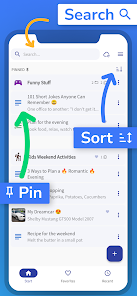
A quick full-text search enables you to find all notes, checklists and folders.
✔️ Pin it
You can pin very important notes and folders so that they are always at the top of the list.
✔️ Favorites
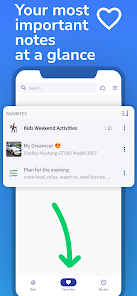
A separate favorites list for notes and folders enables quick access to marked notes.
✔️ History
With a separate list for the most recently edited notes, you can quickly pick up where you left off.
✔️ Move
Notes and folders can be moved to other folders and subfolders, quick and easy.
✔️ Duplicate
Duplicating individual notes or entire folder structures saves you the hassle of copying your texts.
✔️ Recycle bin
Deleted notes are kept in the recycle bin and can be restored if desired.
✔️ Offline
The app can be used offline without an internet connection.
✔️ Manual synchronization
If you wish, you can use manual synchronization (via Google Drive) to access your notes with multiple devices.
✔️ Backup
A manual file backup allows you to export and import your notes.
✔️ Lock
Folders and notes, as well as the entire app, can be locked with a PIN.
✔️ Dark Mode
The app supports the dark mode of your smartphone (dark theme or black theme).
✔️ Ad-free
The app is and will be ad-free. Promised!
Additional features via in-app purchase:
✔️ Pictures
Add your own pictures to your notes.
✔️ Audio recorder
Save your notes and ideas as audio.
✔️ Icons and color selection for folders
There are many different symbols to choose from for the folders. You can also customize the color.
✔️ Colors for notes
Highlight individual notes with different colors.
If you have any questions or suggestions for improvement, I would be happy to receive an email from you.
It's also great as a journal app.
With the newest update we have made the app even better:
Change creation date:
You can now flexibly adjust the creation date of your notes, perfect for better organization.
Sorting by creation date:
Notes can now be sorted not only by the modification date, but also by the creation date.
Customizable date display:
Choose whether you want to display the creation date or the modification date in your notes.
These new features make the app ideal for use as a diary or journal - and some of our users are already using it for exactly that!
They were very happy about the update because it makes capturing and browsing through memories even easier.
Try it out and enjoy even more flexible and clearer note management!
What else can the app do?
With the easy notes app "Folino", you have all your notes under control.
✔️ without ads
✔️ Made in Germany
✔️ Text Notes
Create as many text notes as you want. Various options are available for formatting.
✔️ Checklists
Create checklists and tick off completed entries or rearrange them as you wish.
✔️ Folders
Create your own notes and folder structure. You can create as many folders and subfolders as you want. The number is not limited.
✔️ Search function
A quick full-text search enables you to find all notes, checklists and folders.
✔️ Pin it
You can pin very important notes and folders so that they are always at the top of the list.
✔️ Favorites
A separate favorites list for notes and folders enables quick access to marked notes.
✔️ History
With a separate list for the most recently edited notes, you can quickly pick up where you left off.
✔️ Move
Notes and folders can be moved to other folders and subfolders, quick and easy.
✔️ Duplicate
Duplicating individual notes or entire folder structures saves you the hassle of copying your texts.
✔️ Recycle bin
Deleted notes are kept in the recycle bin and can be restored if desired.
✔️ Offline
The app can be used offline without an internet connection.
✔️ Manual synchronization
If you wish, you can use manual synchronization (via Google Drive) to access your notes with multiple devices.
✔️ Backup
A manual file backup allows you to export and import your notes.
✔️ Lock
Folders and notes, as well as the entire app, can be locked with a PIN.
✔️ Dark Mode
The app supports the dark mode of your smartphone (dark theme or black theme).
✔️ Ad-free
The app is and will be ad-free. Promised!
Additional features via in-app purchase:
✔️ Pictures
Add your own pictures to your notes.
✔️ Audio recorder
Save your notes and ideas as audio.
✔️ Icons and color selection for folders
There are many different symbols to choose from for the folders. You can also customize the color.
✔️ Colors for notes
Highlight individual notes with different colors.
If you have any questions or suggestions for improvement, I would be happy to receive an email from you.
Updated on
Safety starts with understanding how developers collect and share your data. Data privacy and security practices may vary based on your use, region, and age. The developer provided this information and may update it over time.

No data shared with third parties
Learn more about how developers declare sharing

No data collected
Learn more about how developers declare collection
Ratings and reviews
4.7
1.4K reviews

HarleyCAO 13
- Flag inappropriate
September 7, 2025
I really like this notes app. There are no ads. While there is a paid/premium version of the app, the app is perfectly usable without getting the premium version. You aren't limited on how many folders/categories you can create. The only feature I would like (and it's not urgent) is the ability to use dashes (-) for lists as opposed to dots/bullet points.
2 people found this review helpful

Jef Fisher
- Flag inappropriate
- Show review history
September 27, 2025
The folder structure is exactly what I've been looking for, having tried 25+ note apps. It's fantastic. I have to drop it a star for no widget. Hopefully that will happen in upcoming versions. Then it will be a 5 star app. ***2 year update - still loving this app, as much as when I wrote the original review. Love that I can have folders in folders in folders. Helps me keep everything exactly where I want everything to be. Keep up the good work dev
Tobias Schiek - Apps for your everyday life
May 4, 2023
Great. Thank you.😄

Andrew Ampers Taylor
- Flag inappropriate
- Show review history
August 22, 2025
A CATASTROPHE I have listed lots of important notes. I list all my passwords and pins in an AtoZ notebook I keep in my safe. The pin number, after many months of almost daily use, suddenly refused to work! Thanks for your reply, I'd alter it if I were you 😂 No problem, I'll try to help you. Worked straight off on my A4 tablet (S10 ultra) using the same password. I am going to download all my files, port them to my Z Fold7 and add them to another app.
7 people found this review helpful
Tobias Schiek - Apps for your everyday life
August 22, 2025
🤔
What’s new
- Speed up the search function
- Search results are highlighted in color within text notes when opened from the search results
- New folder icons: Glasses, Worker, Knife & Fork, Beer Mug, Wine Glass, Cocktail Glass
- Search results are highlighted in color within text notes when opened from the search results
- New folder icons: Glasses, Worker, Knife & Fork, Beer Mug, Wine Glass, Cocktail Glass
App support
About the developer
Tobias Schiek
tobias.schiek@gmail.com
Nutzung 17
09353 Oberlungwitz
Germany
undefined


