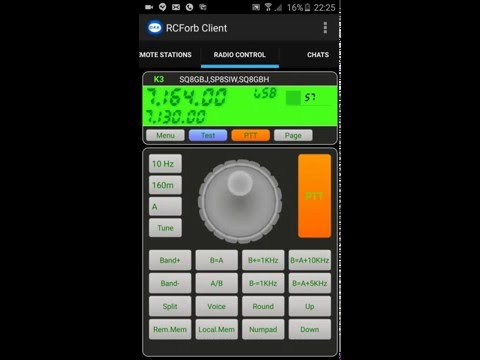

RCForb Client

star
385 reviewsinfo

PEGI 3
info
10K+
Downloads


About this app
This is a pre-release version of RCForb Client. Not all features are complete and we will be incorporating public feedback as RCForb Client matures into a stable release.
Enjoy operating remote amateur transceivers & more by joining our community today! Don't miss rare DX you may never have a chance to hear. Test your own signal propagation, are you being heard in a DX location? Multiple operator support allows for new methods of contesting, nets, round tables, etc. between RF and REMOTE operators.
You must be registered user of RemoteHams.com community.
Visit http://www.remotehams.com/signup.html to create your free account.
Privacy Policy : http://www.remotehams.com/privacy.html
Enjoy operating remote amateur transceivers & more by joining our community today! Don't miss rare DX you may never have a chance to hear. Test your own signal propagation, are you being heard in a DX location? Multiple operator support allows for new methods of contesting, nets, round tables, etc. between RF and REMOTE operators.
You must be registered user of RemoteHams.com community.
Visit http://www.remotehams.com/signup.html to create your free account.
Privacy Policy : http://www.remotehams.com/privacy.html
RemoteHams.com Android RCForb Client Pre-Release
Updated on
Safety starts with understanding how developers collect and share your data. Data privacy and security practices may vary based on your use, region, and age. The developer provided this information and may update it over time.
- No data shared with third partiesLearn more about how developers declare sharing
- No data collectedLearn more about how developers declare collection


Ratings and reviews
341 reviews

Bill R
- Flag inappropriate
- Show review history
September 15, 2026
This app works great for remote ops! Just fantastic. Don't give up if you're trying to make the whole thing work. One hint if anyone's stuck...on the server side at your computer be sure to turn off (or allow RCForb to come through) your firewall including the Windows Defender firewall. It won't port forward otherwise. This is where I got stuck. I hope this helps someone. N0POO
7 people found this review helpful

Mark Hartman
- Flag inappropriate
June 1, 2023
If you can't get audio to radio (solved) The solution was to check app permissions and see if they are enabled for your android mic. This was the only problem I encountered while beta testing. The program beta was installed by me and when that happened the android system updated the version on my phone but did not ask for app permissions as I had already checked them on when I first installed the stable version. This led me to think there was a problem somewhere but no idea where. Solved!
8 people found this review helpful

Eberhard Backeshoff
- Flag inappropriate
April 13, 2021
I really like this app. It works excellently and does what it is supposed to do. However, I'm having a little problem - I am using hearing aids which are coupled to my smartphone via bluetooth. These work fine for making phone calls, too. The built-in microphones of the hearing aids are used, in this case. But within RCForb, it is not possible use them in a reasonable way. When I set the "Bluetooth On Call" Emulation active, the micros are used, but it is no longer possible to alter the RX Volume, and everything is way too loud. When I disable the "Bluetooth On Call" function, I can well hear the audio in my hearing aids but always my smartphone's built-in microphone is used which renders it unusuable when I'm pursuing activities like bicicle-riding, where my phone's in my pocket.
25 people found this review helpful
What’s new
Fixed bluetooth crash.
App support
About the developer
Brandon Christoffer Hansen
kg6ypi@remotehams.com
PO BOX 73
IGO, CA 96047-0073
United States