
Multi Timer

4.6star
672 reviews

Rated for 3+
info
10K+
Downloads

Rated for 3+
Learn more


About this app
Multi Timer is a simple, reliable and most customizable timer & stopwatch application. It can run many timers at once or separately.
Very useful in many situations, such as cooking, sports, games and etc.
✔ Reusable timers with many parameters
Each timer can have different name, alarm sound, length, color label, vibration on/ off and alarm animation including a cute tail swinging cat alarm animation.
✔ Intuitive and easy to use user interface
The application is desinged to use easily and quickly.
✔Grouping timers
Each timer Groups can have up to 100 timers and max 30 timer groups can be created.
✔ Run in the background
The application doesn't need to be running foreground. Once timers start, the application wakes up even after rebooting your phone when time is up.
It's possible to show just notifications instead of bringing the application to front when time is up.
✔ Timer linkage
Timers can be linked. The linked timer will auto start when the linking timer finishes. Linking a timer group and starting all the timers in the group is possible as well.
✔ Text To Speech (Voice Alarm)
Each timer can have different voice alarm of free text. Reading out timer title, end time and timer note are supported.
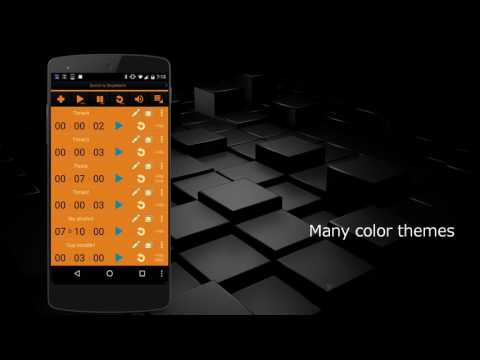
✔ Many color themes
24 color themes are available. You can even change colors of individual parts including notification icon colors.
✔ Timer color labeling
Each timer can be color-labeled.
✔ Super customizable
So many things are customizable. Font size, what buttons to hide/show, many notification related settings, alarm animations, bringing the application to front or not when alarm and more.
✔ Useful sorting functions
Timers can be sorted by remaining time, elapsed time, etc in real time automatically or manually.
✔ Fixed number keypad allows for entering timer time quickly
The number keypad on the timer creation window allows you to enter timer time very quickly.
✔ Other features
• Auto repeat timers (1 to infinite)
• Single stopwatch
• Enable/ disable timers
• Timer Note for individual timers
• Super flexible timer title (several dynamic parameters can be used within the title)
• Four types of alarm animation. Alarm clock, bell, fireworks, bell and tail swinging cat
• Display expected end time or remaining time in Notification
• Import/ export timers and application settings
• Notify when timers end or alarms end
• Timer Event History
• Expanding time of active timers easily (by quick menu, single tap and double taps)
• Display elapsed time, expected end time and original timer time
• Manual sort or real time auto sorting
• Support Cloud backup so that setting and timers will be recovered upon device change
• Four different sizes of fonts and button are selectable
• Possible to select buttons to show and hide
• Initial focus position and focus shift direction of time fields on Timer Creation Window are selectable
• No advertisements for the paid version
There is a free version of the app with Ads as well.
Multi Timer Free
----------------------------------------------------
In case you experience any alarm delay, please check the battery saver setting of the phone as the delay is normally caused by that.
For any issues or requests, please email me at catfantom@gmail.com.
Very useful in many situations, such as cooking, sports, games and etc.
✔ Reusable timers with many parameters
Each timer can have different name, alarm sound, length, color label, vibration on/ off and alarm animation including a cute tail swinging cat alarm animation.
✔ Intuitive and easy to use user interface
The application is desinged to use easily and quickly.
✔Grouping timers
Each timer Groups can have up to 100 timers and max 30 timer groups can be created.
✔ Run in the background
The application doesn't need to be running foreground. Once timers start, the application wakes up even after rebooting your phone when time is up.
It's possible to show just notifications instead of bringing the application to front when time is up.
✔ Timer linkage
Timers can be linked. The linked timer will auto start when the linking timer finishes. Linking a timer group and starting all the timers in the group is possible as well.
✔ Text To Speech (Voice Alarm)
Each timer can have different voice alarm of free text. Reading out timer title, end time and timer note are supported.
✔ Many color themes
24 color themes are available. You can even change colors of individual parts including notification icon colors.
✔ Timer color labeling
Each timer can be color-labeled.
✔ Super customizable
So many things are customizable. Font size, what buttons to hide/show, many notification related settings, alarm animations, bringing the application to front or not when alarm and more.
✔ Useful sorting functions
Timers can be sorted by remaining time, elapsed time, etc in real time automatically or manually.
✔ Fixed number keypad allows for entering timer time quickly
The number keypad on the timer creation window allows you to enter timer time very quickly.
✔ Other features
• Auto repeat timers (1 to infinite)
• Single stopwatch
• Enable/ disable timers
• Timer Note for individual timers
• Super flexible timer title (several dynamic parameters can be used within the title)
• Four types of alarm animation. Alarm clock, bell, fireworks, bell and tail swinging cat
• Display expected end time or remaining time in Notification
• Import/ export timers and application settings
• Notify when timers end or alarms end
• Timer Event History
• Expanding time of active timers easily (by quick menu, single tap and double taps)
• Display elapsed time, expected end time and original timer time
• Manual sort or real time auto sorting
• Support Cloud backup so that setting and timers will be recovered upon device change
• Four different sizes of fonts and button are selectable
• Possible to select buttons to show and hide
• Initial focus position and focus shift direction of time fields on Timer Creation Window are selectable
• No advertisements for the paid version
There is a free version of the app with Ads as well.
Multi Timer Free
----------------------------------------------------
In case you experience any alarm delay, please check the battery saver setting of the phone as the delay is normally caused by that.
For any issues or requests, please email me at catfantom@gmail.com.
Simple and Reliable Multi Timer & Stopwatch
Updated on
Safety starts with understanding how developers collect and share your data. Data privacy and security practices may vary based on your use, region, and age. The developer provided this information and may update it over time.

No data shared with third parties
Learn more about how developers declare sharing

This app may collect these data types
Location, App info and performance, and Device or other IDs

Data is encrypted in transit

Data can’t be deleted
Ratings and reviews
637 reviews

Dave Nesbitt
- Flag inappropriate
July 15, 2026
I paid for the ad-free version and now an ad bar is appearing at the bottom of the app. what gives? also it doesn't allow me to use all the sound files that I was using just a couple weeks ago. now I click on some of the sound files and no sound comes out at all.
Catfantom
July 16, 2026
Multi Timer Ad-Free and Multi Timer with Ads are separate apps. Please open “Multi Timer,” not “Multi Timer with Ads.” Regarding sounds, Multi Timer just shows ringtone sounds available on your device. Custom sounds added to the Ads version must be added again to the Ad-Free version. If you need further help, contact me at catfantom2@gmail.com.

Cal Ripplebear
- Flag inappropriate
- Show review history
April 14, 2026
i like most aspects about this app except for two that are causing me a big problem (particularly with sleeping) the first is i have alarms go off but no indication i can see for which one... second is the ability to do a 'silent alarm' mode. the first is by far the worst as my timers go off like 15x a day and i have no clue why.

Bob
- Flag inappropriate
October 24, 2020
This app is great! I can cook all my favourite recipes now without having to worry about setting the next timer! Just when I thought the app could be improved by grouping timers, I checked the settings and, 'lo and behold, there was an option to move timers to another group! £1.25 is way too cheap for the amount of hassle it saves, really.
6 people found this review helpful
What’s new
Fixed an issue where the remaining time notification displayed incorrectly when the remaining time exceeded 24 hours.
Rated for 3+
Learn moreApp support
About the developer
STUDIO NEKONOBI
catfantom2@gmail.com
5-302-11, MAKINOHARA
INZAI, 千葉県 270-1331
Japan
+81 70-2399-7780


