
X Icon Changer - Change Icons
Contains adsIn-app purchases
4.5star
638K reviews
10M+
Downloads

Rated for 3+
info
About this app
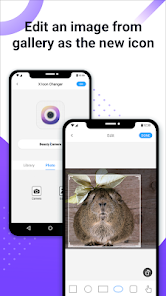
X Icon Changer is a totally free and useful app which can help you change & customize icons and names for any apps. The new icons can be chosen from gallery, other app icons and lots of personalized icon packs. Our app will create a shortcut to the new icon on your home screen. This is the easiest way to decorate your android phone.
☆ HOW TO USE ☆
1. Enter X Icon Changer.
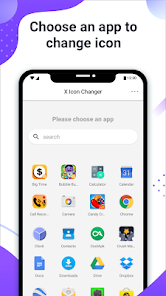
2. Choose an app.
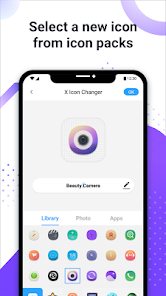
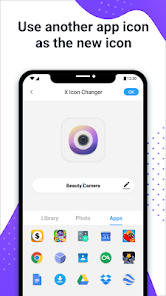
3. Select a new icon from the built-in icon packs, your gallery, other app icons or personalized third-party icon packs.
4. Edit a new name (can be null) for the app.
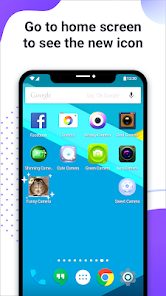
5. Go to the home screen / desktop to see the new shortcut icon.
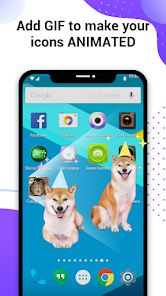
6. Add a GIF to play an interesting GIF animation when the new app icon launches.
☆ ABOUT THE WATERMARK ☆
On Android 8.0 and above, the system will automatically add a watermark to the shortcut icon. We provide a way for you to perfectly change app icons without any watermarks using widget technology:
1. Go to the home screen / desktop, long press a blank space and then click “Widgets” in the pop-up menu.
2. Find “X Icon Changer” on the widget page, long press it and drag it to your desktop.
3. The X Icon Changer widget will open automatically. After that, you can change your app icons without any watermarks.
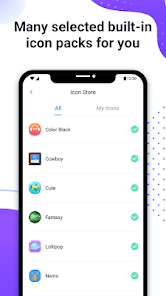
There are lots of selected personalized icon packs built into X Icon Changer. The app and those icon packs are all free to get. Just download X Icon Changer now to decorate your android phone.
☆ HOW TO USE ☆
1. Enter X Icon Changer.
2. Choose an app.
3. Select a new icon from the built-in icon packs, your gallery, other app icons or personalized third-party icon packs.
4. Edit a new name (can be null) for the app.
5. Go to the home screen / desktop to see the new shortcut icon.
6. Add a GIF to play an interesting GIF animation when the new app icon launches.
☆ ABOUT THE WATERMARK ☆
On Android 8.0 and above, the system will automatically add a watermark to the shortcut icon. We provide a way for you to perfectly change app icons without any watermarks using widget technology:
1. Go to the home screen / desktop, long press a blank space and then click “Widgets” in the pop-up menu.
2. Find “X Icon Changer” on the widget page, long press it and drag it to your desktop.
3. The X Icon Changer widget will open automatically. After that, you can change your app icons without any watermarks.
There are lots of selected personalized icon packs built into X Icon Changer. The app and those icon packs are all free to get. Just download X Icon Changer now to decorate your android phone.
Updated on
Safety starts with understanding how developers collect and share your data. Data privacy and security practices may vary based on your use, region, and age. The developer provided this information and may update it over time.


Ratings and reviews
4.5
607K reviews

Zyrene Chiu
- Flag inappropriate
- Show review history
February 11, 2024
I love it, It's so easy to use... But almost every click there's an advertisement, please fix that. and can you allow putting fonts on the app names? It would be so much better. Also, it can work offline without ads. Overall, the application is good, Better because you don't need to pay for anything in order for you to change the application icons. ❤️
231 people found this review helpful

Ema
- Flag inappropriate
- Show review history
July 18, 2020
It is nice and can really make the icons look nice. But to be honest I don't like it that you have to watch ads in order to turn the icon into a picture from your gallery instead of taking it. Also when I am using keyboard fonts, if doesn't allow me to use the fonts because it is different? But to be honest that's kinda fine but hope it allows me to use it soon. I also would like it that it would change the app itself and not add a copy(?) Of it. I hope for the best! :)
420 people found this review helpful

Akira Lavariaz
- Flag inappropriate
November 22, 2023
This is by far one of the best (if not the best) icon changer apps in the market. You can choose use it offline to avoid having ads while using the application itself. You can even customize the name of the apps. One problem though, idk if this is my phone's settings or the app itself, but after a while, the icons you customized will disappear and you'll have to start doing them again ONE BY ONE.
595 people found this review helpful
What’s new
Performance improved.
App support
About the developer
ASTER PLAY PTE. LTD.
support@asterplay.com
180B Bencoolen Street #03-01 The Bencoolen
Singapore 189648
+86 178 1030 9530


