Always visible clock
Contains ads
4.6star
419 reviews
100K+
Downloads

Everyone
info
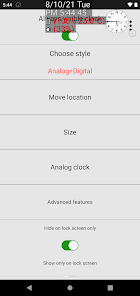
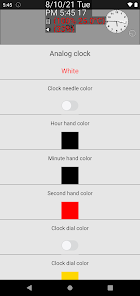
About this app
Safety starts with understanding how developers collect and share your data. Data privacy and security practices may vary based on your use, region, and age. The developer provided this information and may update it over time.

No data shared with third parties
Learn more about how developers declare sharing

No data collected
Learn more about how developers declare collection
Ratings and reviews
4.6
377 reviews

louminis alouminios
- Flag inappropriate
- Show review history
July 26, 2025
seems to be the best app around to add the date on the status bar. itd be nice to have the option to only have it enabled during specific apps. And for color to change accoridng to device theme
OkSoft
July 26, 2025
Tap the "Advanced Features" button on the fourth row.
Then tap "Edge Bar" on the fourth row.
At the top, tap "Save edge Bar for each app."
To enable it for specific apps, turn on the top option.
Changing colors based on the device theme will be added in a future update—thanks for the great idea!

西德什
- Flag inappropriate
- Show review history
July 3, 2021
The BEST floating clock available in the Google Play store. Floating, elegant, customisable and resizable. It displays day/date too, even when resized to the size of an icon or even smaller.......pretty nifty little clock. ⭐⭐⭐⭐⭐⭐⭐⭐⭐⭐EDIT: An option to select TTS voices would be nice.
3 people found this review helpful

Niny Mathe
- Flag inappropriate
- Show review history
October 30, 2021
It is really cool, the best actually. I have been looking for an analogue clock with no luck but this one just popped up and I I am supper happy I saw it... No regret, it always there floating on top with a battery % showing on my minimal launcher👍👍👍
What’s new
Fixed a bug where widget buttons were not displayed due to missing mipmap texture processing. Added an exception for the lock screen view to prevent a startup crash.
App support
About the developer
어영선
fish0486@gmail.com
분포로 113
남구, 부산광역시 48516
South Korea


