
Edge Touch (Donation)
Contains adsIn-app purchases
4.2star
25 reviews
100+
Downloads

Everyone
info
About this app
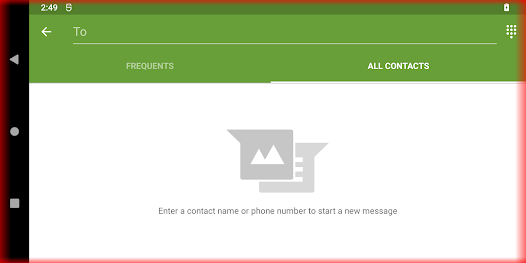
Block touches on top, bottom, left, right screen in portrait and/or landscape mode.
## For my coffee? ##
This is just a donation package for Edge Touch https://play.google.com/store/apps/details?id=com.artvoke.edgetouch .
They are both the exact same app. Buy this app if you like the app and would love to buy me a coffee. If you do decide to buy me a coffee, please do keep just one of them installed on your device.
## Who is this app for? ##
- If you easily register accidental touches on edge/s when using a curve/bezeless phone
- If you easily register accidental touches on edge/s when holding phone with one/both hand
- If you need to block certain edge/s when playing games such as PUBG, Mobile Legend
- If you need to block certain edge/s for specific Application/s
- If you need to block certain edge/s everywhere except for specific Application/s
## The Noes (*Cause I'm relying on this app myself) ##
- No (internet, disk/storage access, dodgy etc) app permissions requested. See App permission section
- No Ads
- No tracking (That's why it's hard to track crashes)
- No in app purchase
- No battery drain
- No slowing down your phone
- No persisting notification to keep app running
- No pretty design and icon :(
## Features ##
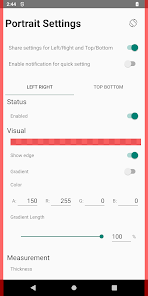
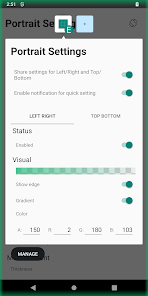
- Highly customizable edge block. See Customization section
- Support top, bottom, left and right
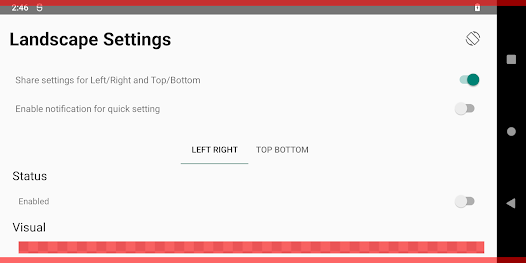
- Support portrait and/or landscape
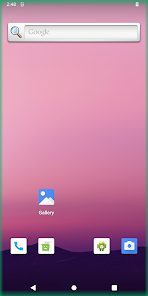
- Support adding shadows to edges by setting display edges with gradient color
- Support avoidance on (selected app, system ui, keyboard etc)
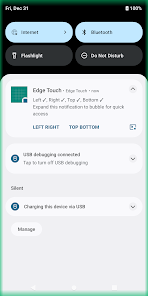
- Quick settings (notification tiles, persistent notification & bubbles)
- Auto starts on boot
- Lightweight and fast
## Customization ##
- Portrait and/or Landscape
- Enable/disable
- Show/hide
- ARGB color if shown
- Gradient
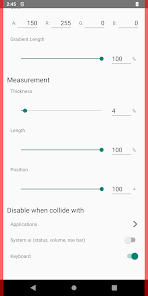
- Thickness
- Length
- Position on screen
- Disable when collide with selected app/s
- Enable only when collide with selected app/s
- Disable when collide with system ui (status, volume, nav bar)
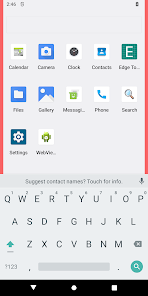
- Auto resize when collide with keyboard
## Security note ##
- App does not request internet access. So not possible to receive any data in and/or transmit and data out
- App does not request disk/storage access. So not possible to write and store any data
## App permission ##
- [request delete packages] meant for prompting a dialog to request uninstalling edge touch app when user have both this and donation version installed. This app will not function properly if both of them are installed
- [run foreground service] meant for querying installed applications to allow user select which application/s (when runs in foreground) to enable/disable edge blocking
## Runtime permission ##
Accessibility Service:
Edge Touch blocking functionality depends on accessibility setting. The accessibility setting is used to render views on the screen edges to block unwanted touches. The setting is also used to read the current foreground application package name, system ui and keyboard. This is to allow Edge Touch to remove the rendered view when avoiding them is configured. Edge Touch does not control, read and modify any screen content. Edge Touch does not collect any personal and sensitive data.
These permissions are dangerous as they allow developers to read everything rendered on the screen. Fear not, as mentioned in Security note section, if the app do reads information rendered on the screen, it has no possible way to record and/or sending them out. Feel free to contact developer if you have any concern on this.
## For my coffee? ##
This is just a donation package for Edge Touch https://play.google.com/store/apps/details?id=com.artvoke.edgetouch .
They are both the exact same app. Buy this app if you like the app and would love to buy me a coffee. If you do decide to buy me a coffee, please do keep just one of them installed on your device.
## Who is this app for? ##
- If you easily register accidental touches on edge/s when using a curve/bezeless phone
- If you easily register accidental touches on edge/s when holding phone with one/both hand
- If you need to block certain edge/s when playing games such as PUBG, Mobile Legend
- If you need to block certain edge/s for specific Application/s
- If you need to block certain edge/s everywhere except for specific Application/s
## The Noes (*Cause I'm relying on this app myself) ##
- No (internet, disk/storage access, dodgy etc) app permissions requested. See App permission section
- No Ads
- No tracking (That's why it's hard to track crashes)
- No in app purchase
- No battery drain
- No slowing down your phone
- No persisting notification to keep app running
- No pretty design and icon :(
## Features ##
- Highly customizable edge block. See Customization section
- Support top, bottom, left and right
- Support portrait and/or landscape
- Support adding shadows to edges by setting display edges with gradient color
- Support avoidance on (selected app, system ui, keyboard etc)
- Quick settings (notification tiles, persistent notification & bubbles)
- Auto starts on boot
- Lightweight and fast
## Customization ##
- Portrait and/or Landscape
- Enable/disable
- Show/hide
- ARGB color if shown
- Gradient
- Thickness
- Length
- Position on screen
- Disable when collide with selected app/s
- Enable only when collide with selected app/s
- Disable when collide with system ui (status, volume, nav bar)
- Auto resize when collide with keyboard
## Security note ##
- App does not request internet access. So not possible to receive any data in and/or transmit and data out
- App does not request disk/storage access. So not possible to write and store any data
## App permission ##
- [request delete packages] meant for prompting a dialog to request uninstalling edge touch app when user have both this and donation version installed. This app will not function properly if both of them are installed
- [run foreground service] meant for querying installed applications to allow user select which application/s (when runs in foreground) to enable/disable edge blocking
## Runtime permission ##
Accessibility Service:
Edge Touch blocking functionality depends on accessibility setting. The accessibility setting is used to render views on the screen edges to block unwanted touches. The setting is also used to read the current foreground application package name, system ui and keyboard. This is to allow Edge Touch to remove the rendered view when avoiding them is configured. Edge Touch does not control, read and modify any screen content. Edge Touch does not collect any personal and sensitive data.
These permissions are dangerous as they allow developers to read everything rendered on the screen. Fear not, as mentioned in Security note section, if the app do reads information rendered on the screen, it has no possible way to record and/or sending them out. Feel free to contact developer if you have any concern on this.
Updated on
Safety starts with understanding how developers collect and share your data. Data privacy and security practices may vary based on your use, region, and age. The developer provided this information and may update it over time.

No data shared with third parties
Learn more about how developers declare sharing

No data collected
Learn more about how developers declare collection
Ratings and reviews
4.2
24 reviews

Kiryl Siaukovich
- Flag inappropriate
October 14, 2025
Please add ability to preserve edge settings in the Landscape-Left and Landscape-Right modes. So that whether I'm watching fullscreen landscape video on the left or right side, always the exact same part of the screen is blocked. Also please add ability to disable "Clicks to disable blocking". I have multiple ghost touches in the blocked area, so I need to set count to 10000 to prevent ghost touches from disabling blocking.
Artvoke Creations
November 12, 2025
Thanks for your feedback. These features should be available in next version.

Daniel
- Flag inappropriate
October 28, 2020
The app is a total game changer for the usability of my expensive bezel-less phone, so I'm more than happy to pay you a coffee! However, when donating, a copy of the app gets installed and if i remove it the coffee gets refunded. So i removed the old copy but i had to re-configure my settings, exclude from battery saver etc for the coffee version. Took me just a couple of minutes so it's a minor annoyance - just some feedback to help you keep the coffee coming :)
Artvoke Creations
October 29, 2020
Thanks for the info! That's super helpful. Let me look into a feasible solution for this. Regards

Kyuhwa Lee
- Flag inappropriate
February 16, 2021
Works well but avoiding selected apps doesn't work at all. Please fix it. Even if I choose an app to avoid collision the edge is still blocked while running the app.
1 person found this review helpful
Artvoke Creations
February 17, 2021
Hi, please can you send a screenshot with display edge enabled to my email? Thanks
What’s new
- Add setting to disable blocking touch
- Add setting to disable "Click to Disable"
- Support separated settings to share right/top in portrait and landscape
- Support separated settings for left and right landscape
Buy me a coffee? Tee-hee
- Add setting to disable "Click to Disable"
- Support separated settings to share right/top in portrait and landscape
- Support separated settings for left and right landscape
Buy me a coffee? Tee-hee
App support
About the developer
Teo Yong Kai
artvoke.creation@gmail.com
127 Compassvale Bow
#04-33
Singapore 544821


