
Peek AOD - Always On Display
In-app purchases
4.1star
1.69K reviews
50K+
Downloads

Everyone
info




About this app
Unlock the Power of Notifications on Your Lock Screen peek notifications!
Scroll through and interact with all current notifications.
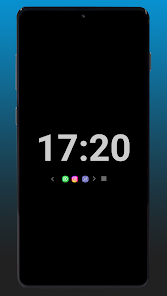
Main features of this app is an always on display with notifications icons which you can click it to view its notification details along with a notifications LED light and charging indicator.
Tired of missing important notifications while your phone is locked? Peek Display - AOD Plus has you covered! Our app lets you view and interact with notifications directly from your lock screen using always on display, saving you time and effort, empowering you to stay connected and manage your notifications effortlessly.
With Peek Display - AOD Plus, you can:
* AOD clock on lock screen with too many analog and numerical designs to choose from.
* Notifications icons below the clock which can be clicked to view the notification details.
* the ability to interact with notification from lock screen like mark as seen or replay.
* See all your notifications at a glance, even when your device is locked
* Swipe left or right to navigate between multiple notifications
* Respond to messages, mark emails as read, and more, all without unlocking your phone
* Customize the notification style to your preference
* Display notifications on a large scale for easy reading from afar
* Set the app to work only while your device is charging, conserving battery life, or only for having new notifications or always after the screen is locked.
* Music playback while on lock screen
* Notifications LED colored per app.
* Charging indecator and battery full LED light.
Never miss a notification again! Download AOD Plus today and enjoy the convenience of managing your notifications right from your lock screen.
Scroll through and interact with all current notifications.
Main features of this app is an always on display with notifications icons which you can click it to view its notification details along with a notifications LED light and charging indicator.
Tired of missing important notifications while your phone is locked? Peek Display - AOD Plus has you covered! Our app lets you view and interact with notifications directly from your lock screen using always on display, saving you time and effort, empowering you to stay connected and manage your notifications effortlessly.
With Peek Display - AOD Plus, you can:
* AOD clock on lock screen with too many analog and numerical designs to choose from.
* Notifications icons below the clock which can be clicked to view the notification details.
* the ability to interact with notification from lock screen like mark as seen or replay.
* See all your notifications at a glance, even when your device is locked
* Swipe left or right to navigate between multiple notifications
* Respond to messages, mark emails as read, and more, all without unlocking your phone
* Customize the notification style to your preference
* Display notifications on a large scale for easy reading from afar
* Set the app to work only while your device is charging, conserving battery life, or only for having new notifications or always after the screen is locked.
* Music playback while on lock screen
* Notifications LED colored per app.
* Charging indecator and battery full LED light.
Never miss a notification again! Download AOD Plus today and enjoy the convenience of managing your notifications right from your lock screen.
Updated on
Safety starts with understanding how developers collect and share your data. Data privacy and security practices may vary based on your use, region, and age. The developer provided this information and may update it over time.

No data shared with third parties
Learn more about how developers declare sharing

No data collected
Learn more about how developers declare collection
Ratings and reviews
4.1
1.68K reviews

Al
- Flag inappropriate
- Show review history
December 11, 2024
Really good. Coming from aodNotify like some others. Interacting with notifications directly from the lock screen is awesome! Wish I could set the time displayed manually, using the bar I could get it to 31 minutes instead of 30 lol. More notification icon config would be cool ... if I enlarge the notification icons too much, they overlap with other buttons. I love huge notification icons. Great work so far! Looking forward to improvements. 🙂👍🏻
8 people found this review helpful

Joe Sebo
- Flag inappropriate
- Show review history
August 18, 2025
Update: Hoping for greater battery efficiency. When Peek is enabled it uses quite a bit of juice. I have led light and icon only enabled. Starting at dim is helpful. Maybe this all that can be done to optimize? Purchased the app to help support the project. Very good start. I am also coming from AOD Notify like another user mentioned and find the interaction with the notifications is a game changer! Developer is a awesome and very responsive.
13 people found this review helpful

Mohamed
- Flag inappropriate
- Show review history
October 26, 2025
AOD activates before auto screen off ( screen timeout) and if you lock the screen manually it has to wake the screen for a sec or 2 before AOD activates. has 2 methods to unlock AOD: swipe up and double tap and can't turn one off. no option to choose to show notification content or icons only
What’s new
* Adjustable icons size.
* Quick ON/OFF toggle in notifications shade.
* Option to display AOD for minutes after screen lock then show again only for new notifications.
* Music Playback on lock screen.
* Notifications LED.
* Adjustable display duration.
* Support icon packs.
* Added many clocks design.
* Private Mode : starts by showing a clock and notifications icons, then tap on an icon to reveal notification content.
* Swipe across all current notifications.
* Quick ON/OFF toggle in notifications shade.
* Option to display AOD for minutes after screen lock then show again only for new notifications.
* Music Playback on lock screen.
* Notifications LED.
* Adjustable display duration.
* Support icon packs.
* Added many clocks design.
* Private Mode : starts by showing a clock and notifications icons, then tap on an icon to reveal notification content.
* Swipe across all current notifications.
App support
About the developer
Feras Mohammed Al Horani
feras.h007.fh@gmail.com
Abu Hail 0237
إمارة دبيّ
United Arab Emirates


