Floating Timer Stopwatch
Contains adsIn-app purchases
4.1star
2.75K reviews
100K+
Downloads

Everyone
info


About this app
🕒 Floating Stopwatch & Timer: Fast, Beautiful, and Always Visible
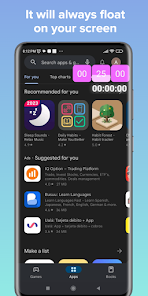
The most beautiful, simple, and fast floating stopwatch for Android.
Keep your timer always on screen — precise, elegant, and perfect for multitasking.
Ideal for presentations, cooking, gaming, studying, or speeches — all without leaving your apps!
🌟 Key Features
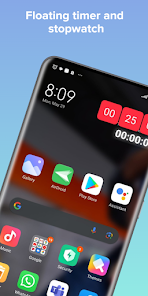
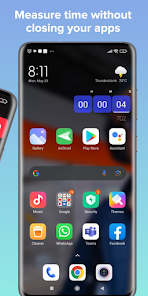
• Floating stopwatch and floating timer: measure time without leaving your current screen.
• Three widget sizes: choose between small, medium, or large to fit your style or screen space.
• Quick close button: instantly close the widget when you’re done — fast and convenient.
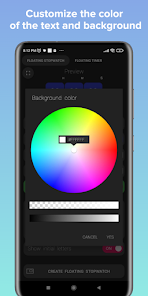
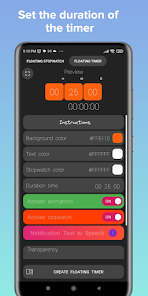
• Customizable widget: select your favorite colors, transparency, and clock style.
• True multitasking mode: works in the background, even with the screen locked.
• Simultaneous stopwatch and timer: track two different times at once.
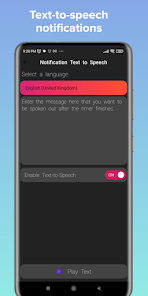
• Voice commands and alarm: get spoken alerts or notifications when time runs out.
• Smooth animations: dynamic progress bars for hours, minutes, and seconds.
• Close protection: prevents accidental widget removal with a confirmation message.
• Full-screen mode: large and clear stopwatch or timer for better visibility.
💡 Perfect for
🎮 Gaming: track runs or sessions (e.g. Subway Surfers).
🎤 Presentations & speeches: stay on time with confidence.
⏰ Cooking or Pomodoro sessions: improve focus and productivity.
📖 JW Library & more: ideal for timing parts or speeches.
👆 Simple gesture controls
• Single tap to start or pause.
• Double tap to reset.
The most beautiful, simple, and fast floating stopwatch for Android.
Keep your timer always on screen — precise, elegant, and perfect for multitasking.
Ideal for presentations, cooking, gaming, studying, or speeches — all without leaving your apps!
🌟 Key Features
• Floating stopwatch and floating timer: measure time without leaving your current screen.
• Three widget sizes: choose between small, medium, or large to fit your style or screen space.
• Quick close button: instantly close the widget when you’re done — fast and convenient.
• Customizable widget: select your favorite colors, transparency, and clock style.
• True multitasking mode: works in the background, even with the screen locked.
• Simultaneous stopwatch and timer: track two different times at once.
• Voice commands and alarm: get spoken alerts or notifications when time runs out.
• Smooth animations: dynamic progress bars for hours, minutes, and seconds.
• Close protection: prevents accidental widget removal with a confirmation message.
• Full-screen mode: large and clear stopwatch or timer for better visibility.
💡 Perfect for
🎮 Gaming: track runs or sessions (e.g. Subway Surfers).
🎤 Presentations & speeches: stay on time with confidence.
⏰ Cooking or Pomodoro sessions: improve focus and productivity.
📖 JW Library & more: ideal for timing parts or speeches.
👆 Simple gesture controls
• Single tap to start or pause.
• Double tap to reset.
Updated on
Safety starts with understanding how developers collect and share your data. Data privacy and security practices may vary based on your use, region, and age. The developer provided this information and may update it over time.

This app may share these data types with third parties
App info and performance and Device or other IDs

No data collected
Learn more about how developers declare collection

Data is encrypted in transit
Ratings and reviews
4.3
2.33K reviews

James Kauzlarich
- Flag inappropriate
- Show review history
June 19, 2023
I originally had trouble getting the reset to happen at all, then read the "What's New", and was finally able to reset the stopwatch to 0! But I couldn't tell you what I'm doing differently. And because of that, I can't reliably reset the stopwatch. It takes me 6 or 7 attempts to get it to reset ONCE! Plus I ALWAYS have to move it before it works! How about Swiping Right (From HOURS to SECONDS) starts the timer. Tapping the MINUTES Un/Pauses. & Swiping Left Resets it to 0? Also, Resizing=A+
2 people found this review helpful
vgsoft
June 19, 2023
Sorry for the confusion with the guide and the description at the stopwatch of reset. Just two continuous light taps inside the widget and you're done. New features for next week: sounds, vibration and safe mode to avoid accidentally stop the widget. We encourage you to buy the full version.

Campbell Mr noodle (a guy)
- Flag inappropriate
- Show review history
May 24, 2023
magic - now I can stop forgetting when. we took the last med dose or my Making it to store before close Task. this is a magical boon that you've coded. question edited in: is there an option, or could there be, to not be able to pause the timer, I need it to run until 0 to be a schedule action tool. without me accidentally causing it to pause. ⏸️
2 people found this review helpful
vgsoft
June 26, 2023
Hello Bob, warm greetings. We are writing to inform you that in two days the functionality will be released so that you can run the timer without accidentally stopping it by touching the widget. We have created a contextual menu for you to manipulate the timer. Write to us at vgsoftapps@outlook.com

Mark
- Flag inappropriate
- Show review history
July 4, 2023
Add an option to hide milliseconds. Setting the milliseconds color opacity to 0 apparently doesn't work.
1 person found this review helpful
App support
About the developer
Andrés Felipe Villa González
vgsoftapps@outlook.com
Calle 44 #43-20 Apt 302
Bogotá, D.C., Bogotá, 055412
Colombia


